If you’re tired of robocalls or mystery numbers ringing your phone all day, Apple just gave iPhone users a helpful new way to deal with them. It’s a smart call screening tool that acts like a virtual assistant, answering unknown calls before you do.
This new feature arrived with iOS 26, which Apple released last month, and it’s already getting attention for how useful it can be in handling unwanted or suspicious calls.
Here’s everything you need to know to get started.
How to Turn On Call Screening
Before proceeding, ensure your iPhone is updated to iOS 26. This version is compatible with iPhone 11 and later models.
Once updated, open the Settings app and go to Apps, then tap Phone. Scroll down until you see the new Screen Unknown Callers option.
You’ll see three choices:
-
Never lets all calls ring through, even if the number isn’t saved
-
Silence sends unknown calls straight to voicemail
-
Ask Reason for Calling is the option you’ll want to try
If the option doesn’t appear, try restarting your phone. Also, double-check your language and region settings just in case.
What Happens When a Call Is Screened
With this feature turned on, your phone adds a little buffer between you and the caller.
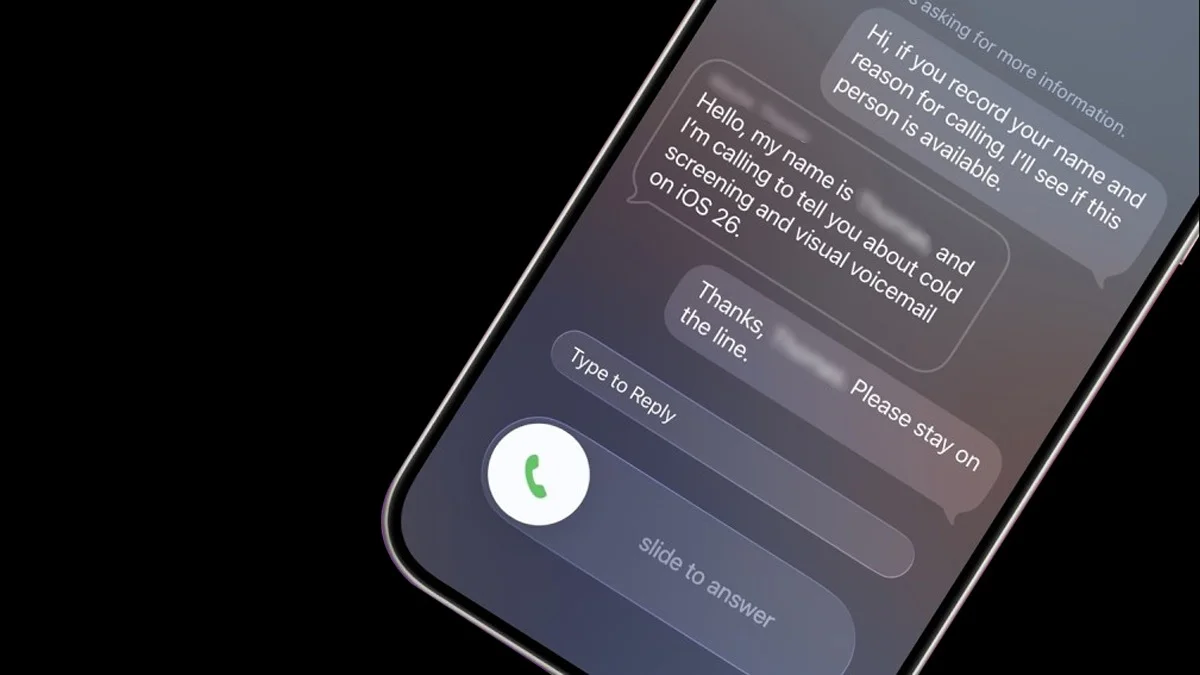
If someone not in your contacts calls you, they’ll hear a Siri-style voice that says something like, “Please say your name and why you’re calling.”
At the same time, you’ll get a pop-up on your screen showing that the call is being screened. As the caller speaks, their response is turned into text that shows up on your screen like chat bubbles.
From there, you can decide whether to answer the call.
If you’d rather not talk, you can tap on a pre-written message like “I’ll call you later” or “Send more information.” The phone’s voice will read it out loud to the caller.
You can also type out a custom message, which the digital voice will say for you.
If you need a few seconds to decide, that’s fine too. The phone will keep ringing while you make up your mind.
Does It Work Well?
This feature offers a nice middle ground. Instead of blocking every unknown caller or letting every single one through, it lets you hear who’s calling and why.
That said, it’s not perfect for everyone. Some early users, including journalists at the Associated Press, shared mixed results.
One AP reporter said it worked “seamlessly” and helped cut out the noise. Another liked it for keeping away unwanted cold calls from marketers.
“However, it’s not great when delivery drivers try to call me and then just hang up,” he added.
People on social media have had similar complaints. Some missed calls were expected from a mechanic or plumber. It turns out not everyone realizes they need to interact with the system instead of just leaving a voicemail.
If you don’t end up liking how it works, you can easily switch it off anytime in your settings.
What About Android Users?
Apple may be just adding this feature now, but Google has had something similar for quite a while. Pixel phones in the US have offered automatic call screening for years.
Google recently announced that the feature is expanding to Australia, Canada, and Ireland, too.
To check if it’s on, open your Phone app and look for Call Screen in settings.
Google’s version is a bit more hands-off. When someone calls you, the phone asks who they are and why they’re calling. If it thinks it’s spam, it ends the call automatically. If it sounds legit, the call goes through.
Of course, it’s not perfect either. Google says that it might not catch every spam call and sometimes might not fully understand or write out what the caller says.
Samsung Galaxy users also have something similar. Their phones use Bixby’s text call feature, which lets the AI assistant screen calls in much the same way.
ALSO READ: Why Snapchat Is Draining Your Battery And How To Fix It