Hidden iPhone Feature That May Help Prevent Travel Nausea
Travel nausea, often referred to as motion sickness, is a common problem for people who use their smartphones while riding in cars, buses, or other moving vehicles. Many experience dizziness, headaches, or nausea after just a few minutes of looking at their phone during travel, making it uncomfortable to read, watch videos, or scroll through messages.
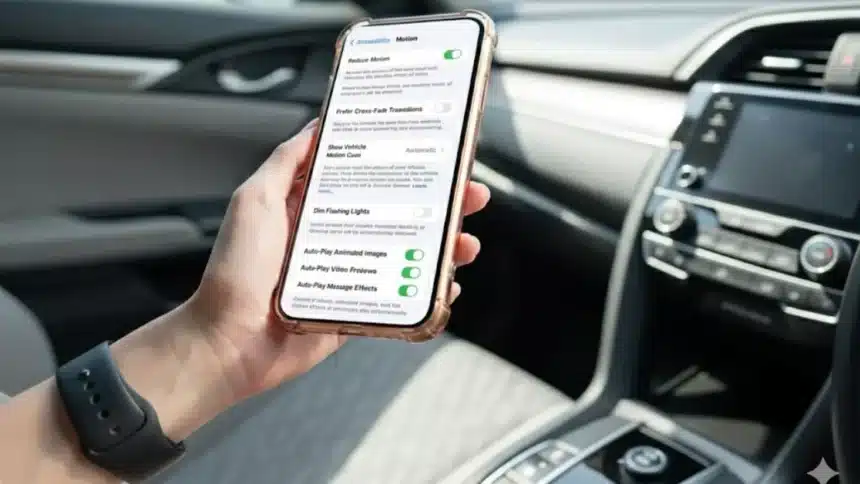
Apple has quietly introduced a built-in iPhone feature designed to address this exact issue. Known as Vehicle Motion Cues, the feature aims to reduce motion sickness by aligning what users see on their screen with the movement their body feels. While it sits inside Accessibility settings and remains largely unnoticed, this tool could make a meaningful difference for many travellers.
- Hidden iPhone Feature That May Help Prevent Travel Nausea
- What Is the Hidden iPhone Feature
- Why Using an iPhone Can Cause Travel Nausea
- How Vehicle Motion Cues Works
- Why Apple Designed This Feature
- How to Turn On Vehicle Motion Cues on iPhone
- What the Visual Cues Look Like
- Who Can Benefit Most From This Feature
- User Experiences and Observations
- Safety Considerations
- Why This Feature Remains Largely Unknown
- How This Fits Into Apple’s Accessibility Strategy
- Frequently Asked Questions (FAQs)
What Is the Hidden iPhone Feature
The feature is called Vehicle Motion Cues. It is an Accessibility setting available on iPhones and iPads running iOS 18 or later. Apple designed it specifically for passengers who feel sick when using their device in a moving vehicle.
Vehicle Motion Cues works by displaying subtle animated visual indicators, usually dots or patterns near the edges of the screen. These indicators move in real time, matching the direction and speed of the vehicle’s motion. The idea is to visually communicate movement to the brain while the user looks at the screen.
This feature is not turned on by default, which is why many users are unaware of its existence. It remains hidden inside the Motion section of Accessibility settings, despite being one of Apple’s more practical additions for daily travel.
Why Using an iPhone Can Cause Travel Nausea
Motion sickness occurs due to a sensory mismatch in the brain. While travelling in a vehicle, the inner ear detects movement, acceleration, and turning. However, when someone focuses on a phone screen, their eyes see a stable and unmoving image.
This mismatch between what the body feels and what the eyes see can confuse the brain. As a result, symptoms such as nausea, dizziness, sweating, or headaches can occur. This problem becomes more noticeable when reading text, scrolling social media, or watching videos during travel.
Vehicle Motion Cues is designed to reduce this mismatch by giving the eyes visual confirmation that the body is in motion.
How Vehicle Motion Cues Works
Vehicle Motion Cues uses the iPhone’s built-in motion sensors, including accelerometers and gyroscopes. These sensors detect real-time changes in speed, direction, and movement while the vehicle is in motion.
Once activated, the feature displays animated cues on the screen that move in sync with the vehicle. For example, when the car turns, the visual indicators shift accordingly. When the vehicle accelerates or slows down, the motion cues respond in the same way.
By showing this subtle movement, the brain receives consistent information from both the inner ear and the eyes. This alignment may help reduce the sensory confusion that often leads to motion sickness.
Why Apple Designed This Feature
Apple introduced Vehicle Motion Cues as part of its broader Accessibility improvements. The company has stated that the feature was developed to help people who experience motion sickness while using devices during travel.
Rather than requiring users to stop using their phone entirely, Apple’s approach allows passengers to continue reading, browsing, or watching content with reduced discomfort. The feature is especially helpful for long journeys, daily commutes, or travel situations where phone use is unavoidable.
Apple emphasises that the feature is intended for passengers only and not for drivers.
How to Turn On Vehicle Motion Cues on iPhone
Vehicle Motion Cues can be enabled manually or set to activate automatically. The steps below follow Apple’s official guidance.
1. First, open the Settings app on your iPhone.
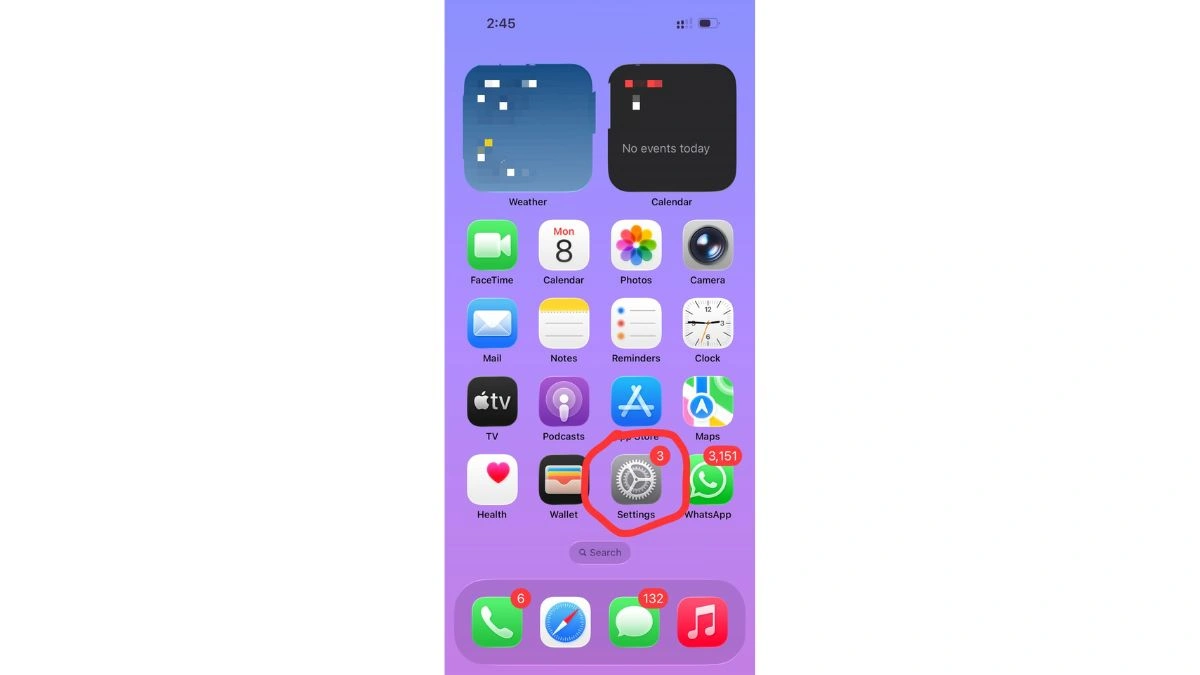
2. Next, tap Accessibility.
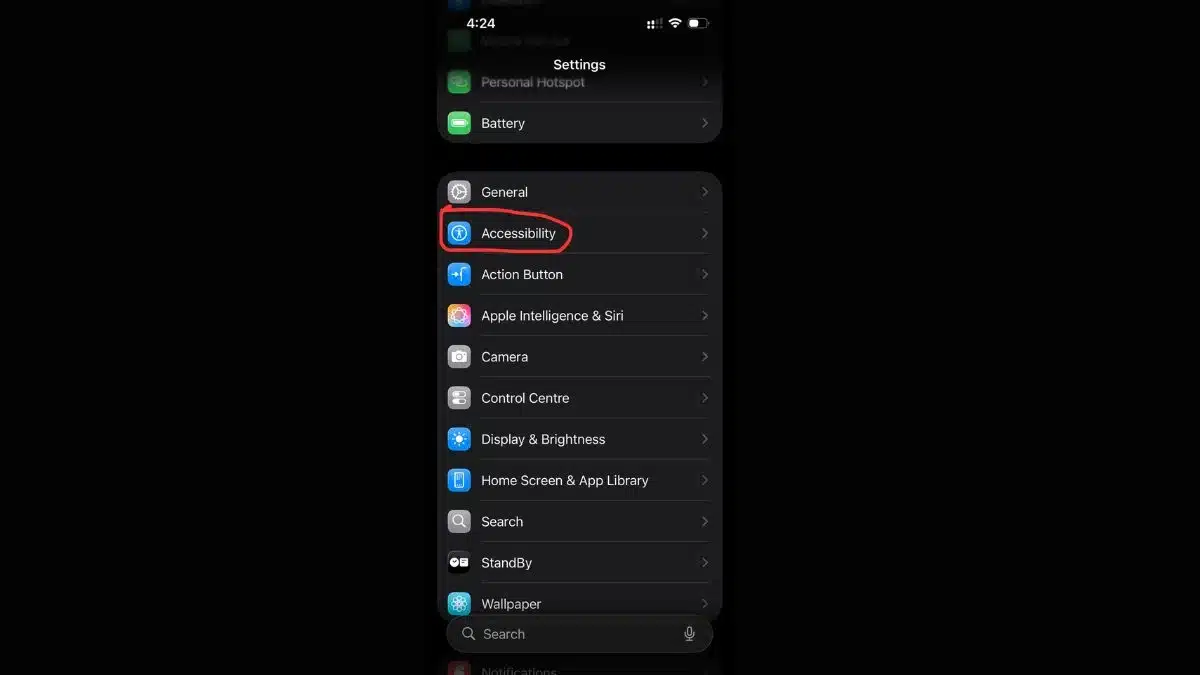
3. Scroll down and select Motion.
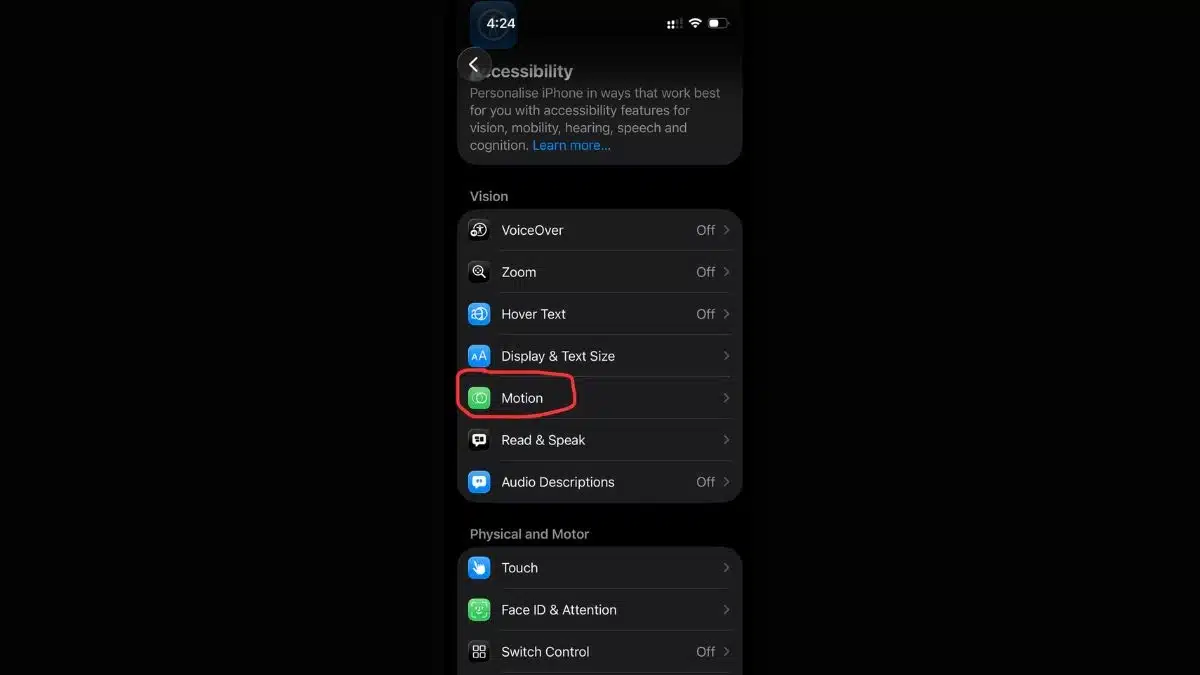
4. Tap on Vehicle Motion Cues.

5. Turn the feature On or select Automatic.
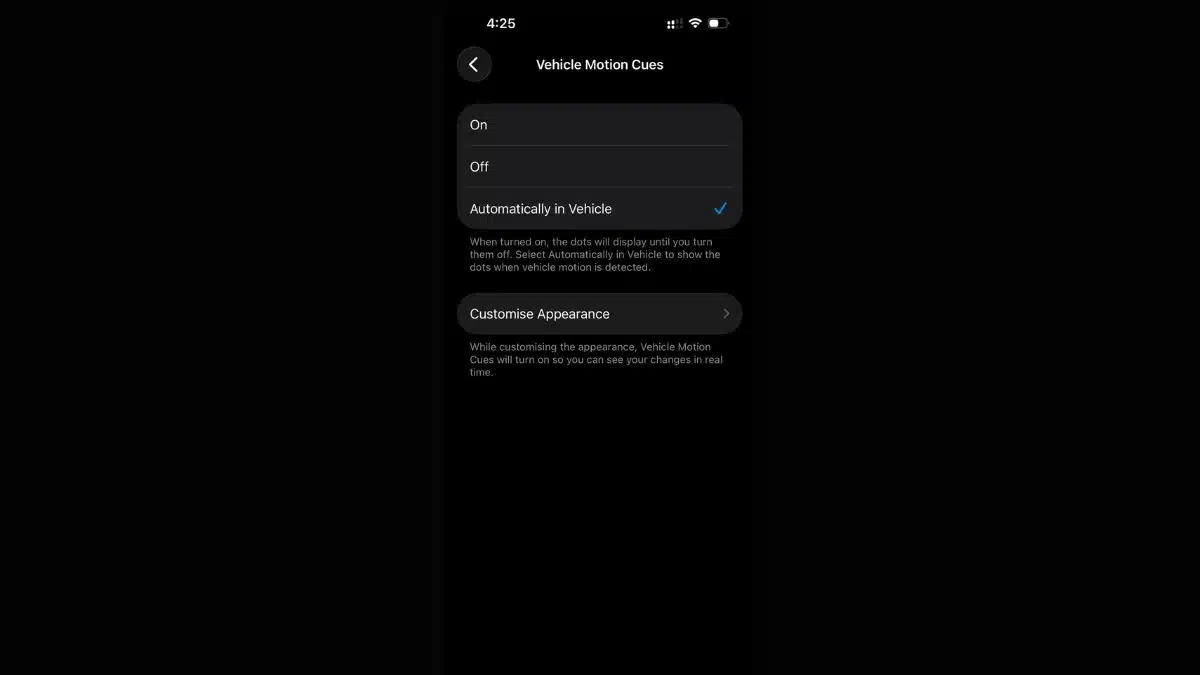
When set to Automatic, the iPhone will activate the feature whenever it detects that the user is travelling in a moving vehicle.
What the Visual Cues Look Like
The visual cues appear as small animated dots or patterns placed along the edges of the screen. They are designed to remain subtle so they do not interfere with normal phone use.
The indicators move smoothly and respond to turns, acceleration, and braking. They do not cover content or require interaction, allowing users to continue reading or watching without distraction.
Because the cues stay at the edges, many users report that they fade into the background after a short time.
Who Can Benefit Most From This Feature
Vehicle Motion Cues may be useful for people who frequently experience nausea while using their phone in vehicles. This includes passengers who read messages, browse social media, watch videos, or work during travel.
The feature may also benefit people who commute long distances or travel regularly by car, bus, or taxi. Some users report reduced discomfort during short trips, while others find it more helpful on longer journeys.
It is important to note that motion sickness varies from person to person. While some users experience noticeable relief, others may find the effect mild or limited.
User Experiences and Observations
Reports from users and reviewers suggest mixed but generally positive results. Some people notice reduced nausea within minutes of enabling the feature, while others experience partial improvement rather than complete relief.
Experts note that because motion sickness affects individuals differently, no single solution works for everyone. Vehicle Motion Cues is not positioned as a medical treatment, but rather as a helpful tool that may ease symptoms for certain users.
Apple itself acknowledges that results may vary depending on the individual.
Safety Considerations
Apple clearly states that Vehicle Motion Cues is intended for passengers only. Using this feature while driving could be distracting and unsafe.
The feature should be disabled if it causes discomfort or distraction. Users should also remember that no screen-based solution can completely eliminate motion sickness in all situations.
Why This Feature Remains Largely Unknown
Despite its usefulness, Vehicle Motion Cues is buried deep within Accessibility settings. Many users never explore these menus unless they are actively searching for a solution.
Apple does not heavily promote the feature during setup or updates, which contributes to its low visibility. However, growing awareness through technology coverage has started to bring attention to this hidden tool.
How This Fits Into Apple’s Accessibility Strategy
Vehicle Motion Cues reflects Apple’s broader approach to Accessibility, where features designed for specific needs often benefit a wider audience.
By using existing sensors and subtle design changes, Apple created a solution that does not require additional hardware or third-party apps. This approach aligns with Apple’s goal of making devices more adaptable to real-world challenges.
Vehicle Motion Cues is a hidden iPhone feature that may help reduce travel-related nausea by aligning on-screen visuals with real-world motion. By addressing the sensory mismatch that causes motion sickness, the feature allows passengers to use their devices more comfortably while travelling.
Although it does not work the same way for everyone, it offers a simple, built-in option worth trying for anyone who experiences discomfort when using their phone in a moving vehicle. With just a few taps in the Accessibility settings, users can enable a feature designed specifically to make travel easier.
Frequently Asked Questions (FAQs)
Q1. What is the hidden iPhone feature that may help with travel nausea?
A. The feature is called Vehicle Motion Cues and is available in iOS 18 and later.
Q2. Where can I find Vehicle Motion Cues on my iPhone?
A. It is located in Settings, then Accessibility, then Motion, and then Vehicle Motion Cues.
Q3. How does Vehicle Motion Cues reduce motion sickness?
A. It displays visual motion indicators that match the movement of the vehicle, helping reduce sensory mismatch.
Q4. Does Vehicle Motion Cues work for everyone?
A. No, results vary between individuals. Some users feel noticeable relief, while others experience limited improvement.
Q5. Can drivers use Vehicle Motion Cues?
A. No, Apple states the feature is intended for passengers only.
Also Read- Google Phone App Brings Urgent Call Alerts To Android