





With only a small amount of beta testing done, WhatsApp will soon begin rolling out their highly anticipated user names feature to their entire user base. This new option provides greater privacy for its users, and also offers new ways to connect without sharing your phone number.
Usernames Arrive in Beta
After months of leaks and speculation, usernames have started appearing in the latest WhatsApp beta versions on both Android and iOS. However, the rollout is gradual, meaning only a limited number of users can access it for now.
The feature being in beta suggests a wider release could be on the horizon soon.
How to Set Your Username on WhatsApp
If you have access to the feature, setting up a username is simple:
- Open WhatsApp
- Go to Settings
- Tap on Profile
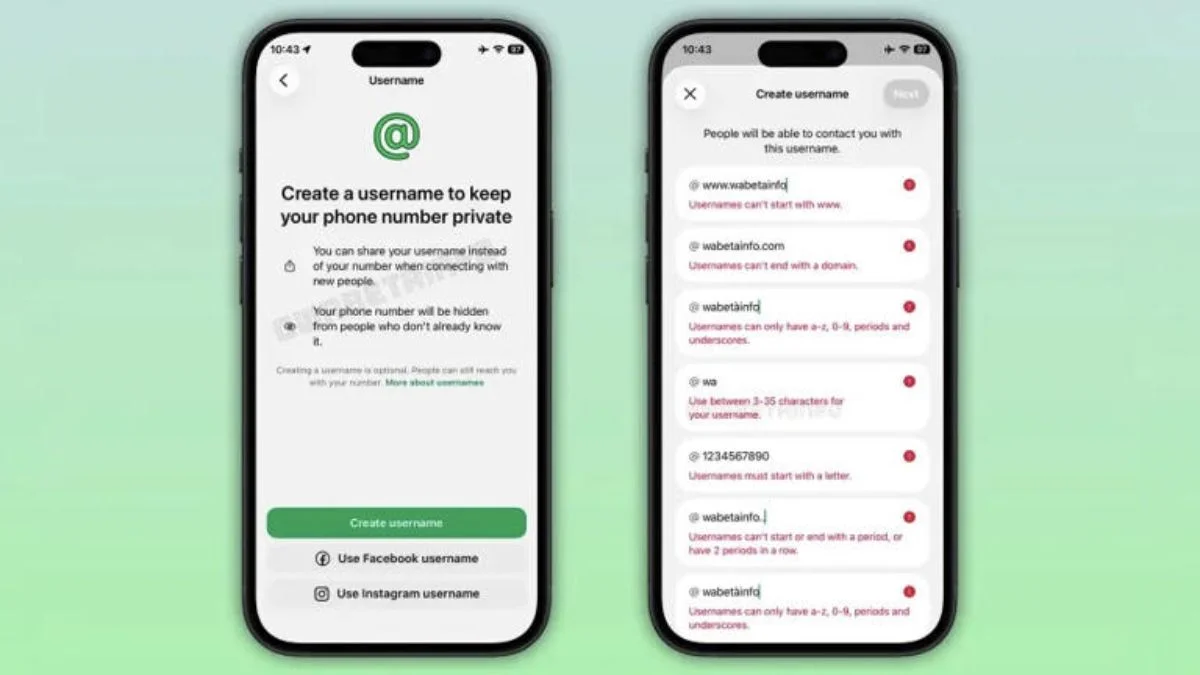
- Create your username
Users also have the option to use their existing usernames from Facebook or Instagram, making the process even easier.
Username Rules You Should Know
There are a few restrictions when creating a username:
- Must be at least 3 characters long
- Should start with a letter
- Can include numbers, periods, and underscores
- Must be unique across Meta platforms
- Cannot start with “www.” or end like a domain
- Maximum length is 35 characters
These rules ensure consistency and prevent misuse across platforms.
The most significant benefit of using a username is that you’re no longer required to provide your phone number to each person you communicate with via WhatsApp. You can add contacts using only their username.
As part of increasing security measures, WhatsApp has introduced an optional four-digit code for your username. Therefore, someone who wants to contact you will require both your username and this code, making it more difficult for anyone to send unsolicited text messages.
While using usernames increases your privacy, users must still link their account to a phone number before they start.
However, it is not required to make this phone number public to others.
Also Read: How To Use Voice And Video Calling On Whatsapp Web: A Quick Guide