



Over time, many iPhone users start noticing that their battery doesn’t last as long as it once did. Apps drain power faster, the phone needs frequent charging, and the overall battery health slowly declines. While replacing the battery or upgrading the device is an option, there are several simple ways to slow down battery wear and keep your iPhone running efficiently.
Here are some practical tips that can help you maintain better battery health.
Turn On Low Power Mode When Needed
Low Power Mode is designed to extend battery life when your phone is running low on charge. Once enabled, it reduces background activity, visual effects, and some system processes.
This feature is especially useful during travel, long workdays, or when you don’t have immediate access to a charger.
Check Which Apps Use the Most Battery
While the battery itself could be the culprit for your poor battery performance, you may find that certain applications are draining your phone’s battery too fast.
Social media applications like WhatsApp and Instagram, games and navigation applications tend to deplete the iPhone’s battery at a much higher rate than most other applications.
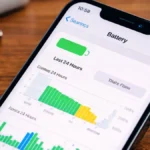
Go to Settings > Battery to find out which applications are consuming the most power; if there is a high consumption of battery by an application, you may want to limit or delete the application to help improve your battery life.
Use Dark Mode
Many of the newest iPhones are using OLED display technology, which means that the individual pixels on the display will turn off when displaying a colour, thereby allowing for lower energy usage.
Therefore, by using Dark Mode, your iPhone will consume less power when using an application or navigating between menus, ultimately providing a minor improvement to battery life daily.
Develop Better Charging Habits
Charging habits have a direct correlation to how long your battery will last. Consistently plugging and unplugging your phone or creating charging habits are ways that you can prolong the life of your iPhone’s battery.
Lower Your Screen Brightness
Your iPhone’s display is one of the biggest sources of battery drain. Keeping brightness at maximum levels consumes significant power.
Reducing brightness or enabling automatic brightness adjustment can help conserve battery without affecting everyday use too much.
Keep Your iPhone Updated
Software updates often include performance improvements and bug fixes that can affect battery efficiency. Occasionally, a software issue might cause unusual battery drain.
Installing the latest stable iOS updates ensures that your device runs on the most optimized version available.
Avoid Extreme Temperatures
Battery performance can drop quickly when exposed to very high or very low temperatures. Excessive heat, in particular, can permanently damage battery capacity.
To protect your battery, avoid leaving your phone in direct sunlight or extremely cold environments for long periods.
Control Background App Activity
Some apps constantly refresh content in the background even when you are not actively using them. This continuous activity can quietly drain battery power.
Managing background refresh settings allows you to limit which apps can update in the background, helping reduce unnecessary battery usage.
iPhone batteries naturally degrade over time, but good usage habits can slow down that process.
Also Read: iPhone Vs Android: 7 Key Differences That Never Change