Split Screen and Floating Windows in Redmi Phone: There are moments when one wants to multitask, and having to switch between different applications becomes a task. However, Redmi Phones give their users an in-built feature, using which they can use two apps simultaneously on the same screen.
- What Are Split Screen and Floating Windows?
- Step-by-step Guide to enable the split-screen feature:
- Step 1: Tap on the bottom left button on your phone’s display.
- Step 2: Choose one of the open apps.
- Step 3: Tap on the second icon, which is for splitting the screen.
- Step 4: Select the second app that you want to use in the split screen.
- Step-by-step Guide to enable the Floating Windows feature:
With this feature, the user can do two things at the same time on one screen, like checking notes on his or her phone and writing an email at the same time.
What Are Split Screen and Floating Windows?
- Split Screen: Split Screen enables the user to use two applications side-by-side. This makes it perfect for multitasking.
- Floating Windows: Floating Windows enable the user to open an app in a small window on the screen, which can be moved around.
Split screen and floating windows in Redmi phones are two of the most beneficial features that many of its users are not aware of. This feature makes multitasking very easy.
Step-by-step Guide to enable the split-screen feature:
Step 1: Tap on the bottom left button on your phone’s display.
Once you tap on the bottom left button on your phone’s display, you will see all the open apps and tabs on your screen.
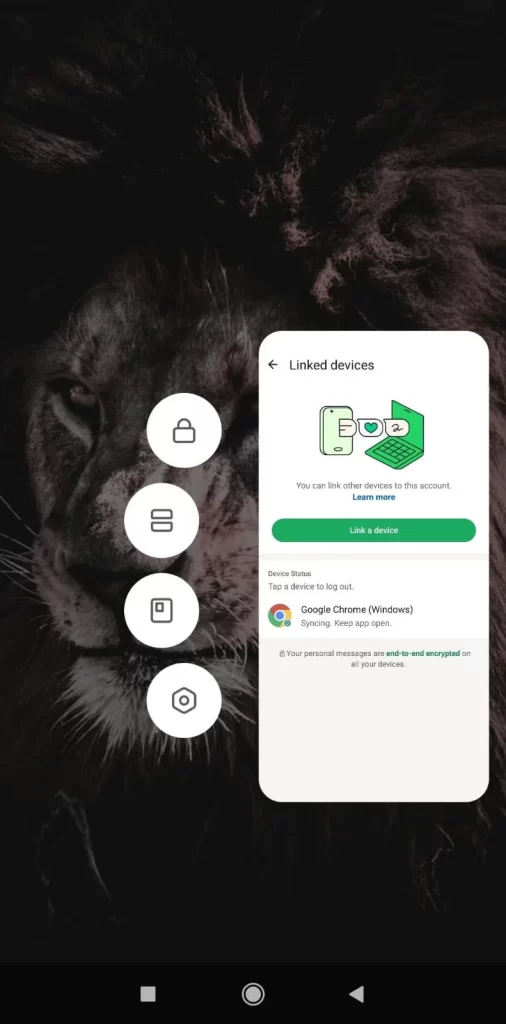
Step 2: Choose one of the open apps.
Long-press on any one of the open apps, and 4 different options will appear to choose from.
Step 3: Tap on the second icon, which is for splitting the screen.
Tap on the second option icon, which is for splitting the screen into two.
Once you do this, the app that was open on your Redmi phone will move towards the top left of the screen, splitting the screen in half, and the remaining open apps that are compatible with the split screen feature will appear in the bottom half of the screen.
Step 4: Select the second app that you want to use in the split screen.
You can now select the second app that you want to open in the bottom half of your display screen by selecting from the open apps.
Step-by-step Guide to enable the Floating Windows feature:
Floating windows are another interesting and useful feature offered by Xiaomi in its Redmi phones.
Step 1: Tap on the bottom left button on your phone’s display.
Once you tap on the bottom left button on your phone’s display, you will see all the open apps and tabs on your screen.
Step 2: Choose one of the open apps.
Long-press on any one of the open apps, and 4 different options will appear to choose from.
Step 3: Tap on the third icon, which is for enabling the floating windows option.
Tap on the third option icon, which is for enabling floating windows.
Once you do this, the app that was open on your Redmi phone will float on the screen and you can move it anywhere on the screen by dragging it.
Step 4: Select the other app that you want to use while still keeping the floating app open on top of the second app.
You can now select the second app that you want to open on your display screen by selecting from the open apps.
Once you click on the second app, the floating apps will display right over this open tab, and you can use both the open tabs simultaneously without having to switch back and forth multiple times.
READ MORE: Xiaomi 17 Vs iPhone 17: Which Is the Correct Pick for Your Needs?