Back Up Your iPhone, iPad Or iPod Touch In iTunes On PC: Let’s be honest, tech fails when you least expect it. One crash, one accidental drop, or one stolen phone, and boom your photos, chats, documents, everything’s gone. In today’s world, where our entire lives sit inside a screen, backing up your device isn’t just smart, it’s survival.
Cloud storage, external drives, even simple auto-backups exist for a reason. It’s not about if something goes wrong, it’s about when. So don’t wait for a meltdown to learn the hard way. Back it up, sleep easy, and thank yourself later when disaster strikes and you’ve got everything safe, neat, and just a tap away.
Back Up Your iPhone, iPad Or iPod Touch In iTunes On PC
A backup on iPhone, iPad, or any Apple device is a saved copy of your data photos, messages, app data, and settings stored either in iCloud or on a computer. It ensures you can restore everything if your device is lost, damaged, or replaced. Think of it as your digital safety net.
Backup your device
iTunes automatically backs up your device when you connect it to your computer. But you can also back up your device manually at any time. And if you have iOS 3.0 or later, iTunes can encrypt your backups to secure your data.
- Connect your device to the computer you normally sync with.
You can connect your device using a USB or USB-C cable or a Wi-Fi connection. To turn on Wi-Fi syncing, see Sync iTunes content on PC with devices on Wi-Fi. - Go to the iTunes app on your PC.
- Click the Device button near the top left of the iTunes window.

Back Up Your iPhone, iPad Or iPod Touch In iTunes On PC, Click the Device button near the top left of the iTunes window - Click Summary.
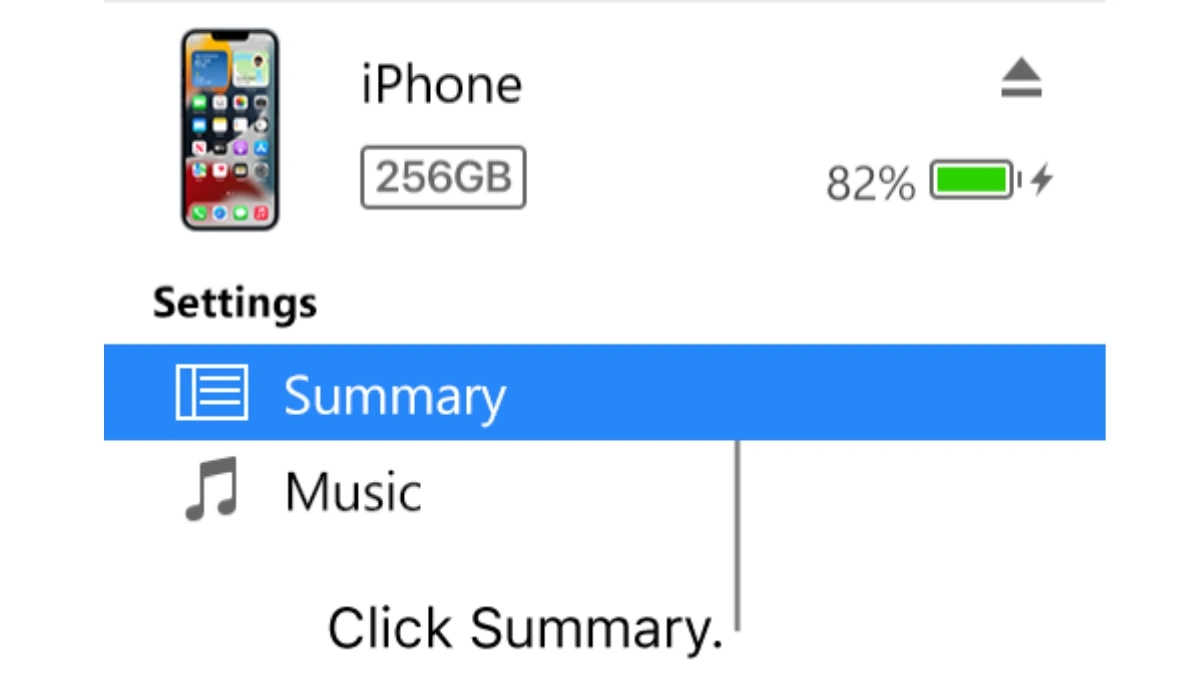
Back Up Your iPhone, iPad Or iPod Touch In iTunes On PC, Click Summary - Click Backup Now (below Backups).
To encrypt your backups, select “Encrypt local backup”, type a password, then click Set Password.
To see the backups stored on your computer, choose Edit > Preferences, then click Devices. Encrypted backups have a lock icon in the list of backups.