



Google Maps Power Saving Mode: What It Is and Why It Only Works on Pixel 10 Phones
Google Maps is one of the most used apps for navigation, whether for daily travel or long road journeys. But a common issue for many users has always been the rapid battery loss during turn-by-turn navigation. This happens because the phone keeps the screen active while using GPS, mobile data and other power-heavy functions. Over time, this has become a concern for people who rely on Maps throughout the day.
To solve this problem, Google has introduced a new feature called Power Saving Mode for Google Maps. The rollout has started and early reports highlight its clear purpose: helping reduce battery drain during long navigation sessions. However, the feature comes with a major limitation. It is available only on the Pixel 10 series and does not support walking or cycling modes.
Power Saving Mode Comes to Google Maps
Power Saving Mode is designed to reduce energy consumption while you use turn-by-turn navigation. This is especially useful during long drives where a phone may lose a significant amount of battery. Google has focused on creating a lightweight version of navigation that uses less power but still provides the essential information needed to continue the route.
The feature is rolling out now, as reported by 9to5Google. At this stage, it remains exclusive to Pixel 10 devices. This means that older Pixel phones and other Android models do not have access to the feature. Google has not said whether it plans to expand Power Saving Mode to more devices in the future.
For now, the Pixel 10 series is the only group of smartphones with the hardware support needed for this new experience.
How Power Saving Mode Works
The idea behind Power Saving Mode is simple. Instead of showing the full navigation interface with colors, animations and regular updates, Google Maps switches to a low-power screen that focuses only on the most important information.
Google uses a system feature called AOD Min Mode. This allows Maps to run full-screen on the phone’s Always-On Display. The map becomes dim and monochrome and updates more slowly. Since the screen consumes far less power in this state, the battery impact is reduced.
The simplified navigation view hides extra information that is not needed for basic driving. Features such as traffic layers, color-coded routes, zoom animations and street labels are removed. What remains is a clean and minimal interface that shows the next turn, estimated arrival time and distance.
This design allows users to follow directions without draining their battery quickly. The feature is helpful during situations where charging is not available, such as long drives or road trips in remote areas.
How to Activate Power Saving Mode
Turning on Power Saving Mode is easy. Once you start turn-by-turn navigation on a Pixel 10 device, you can press the power button. The phone then switches automatically into the low-power display mode.
This activation method makes the feature more accessible, especially while driving. Users do not need to search through menus or adjust settings manually during travel. They can enable the feature with a simple press.
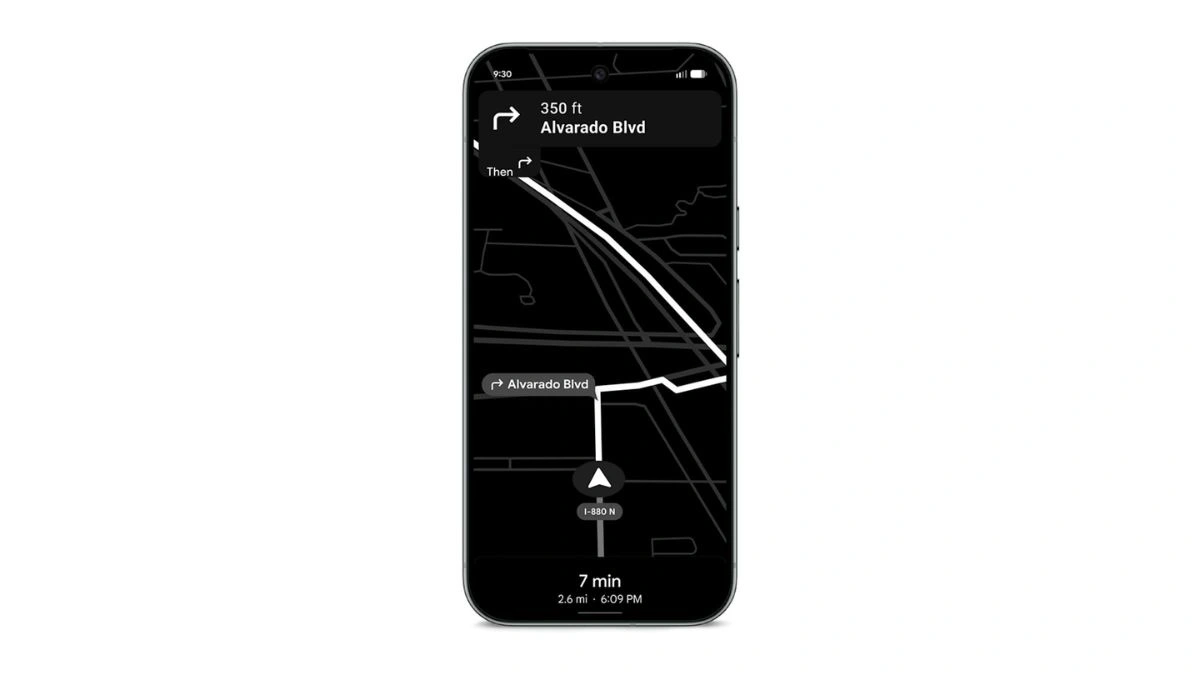
Google reports that using Power Saving Mode can extend navigation time by up to four additional hours. This is a significant improvement for people who frequently use Google Maps on long trips.
Limitations of Power Saving Mode
While the feature offers benefits, it also comes with certain restrictions. First, Power Saving Mode supports only driving. It does not work for walking or cycling navigation. This limits its usefulness for people who travel on foot or by bike for long distances.
Another major limitation is device compatibility. Only Pixel 10 phones can access Power Saving Mode. This restriction removes the possibility for many users across different Android brands to try the feature. At this stage, Google has not confirmed whether wider support is coming.
Power Saving Mode is enabled by default on the Pixel 10 series. Users who prefer the standard navigation experience can turn it off from Google Maps settings.
Why Google Is Introducing This Feature
Battery drain during navigation has been a long-standing issue. Many users charge their phones while driving because Google Maps consumes power faster than most apps. By launching Power Saving Mode, Google is offering a solution that improves the overall navigation experience.
This update also highlights Google’s focus on improving software efficiency. It gives users a more reliable way to navigate without worrying about sudden battery loss. Even though the feature is limited to a specific group of devices, it shows how Google is working to address real problems faced by mobile users.
If Google expands the feature to more phones in the future, it could become one of the most helpful updates Maps has received in recent years.
FAQs
Q1. What is Google Maps Power Saving Mode?
A. It is a new feature that provides a low-power version of turn-by-turn navigation, designed to reduce battery drain on long drives.
Q2. Which phones support Power Saving Mode?
A. At the moment, only the Pixel 10 series supports Power Saving Mode.
Q3. Does Power Saving Mode work for walking or cycling?
A. No. The feature works only for driving navigation.
Q4. How do you turn on Power Saving Mode?
A. Start navigation, then press the power button. The screen will switch into the low-power Always-On Display version of Maps.
Q5. How much extra battery life can it provide?
A. Google suggests that users may gain up to four extra hours of navigation time during long trips.
Also Read- Best USB Car Accessories: 5 Useful Add-Ons To Upgrade Any Vehicle