Simple Charging Habits That Improve Your Phone Battery Health
Phone batteries have become smarter, but they still need good charging habits to last longer. Many people unknowingly damage their battery by using the wrong chargers, relying too much on fast charging or keeping their phone at extreme battery levels. These mistakes slowly reduce battery health and make the phone age faster.
This guide explains simple and practical ways to protect your battery using the information you provided. Each method focuses on easy daily habits that anyone can follow. You do not need technical knowledge or special accessories. Small changes make a big difference when it comes to battery performance and long term durability.
Always Use the Correct Charger
Using the original charger that comes with your phone offers the safest and most reliable performance. These chargers are designed and tested to deliver the exact amount of power your device needs. They protect your battery from unnecessary strain and maintain long term health. Many users switch to cheap third party chargers to save money, but these low quality options often cause battery damage due to unstable power delivery.
If you lose your original charger, it is best to choose a trusted brand. Companies like Anker and Belkin offer safe and well tested alternatives that match the standards set by phone manufacturers. When buying a charger, pay attention to whether your phone uses USB A or USB C and avoid no name products that do not follow proper safety requirements.
Do Not Ignore Your Charging Cable Quality
Many people focus only on the charging adapter and forget that the cable is equally important. A good cable ensures that power flows safely and efficiently from the charger to the device. Cheap or uncertified cables often deliver unstable power, which may cause slow charging or internal stress on the battery.

Apple users should look for MFi certified cables. This certification confirms that the cable meets Apple’s safety and performance guidelines. Android users, especially those with modern phones, should choose USB C to USB C cables from reputable brands. Mixing older USB A cables with newer devices may cause slow speeds or power mismatch issues that affect battery life over time.
Use Fast Charging Only When Needed
Fast charging is helpful when you are short on time. Some chargers can deliver up to 100 watts, bringing your phone back to life in minutes. While this speed is convenient, it should not be used all the time. Fast charging produces more heat than normal, and heat is one of the biggest factors that harms lithium ion batteries.

When possible, use slower charging during the night or when you do not need the phone immediately. Modern phones try to manage heat during fast charging, and devices like the Pixel 6 even limit speeds automatically. Still, choosing slower charging for long sessions is a better habit. If you buy a fast charger, choose one that is QuickCharge certified or one that stays below 65 watts for safety.
Avoid Charging to Extremes
Letting the battery drop to 0 percent or charging it up to 100 percent on a regular basis can reduce its lifespan. Experts recommend keeping your battery between 20 percent and 80 percent for the best long term health. These levels avoid unnecessary stress and help the battery remain stable for more cycles.
The old idea of fully draining a phone to calibrate the battery came from older nickel based batteries. Modern lithium ion batteries do not need this and can be harmed by it. Small top ups during the day are easier on the battery compared to leaving the phone plugged in all night. However, modern phones do stop charging once they reach 100 percent, so occasional full charges will not cause major problems.
Give Your Phone a Break While Charging
Using your phone while it is charging creates extra heat because both the battery and the processor are working at the same time. Activities like streaming videos, gaming or scrolling social media make the device warm. This heat builds up and works against battery health.
It is better to let the phone rest when it is plugged in. Keeping the device cool during charging helps maintain battery strength and reduces long term wear. Even short breaks can improve temperature control and extend overall battery performance.
Understand Wireless Charging and Its Effects
Wireless charging has become more common since the arrival of Apple’s MagSafe system in 2020. Wireless charging is convenient and cable free, but it also generates more heat and is less energy efficient than wired charging. This does not mean wireless charging is harmful, but it should be used wisely.
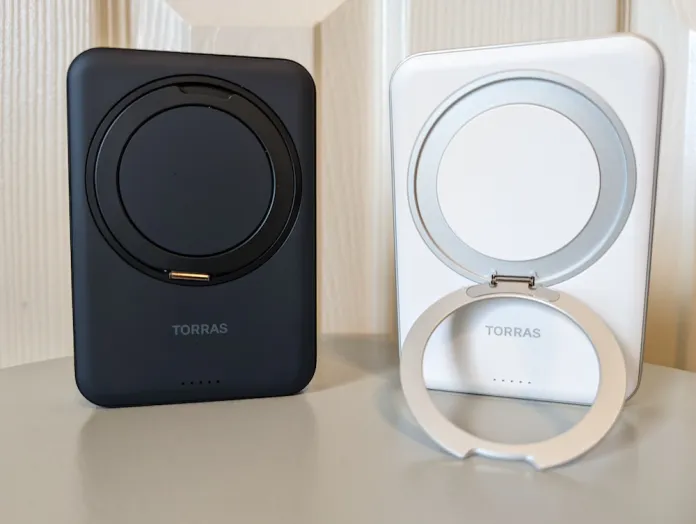
Most wireless chargers under 10 watts charge slowly, which is fine for overnight charging or casual use. They are safe as long as you use good quality chargers from trusted brands like Anker and Belkin. iPhone users often get the best results with the official MagSafe charger, which maintains stable performance and compatibility. Wireless charging is still a useful option when convenience matters more than speed.
FAQs
Q1. Is it safe to use third party chargers?
A. Yes, but only if they come from trusted brands. Cheap chargers can damage your battery.
Q2. Why should I avoid fast charging all the time?
A. Fast charging creates heat, and heat reduces battery health over time.
Q3. Are cheap cables harmful to my phone?
A. Low quality cables may cause unstable power delivery, slow charging or battery wear.
Q4. Should I let my battery reach 0 percent?
A. No. Modern batteries stay healthier when kept between 20 percent and 80 percent.
Q5. Does wireless charging damage the battery?
A. No, but it generates more heat. Using good quality wireless chargers is recommended.
Also Read- How To Remove Duplicate Photos On Android: Simple Google Photos Cleanup Guide