


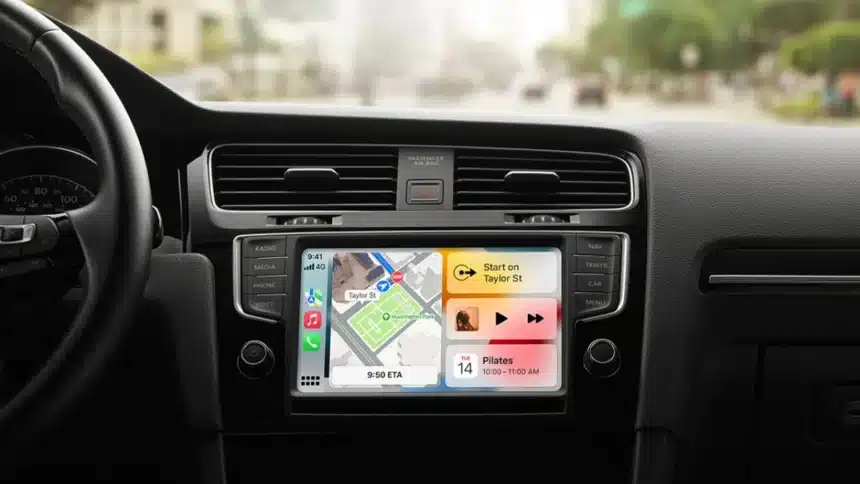
On June 8, 2026, Apple had their usual WWDC (Worldwide Developers Conference), and the main attraction was the revamped version of its virtual assistant, Siri AI.
However, CarPlay had equally impressive updates as well as some substantial improvements over its previous versions.
These improvements include enhanced voice recognition, native video application support, improved position tracking, navigation, and some much-needed improvements to audio and wireless streaming reliability.
As of right now, iOS 27 is in developer beta testing, public beta testing is expected to take place in July, with a full release to the general public expected in September 2026.
Here is a breakdown of everything new.
1. Siri AI Comes to CarPlay
Apple has completely redesigned Siri with the introduction of the all-new Siri AI. Powered by Apple Intelligence, this brand-new version of Siri provides an entirely different user experience from previous versions of Siri, including the ability to answer questions normally asked on Google or ChatGPT, along with providing context to your ongoing conversation with Siri.
When using Siri to inquire about a hiking trail, if you ask an additional question, such as, “How far away is that hiking trail?” Siri understands you are referring back to the previous hiking trail and does not require you to repeat yourself or start over with your question.
Additionally, the Siri user interface was also redesigned for the new version. Instead of the Colour overlay introduced in iOS 18, Siri now appears as a small glowing sphere in the centre-bottom of the CarPlay display screen, similar to pre-iOS 18 configurations of Siri but looking cleaner and more subtle than before.
Finally, you will no longer have to manually backtrack through all your CarPlay conversations. All CarPlay conversations are included in your full list of Siri history, and those that were scribed via CarPlay will be designated by a vehicle icon, allowing for easier searching and returning to past conversations between you and Siri via CarPlay.
2. Dedicated Video Apps for CarPlay
iOS 26 introduced the ability to watch video in your car via AirPlay, essentially mirroring your iPhone’s screen to your car’s display. It worked, but it was basic. With iOS 27, Apple is going a step further by letting developers build dedicated CarPlay video apps.
What this means in practice: instead of picking up your phone, starting a video, and then casting it to the screen, you will be able to browse and select videos directly from your car’s display, just like how you browse music or podcasts today through CarPlay.
If Netflix, YouTube, or Apple TV+ potentially offer a proper CarPlay interface, you can navigate without touching your phone.
For safety reasons, video playback is strictly limited to when the vehicle is parked. The moment you start driving, the video cuts out. Apple has also included an automatic fallback: if your car does not support video or you disconnect while a video is playing, the audio continues uninterrupted, so you can keep listening to a podcast or documentary without skipping a beat.
There is one catch- automakers need to explicitly support the video feature for it to work. It will not roll out automatically across every CarPlay-compatible car.
Apple has not published a list of supported vehicles yet, so compatibility will become clearer as iOS 27 approaches its public release.
3. Audio Scrubbing in Now Playing
It seems like a small thing, but if you listen to podcasts or audiobooks in your car via CarPlay, this change will greatly improve your experience.
Before iOS 27, when I wanted to skip to a certain point in a podcast, I would have to press and hold the fast-forward button to advance through the podcast.
But iOS 27 has added a real progress bar to the Now Playing screen as well as the ability to tap on a point in the progress bar to quickly skip to that point.
This is a feature I thought would have existed before now, so I’m not sure what took so long, but I’m glad it’s finally here.
4. Audio MiniPlayer in Apps
Previously, when you were inside a third-party app on CarPlay, say, a navigation app, there was just a small waveform icon in the corner to indicate something was playing. That was it. No artwork, no controls.
iOS 27 replaces that with a proper MiniPlayer in the top-right corner of apps. It shows album art and gives you playback controls without forcing you to switch back to the Now Playing screen. It is a small change that meaningfully reduces the friction of managing audio while doing something else on the screen.
5. Improved Wireless CarPlay Reliability
Wireless CarPlay has had a notoriously inconsistent track record. Even after iOS 26 and its subsequent updates attempted fixes, many users continued reporting dropped connections, audio lag, and unreliable pairing.
iOS 27 directly addresses this. Apple has explicitly confirmed that wireless CarPlay reliability is improved in this release. The specifics of what was changed under the hood have not been detailed publicly, but for the many drivers who have dealt with frustrating disconnects on their daily commute, this is a welcome promise.
6. Better GPS Accuracy and Navigation Heading
Apple Maps on CarPlay is getting improved GPS accuracy and navigation heading detection. In plain terms, this means the arrow showing which direction you are facing will be more accurate, particularly useful in dense urban areas where tall buildings confuse GPS signals, or in multi-storey car parks where location can drift.
If you have ever experienced the Maps arrow spinning in the wrong direction while you are clearly moving forward, this fix is aimed squarely at that problem.
7. New Wallpapers and Refreshed Icons
iOS 27 also brings a visual refresh to CarPlay. A new set of wallpapers is available, featuring wavy, layered designs in multiple colours with both light and dark variants, matching the default wallpaper style found in iOS 27 and macOS Golden Gate.
App icons across CarPlay have also been updated with Apple’s new Liquid Glass design language, the same translucent, layered aesthetic introduced with iOS 26 and refined further in iOS 27.
When Can You Get It?
iOS 27 is currently available as a developer beta. A public beta opens in July 2026, and the full public release is expected in September 2026 alongside new iPhone hardware. All CarPlay features require an iPhone running iOS 27, and Siri AI specifically requires an iPhone 15 Pro or newer.
Also Read: WWDC 2026: Here’s Everything Apple Just Announced