Samsung has unveiled a new feature in its UI 8 update that is aimed at tackling the rise of AI-driven voice phishing scams. The latest feature is called the ‘Voice Phishing Suspected Call Alert’ that has recently rolled out in South Korea, and is limited to Galaxy devices running on One UI 8.
This means that users with the Samsung Galaxy Z Fold 7 and Galaxy Z Flip 7 foldable smartphones access this feature. It is only available on Samsung’s newest foldable phones. The company is expected to expand the feature to more markets in the coming months.
Samsung already offers similar features with its Bixby Text Call and Smart Call. This new feature directly addresses the growing threat of AI-powered voice phishing attacks.
For context, Google offers a feature known as Call Screening, that essentially answers calls on behalf of the user and screens what the call is about. Likewise, Apple offers Silence Unknown Callers feature that prevents you from getting unknown contacts.
Samsung’s ‘Voice Phishing Suspected Call Alert’ Feature: How Does It Work
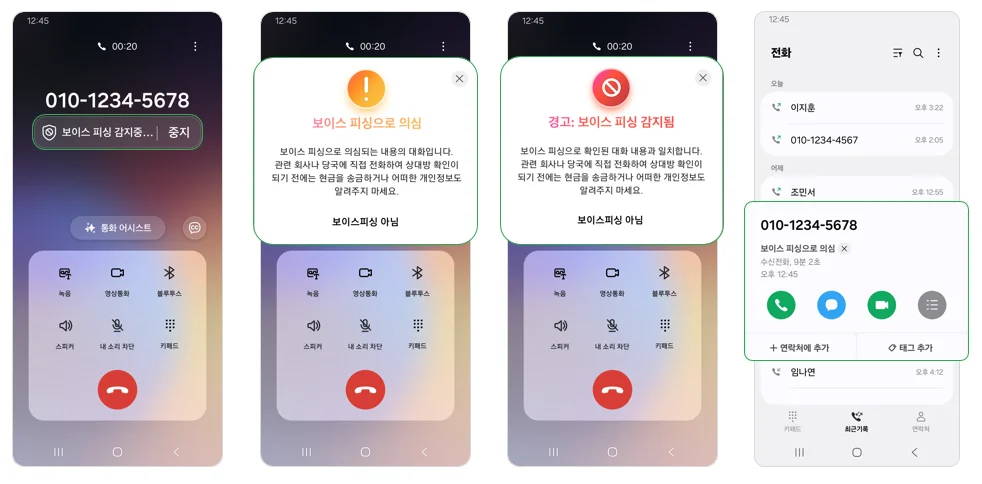
According to a company representative, Samsung users will see a “detecting” message when dialling an unsaved number. This feature is, however, limited to outgoing calls.
“When calling an unknown number, we detect and notify you in real time using AI whether there is a suspicion of voice phishing”, a community post read. If a potential threat is identified, users will receive an instant alert through sound and vibration.
According to Samsung, the Voice Phishing Suspected Call Alert feature detects voice phishing by using data from the National Police Agency and the National Institute of Scientific Investigation.
Also Read: Samsung Galaxy Z Fold 7 Enterprise Edition: An Ideal Phone For Business
How to Enable Voice Phishing Suspected Call Alerts on One UI 8
Here is a step-by-step guide to enable the feature:
Go to the phone’s app and select Settings > Voice Phishing Suspected Call Notification > Voice phishing suspected call notification. This will activate the feature
Interested users can check their One UI version by through Settings > Software update > Download and install to get the latest update.
Voice Phishing Suspected Call Alerts on One UI 8: Availability
The Voice Phishing detection feature is limited to Korea currently. The tech giant is expected to introduce it to global users. However, there is no official confirmation.