
Incognito Mode: Modern-day web browsers such as Google Chrome, Safari, Firefox and Opera have an option of Incognito private mode, which allows users to surf the web in a way that feels completely private as a result of no history being saved on the device, along with an icon that is similar to what you see in spy movies.
However, Incognito Mode provides limited privacy, which means it is not as private as you think.
What Does Incognito Mode Actually Do?
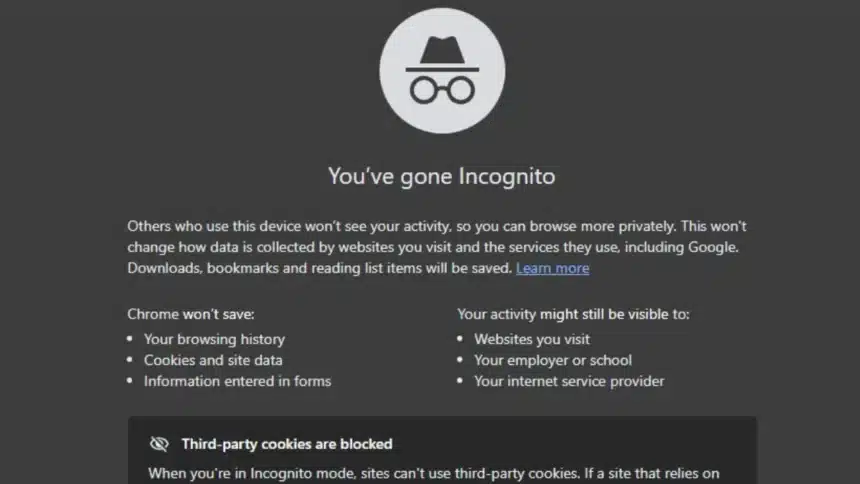
Incognito Mode mainly protects your activity from other people who use the same device. When you browse in Incognito on browsers like Google Chrome, your browsing history, cookies, and form data are not stored on your computer after you close the session.
This means if someone else later opens the browser on that same device, they won’t see the websites you visited during that private session.
For example, if you use a shared laptop at home or work, Incognito Mode prevents your browsing history from appearing in the regular browser history.
Can Websites Still Track You in Incognito Mode?
This is certainly a point with lots of confusion surrounding it. Even if you are browsing using Incognito Mode or private browsing, the websites that you visit will still be able to see some information about you.
For instance, they will still see details about the device you are using (for example, type and manufacturer), your IP address, which browser you have, and, in some cases, even your approximate geographical location.
Your Internet Service Provider (ISP), as well as network administrators, may also be able to view your online activity.
So, using Incognito Mode does not provide online anonymity; the websites that you visit can still load third-party tracking scripts, can use browser fingerprinting to track your activity, and can track users via their login accounts or other device data.
Why Do So Many People Think Incognito Means Total Privacy?
The name itself creates the confusion.
Terms like “Incognito,” “Private Browsing,” and ‘InPrivate’ make it sound like your activity is invisible. Combined with visual cues like dark-themed browser windows and notifications about blocked cookies, many users assume their browsing is completely hidden.
However, these features are mostly designed to prevent local tracking, not to hide your activity from the internet.
How Can You Actually Browse More Privately?
If you want stronger privacy online, Incognito Mode alone is not enough. Some browsers focus more heavily on blocking trackers and protecting user data.
Options like Brave and DuckDuckGo Browser include built-in tools that automatically block many tracking scripts and cookies.
For an additional layer of privacy, many people use a Virtual Private Network (VPN) such as NordVPN or ExpressVPN. A VPN hides your IP address and encrypts your internet connection, making it harder for websites or networks to track your activity.
Is Incognito Mode Really Private?
The simple answer is ‘ NO‘. Incognito Mode is useful if you simply want to avoid leaving browsing history on your device. But it does not hide your activity from websites, internet providers, or employers on monitored networks.
In short, Incognito Mode offers local privacy, not complete online anonymity.
Also Read: How To Check If Your Phone Is Being Hacked?