For years, DaVinci Resolve has been the go-to tool behind the look of big-screen Hollywood films. Now, that same level of colour control is stepping out of cinema and into still photography, and surprisingly, it’s coming for free.
During a livestream on April 13, Blackmagic Design unveiled DaVinci Resolve 21, and the update isn’t just another upgrade for video editors. It marks a clear shift: the software is now stepping directly into the photo editing space, targeting photographers and hybrid creators who juggle both images and video.
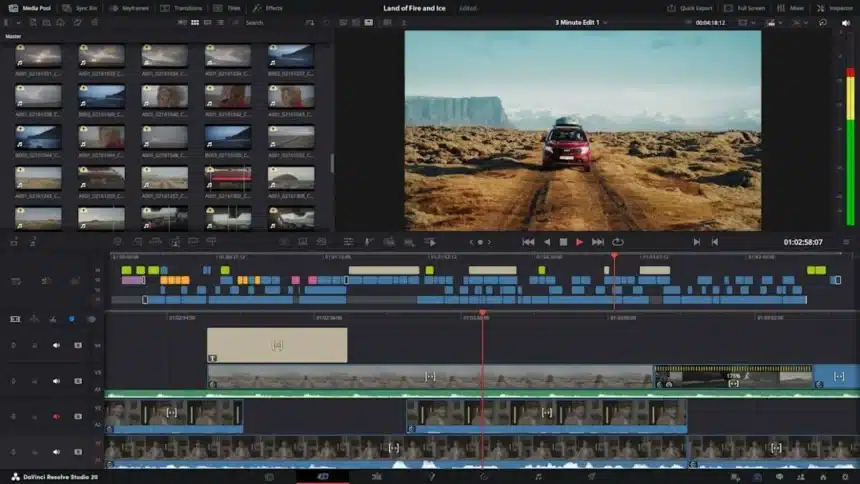
The update introduces a dedicated Photo page where users can organise, cull, and edit images in one place. It’s built for creators who are tired of switching between multiple tools just to finish one project.
DaVinci Resolve Promises Hollywood-Level Colour Tools, Now for Photos
What makes this move stand out is not just the addition of photo editing, but the kind of tools being offered. Instead of basic sliders and presets, users are getting access to the same colour grading system used in films, complete with colour wheels, advanced curves, and professional scopes that analyse hue, saturation, and luminance in detail.
This level of control is rarely seen in traditional photo editors, giving photographers a real shot at achieving cinematic looks without relying on third-party plugins.
About how edits are processed, one of the key differentiators between typical tools like Adobe Photoshop and DaVinci Resolve’s workflow is that there are no layers- it is instead based on a node.
A node will create a flow chart-like process for making all edits, so you can create a very complicated edit in stages.
Each image can be separated by applying adjustments to parts of the image, and established looks can be reused again and again on many different images without the need for any additional work. While it may take a little time to get used to it, it will end up being much more versatile once you learn how to use it.
Cinematic photography is trending now on all social platforms; Blackmagic has definitely recognized this and developed tools within DaVinci Resolve that are designed specifically for those who want to replicate that look (Film Look Creator) by putting in film effects such as halation, bloom, grain, and vignetting.
Tools (i.e., Relight FX, Magic Mask, Depth Maps) take things a bit further; these tools allow you to alter the lighting or isolate the subject in the photo even after the image was taken, which typically requires someone with an advanced editing skillset or utilizes multiple applications.
AI Tools That Actually Save Time
AI is doing a lot of heavy lifting in this update. DaVinci Resolve 21 includes tools for increasing image resolution, reducing noise, and removing unwanted objects.
There are also portrait-focused features like skin smoothing, blemish removal, and dark circle reduction. These are practical tools that solve real editing problems, especially for photographers working with client shoots or social media content.
Organising Photos Without Leaving the App
The focus of the update is on editing and workflow. The Media Pool now supports still images by adding star rating, colour label, favourite, and album organisation features.
With these new features, DaVinci Resolve has become a photo management system as well as an editing tool, saving you from having to use multiple packages.
As well as supporting RAW files from the major brands, Canon, Nikon, Sony and Fujifilm, this version now supports Apple’s ProRAW as well.
There’s also tethering support for select Sony and Canon cameras, allowing photographers to import images directly into the software while shooting.
This is especially useful for studio workflows where instant review matters.
Also Read: Best Photo Editing Apps of 2026 You Need to Try Right Now