One of Gmail’s numerous issues is clutter. So, Google has taken action and created an AI service called “Gmail AI Inbox,” which helps you manage your cluttered email by using artificial intelligence to rearrange your emails so they look clearer, simpler, and more organised.
Google had initially teased building this feature in January. Now they are rolling out the service as Beta to Premium AI Users, and it is completely revolutionary.
What’s new in AI Inbox
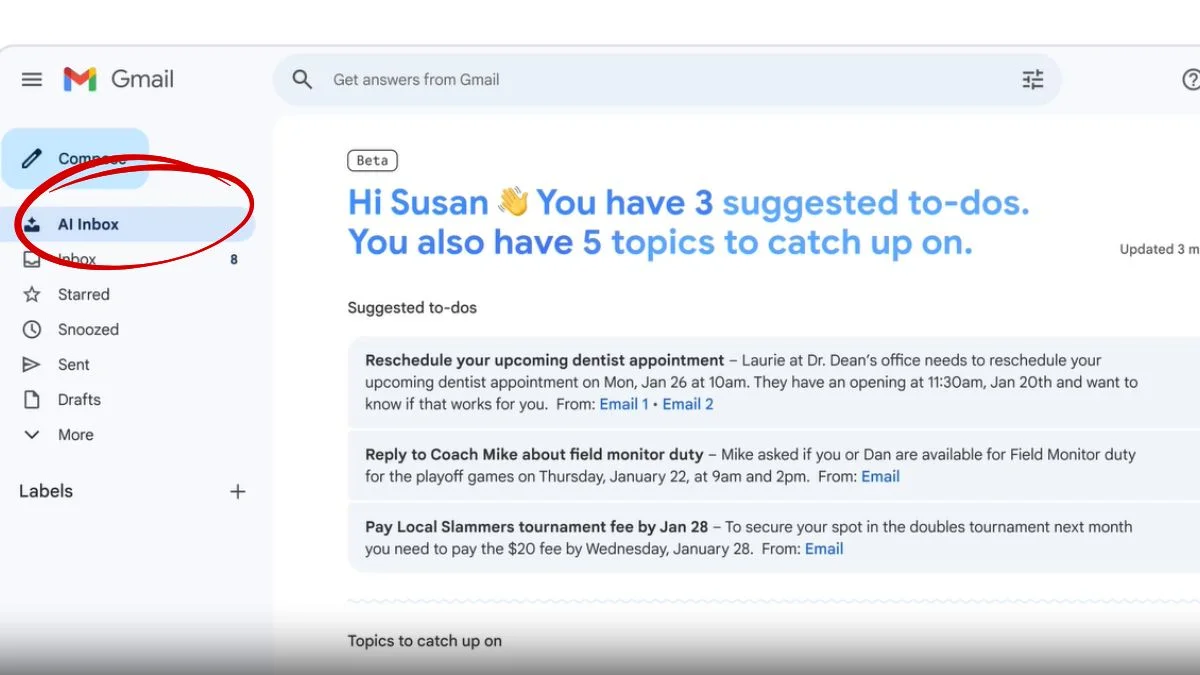
Instead of the usual reverse chronological list, AI Inbox adds a smarter layer on top of your regular inbox. You’ll still have your standard view, but now there’s a new section called “AI Inbox” sitting above it.
The idea is simple: stop making users dig through emails and instead show them what actually matters.
When you open it, you’re greeted with a quick summary of your inbox along with a timestamp showing when it was last updated.
But the real value kicks in with two key sections:
Suggested to-dos:
This is where Gmail gets practical. It pulls out emails that need action, like bills, reminders, or anything time-sensitive. Instead of opening multiple gmails, you can see what needs attention right away, with direct links to the source messages.
Topics to catch up on:
Not everything is urgent, and Google knows that. This section groups less critical emails into categories like travel plans, events, or health updates. It’s more about staying informed without feeling overwhelmed.
Privacy & Availability
As per Google, it is a major concern of yours and of the company that if you are reading your emails using AI, you are losing your privacy. Google states that this information will not be integrated into Google’s AI model, and the company has created a special environment or “engineered privacy.” This is a secure, isolated system where your data will remain.
Google has also stated that all your data from Workspace will not be utilized to train AI models, and that you may choose to turn off (disable) any of these features if you do not feel comfortable using them. To turn off the AI features, you may do this by disabling the Smart features from your Gmail Settings.
As of right now, the AI Inbox is only being introduced as a beta product and to AI Ultra subscribers, who are paying $249.99 monthly.
AI Inbox was previously available only to a limited number of testers; therefore, the introduction of it to everyone is the first large rollout of this product, and it is still at a premium price point.
Why this actually matters
Let’s be real, most inboxes today are chaotic. Important emails get buried under promotions, updates, and random notifications. What Google is doing here is shifting email from a passive tool to something that actively helps you manage your day.
This move is powered by Gemini 3, which analyzes your inbox to figure out what’s important and what’s not. The goal is to save time, reduce decision fatigue, and make email feel less like a chore.
This isn’t just about Gmail. It’s part of Google’s larger push to bring AI deeper into everyday tools.
Alongside AI Inbox, the company has also introduced AI-powered search summaries and an upgraded proofreading tool for tone and grammar.
Also Read: Apple Releases ‘Playlist Playground’ With iOS 26.4