WhatsApp has finally rolled out voice and video calling directly on web browsers, meaning users no longer need to download the desktop app to make calls.
This feature has been long-awaited by users, and it is now available to a limited number of beta testers, according to WABetaInfo. Currently, it supports one-to-one calls only, but a wider rollout for all users is expected in the coming weeks.
What’s New on WhatsApp Web?
Till now, the WhatsApp Web has been mainly and mostly used for chatting and file sharing. But, with this new update, users can now make voice calls, do video calls, and can even share their screens during the video chat.
All of this works directly from a web browser, making WhatsApp Web more useful for work, meetings, and everyday chats.
How to Make Voice and Video Calls on WhatsApp Web
If the new feature is enabled on your account, here’s how you can use it:
- Open web.whatsapp.com on your browser.
- Log in by scanning the QR code using your phone.
- Open an individual chat (group chats are not supported yet).
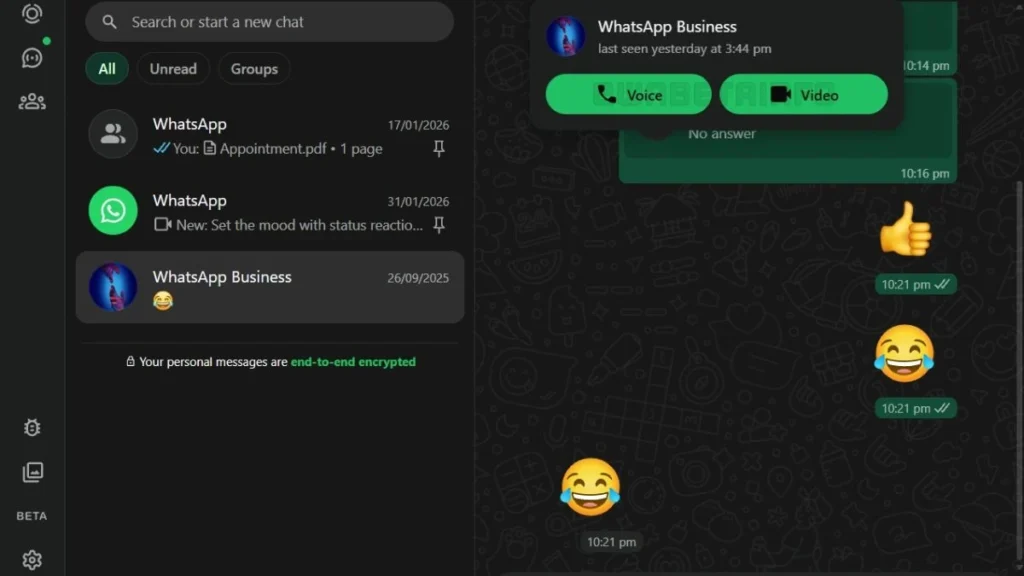
- Look at the top of the chat window for the phone icon (voice call) or camera icon (video call).
- Click on the icon to start the call.
And, your call will start. No extra setup or downloads needed.
Screen Sharing During Video Calls
WhatsApp Web also allows screen sharing, but only during video calls. This can be useful for work presentations, online collaboration and if you wish to explain something visually
WhatsApp advises sharing your screen only with trusted contacts, as anything on your screen will be visible in real time.
Security and Privacy
Just like on mobile, all voice and video calls on WhatsApp Web are protected with end-to-end encryption using the Signal protocol. This means that only you and the other person can hear or see the call; no third-party app or even WhatsApp can access the content.
This new update makes WhatsApp Web far more practical, especially for users who prefer working on a browser, use Linux or systems where the desktop app is limited and also for those who don’t want to install any extra software
Once group calling arrives, WhatsApp Web could potentially become a better alternative to other calling platforms like Google Meet, Zoom and more.
Also Read: Meta Warned By EU Over WhatsApp Ban On Rival AI Chatbots