
Apple HomeKit has been around for more than a decade, but many iPhone users still don’t fully understand what it actually does.
Launched in 2014, Apple HomeKit is Apple’s smart home platform that allows users to control connected devices like lights, cameras, door locks, speakers, thermostats, and more directly from an iPhone, iPad, Mac, Apple Watch, or Apple TV.
Think of it as Apple’s version of Amazon Alexa or Google Home but built specifically for the Apple ecosystem.
And while Apple rarely talks about HomeKit as much as it talks about iPhones or AirPods, the platform has quietly become one of the most powerful smart home systems available today.
What exactly does Apple HomeKit do?
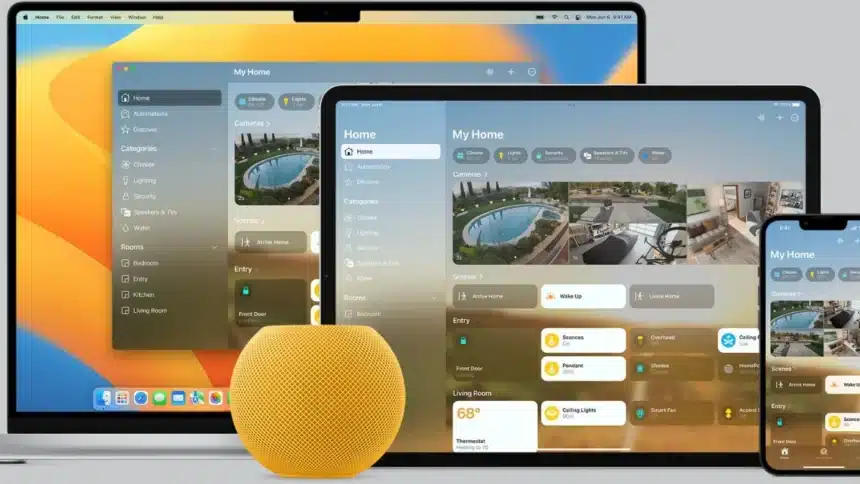
Apple HomeKit connects compatible smart devices into a single system controlled through Apple’s Home app and Siri voice assistant.
Instead of using separate apps for every smart gadget in your house, HomeKit lets users manage everything from one place.
That includes Smart lights, Security cameras, Video doorbells, Smart locks, Thermostats, Smart plugs, TVs and speakers, Sensors, Air purifiers, Garage doors, Smart blinds, Garden sprinklers
The Home app comes pre-installed on Apple devices, meaning many iPhone users already have access to HomeKit without realising it.
How the Apple Home app works
The Home app acts as the main control centre for your smart home.
Compatible devices from different brands, like Philips Hue lights, Aqara doorbells, or Nuki smart locks, can all appear together inside the app.
Users can organise devices by rooms, create shortcuts called “Scenes,” and build automations that work automatically in the background.
For example:
- Lights can turn on automatically when you arrive home
- Music can stop when everyone leaves the house
- A “Movie Night” scene can dim lights and adjust speakers instantly
- Cameras can send alerts directly to your Apple TV
The biggest advantage is convenience. Instead of opening multiple apps, everything works inside one ecosystem.
Does Apple HomeKit need a hub?
No, it’s not possible to connect your iPhone, iPad or Mac that is connected to the same Wi-Fi network to HomeKit devices directly.
You can, however, access your HomeKit-enabled devices remotely using a HomeKit Hub device.
Apple requires that you have an Apple TV 4K, HomePod or HomePod mini in order to access devices remotely. HomePod mini is the most utilized HomeKit Hub as it serves the dual purpose of being a smart speaker and providing access to smart-home devices.
Apple HomePod mini plays a major role
The HomePod mini is often considered the easiest way to build a HomeKit setup.
The compact smart speaker allows users to control devices using Siri voice commands while also acting as the central hub for automations and remote access.
It also integrates deeply with Apple Music, AirPlay, and other Apple services.
For users already invested in the Apple ecosystem, it creates a seamless smart home experience without needing additional third-party hubs.
Apple HomeKit security cameras and doorbells
One area where HomeKit has become especially popular is home security.
Compatible cameras and video doorbells can stream live footage directly to Apple devices, including Apple TV.
For example, if someone rings a HomeKit-enabled doorbell during a movie, users can instantly view the live camera feed on their television without picking up their phone.
Apple also offers HomeKit Secure Video, a feature that stores camera recordings securely in iCloud.
The company heavily promotes privacy here, using:
- End-to-end encryption
- Secure authentication
- Encrypted cloud storage
- Device verification systems
That privacy-focused approach is one reason many Apple users prefer HomeKit over competing smart home platforms.
What is Matter?
One of the biggest problems in smart homes has always been compatibility.
Different brands often require separate apps and ecosystems, making setups frustrating.
That’s where Matter comes in. Matter is a universal smart home standard designed to make devices from different companies work together more smoothly.
Apple supports Matter inside HomeKit, meaning users can increasingly control devices from brands like Google, Amazon, Philips Hue, Yale, and others through Apple’s Home app.
In simple terms, Matter aims to make smart homes less complicated.
Is Apple HomeKit worth using?
For Apple users, HomeKit is one of the easiest ways to build a smart home.
Its biggest strengths are:
- Strong privacy protections
- Seamless Apple ecosystem integration
- Clean and simple controls
- Reliable automations
- Siri voice support
- Cross-device syncing
The biggest limitation is that Apple HomeKit still supports fewer devices compared to Amazon Alexa or Google Home.
But thanks to Matter support, that gap is slowly shrinking.
For anyone already using an iPhone, Apple Watch, or Mac daily, HomeKit can quietly turn those devices into a full smart home control system without needing much extra setup.
Also Read: 9 Windows Settings That Need Modification For Seamless Working