


Wondering why your smartphone’s fast charging stops at 80%? You are not alone because many modern Android and iOS devices automatically pause charging at 80% as a safety measure to prevent overheating and extend battery lifespan.
In this guide, we will explain the exact reasons why your phone stops charging at 80 percent and provide simple step-by-step instructions to turn this feature off if you need a full 100% charge.
Know The Basics Of Battery Charging
Understanding why the phone stopped charging at 80% is important, but first, a few things about battery charging are worth knowing. Your smartphone runs on a rechargeable lithium-ion battery like most smartphones these days. As power flows into the device, lithium ions move from the positive electrode to the negative electrode, where they store energy.
There are 3 phases of charging: bulk, absorption, and trickle. The battery charges very quickly to 80% charge at the bulk stage. During the absorption stage, the rate of charge to the battery decreases until it is 100%. Lastly, in the trickle stage, the phone’s battery is maintained at 100% charge.
What is optimized battery charging, and how does it work?
This feature prevents the battery from overcharging at 80% until it detects that the power plug is no longer attached. This function usually gets used to your habits and will start charging without you disconnecting it. This feature is designed to keep the phone’s battery healthy and make it last longer. Generally, when you charge the phone, it reaches 100%.
However, if it remains at 100% for an extended period, it can be dangerous. That is why optimized charging solves this problem by charging the phone’s battery to 80%, then pausing charging. This feature delays starting the remaining 20% of charging until it predicts the phone will be disconnected, based on your usual charging pattern.
Your device learns your charging pattern, optimizes battery usage, and maintains fast charging.
Why Fast Charging Stops at 80%: Main Reasons Explained
Apart from optimized battery charging discussed earlier, smartphones do not charge more than 80%, due to the following three reasons:
Overheating Protection
If your smartphone gets very hot while charging, the device may pause charging to prevent battery damage. Manufacturers employ thermal management systems to limit charging at high temperatures because heat is a major cause of battery degradation. For users of iPhones, they would have seen the message get displayed on their screens that charging has been paused and will resume when the phone temperature becomes normal again.
Higher Power Consumption And Background Apps
Some background processes and high-power apps can also interfere with the phone’s charging. If your smartphone has power-intensive apps, it may have trouble charging beyond a certain point.
Battery Calibration Issues
The battery calibration can get a little mixed up over time, which can give you inaccurate readings. These inaccurate readings can make you feel that the battery is less charged, even when it’s completely charged.
Steps to Turn Off the 80% Fast Charging Limit
Listed below are the steps to turn off the 80% charging limit across popular smartphones:
For iPhone (iOS):
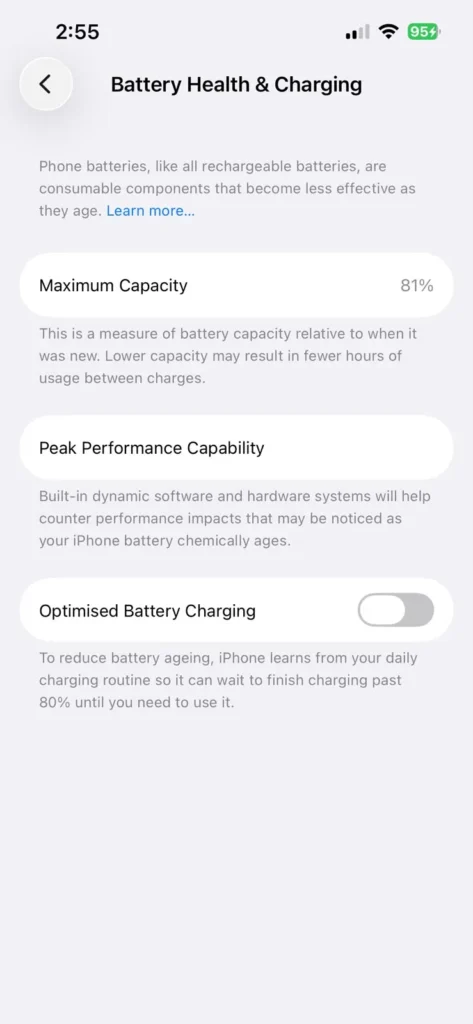
- Go to Settings > Battery.
- Tap Battery Health & Charging.
- Select Charging Optimization and turn off Optimized Battery Charging (or set to None).
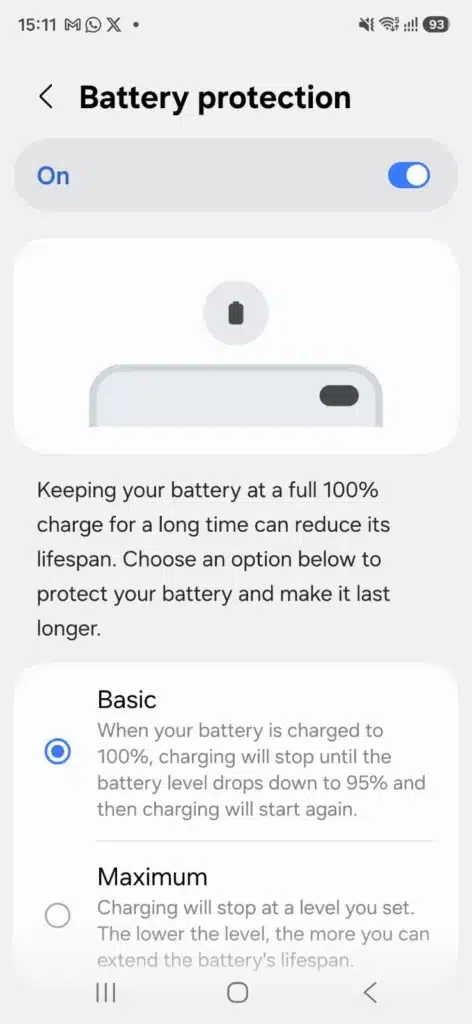
For Samsung Galaxy (One UI):
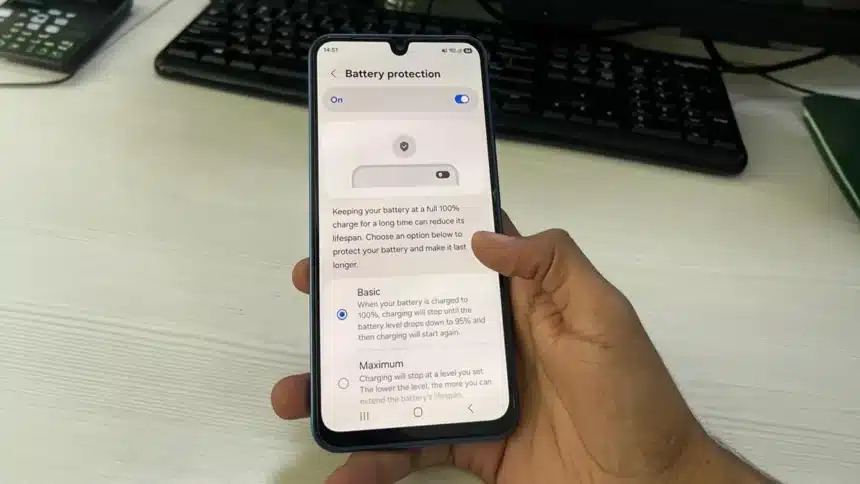
- Go to Settings > Battery > Battery protection.
- Turn off the main battery protection toggle at the top to allow full 100% charging.
- Tip: If you want basic protection while still reaching 100%, keep the switch on and select Basic (instead of Maximum).
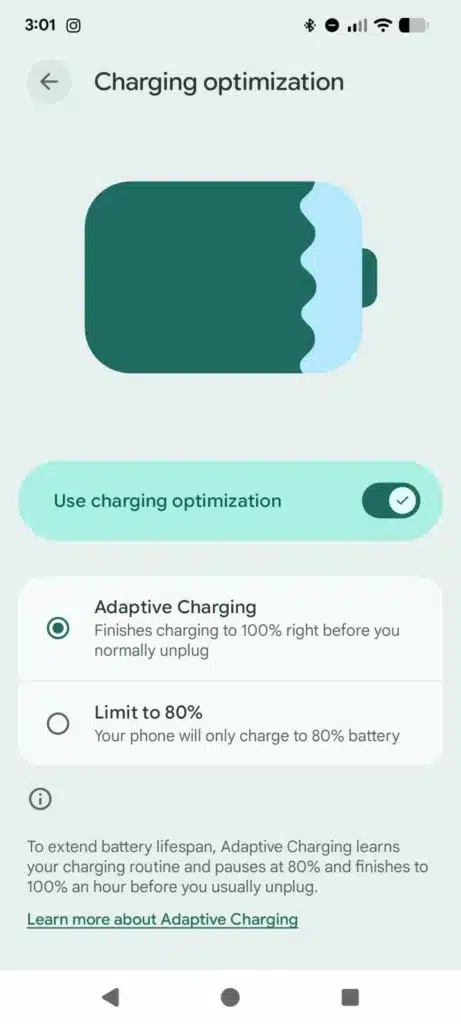
For Google Pixel:
- Go to Settings > Battery > Battery Health > Charging Optimization.
- Select Adaptive Charging instead of Limit to 80% so your phone charges fully to 100%.
- Alternatively, you can toggle off Use charging optimization at the top to disable all charging limits completely.
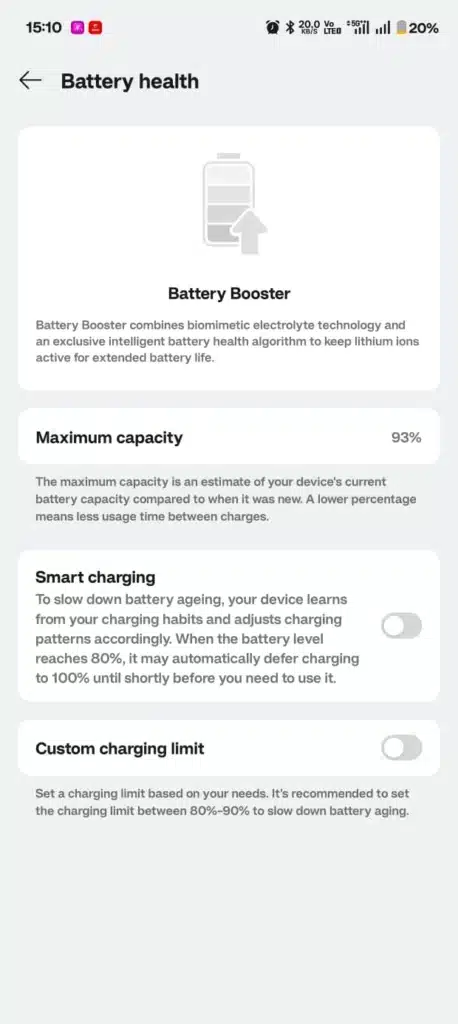
For OnePlus (OxygenOS):
- Go to Settings > Battery > Battery health.
- Turn off both Smart charging and Custom charging limit toggles to allow uninterrupted 100% charging.
Why Is 80% Charging Good?
After numerous studies on battery behavior, it has been concluded that lithium-ion batteries experience very little stress when charged and kept between 20 and 80%. When in this range:
- The chemical reaction remains quite stable.
- The battery wear is also very minimal.
- The heat generation is also relatively lower.
- The voltage remains within safe limits.
If the battery is charged above 80%, its voltage can rise sharply. Even though high voltages may look harmless, over time, they can accelerate the phone’s battery’s internal chemistry. That is why even EV manufacturers recommend keeping vehicles charged at a maximum of 80%, as the same principle applies to smartphones as well.
Conclusion: Should You Limit Your Charging to 80%?
To conclude, keeping the 80% charging limit enabled is recommended if you want to maximize your smartphone’s battery health and prevent long-term wear. However, if you have a long day ahead or need maximum battery life, you can easily disable this feature using the steps above to get a full 100% charge whenever needed.
Visit Devicology for the latest Tech News, Guides, and in-depth Reviews. Follow us on Whatsapp, LinkedIn, X (Twitter) and Instagram to never miss an update!