


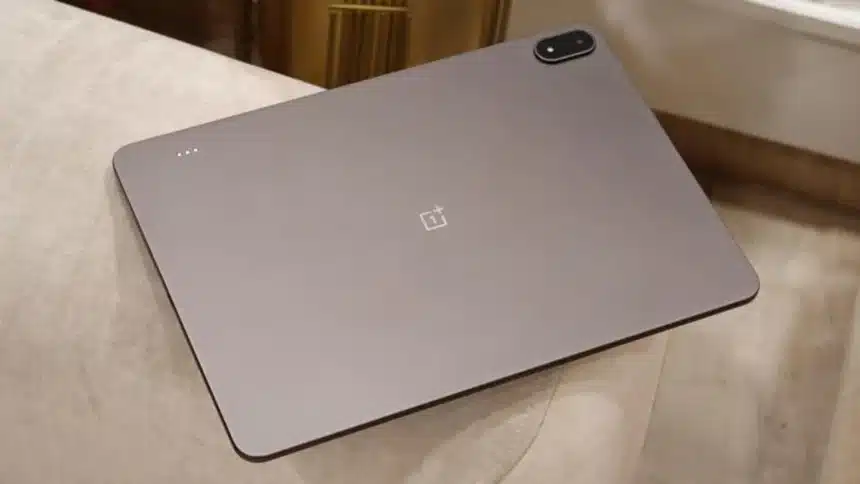
The OnePlus Pad family is quietly becoming one of the best product families in OnePlus’ history.
Even if they are not as praised in the market as their phone counterparts, this line of tablets continues to be “flagship killers” with amazing specs and good software, as well as fewer compromises than other tablets.
On paper, the OnePlus Pad 4 doesn’t change the basic format much, with a new Snapdragon SoC, a larger battery than the Pad 3 and 2, and a standard design for the product family.
The latest announcement did have some new trade-offs versus previous models, like the base RAM in this model is less than that of the previous 2 models.
After using this tablet for 3 weeks, people have managed to know the weakness of this, which is not the hardware but something else.
If you are also interested in knowing deeply about this, read till the last.
Display
On the OnePlus Pad 4, you will get an edge-to-edge 13.2-inch IPS LCD panel with a surprisingly high resolution of 3.4K, along with support for Dolby Vision and blisteringly-fast refresh rates of up to 144Hz, all elements working beautifully together to create an incredibly compelling display experience.
With the display’s brightness being upped from 900 nits to 1,000 nits in high-brightness mode, outdoor viewing is slightly more pleasurable than before, and video and picture playback are fluidly smooth on the screen. Thus, users will likely not feel dissatisfied when they use the display regularly.
However, it’s also important to note that the OnePlus Pad 4 still has an LCD panel, a fact that can be most easily determined by comparing it with premium devices using OLED panels in the marketplace today.
Although LCD panels’ colours are vibrant and the viewing angles are quite good, there is no comparably low black level or similarly high colour saturation that OLED technologies present to users.
While this difference likely won’t be as evident when using the OnePlus Pad 4 by itself, there will be a materially significant difference when placing it alongside a premium OLED device.
The OnePlus Pad 4’s display is an absolute strong point for the entire device, especially when combined with the outstanding eight-speaker system provided by OnePlus, making this an exceptional multimedia device, whether for streaming video, watching a live sporting event or trying to catch up with your favourite television show.
There are not many devices available in the Android tablet space that rival the OnePlus Pad 4 with respect to multimedia capabilities.
Design
The OnePlus Pad is really thin, with a 5.9mm thickness, making it appear very premium to the touch.
OnePlus’ Pad offers an unibody metal housing, slim bezels and an overall minimal look. It is nice to see that OnePlus has maintained distinct volume buttons, something many people will be glad to see.
However, there is a downside to this combination; the tablet has a large battery coupled with a large 13.2-inch screen, which adds up to a fairly heavy tablet.
The slim body helps in easing the fatigue of holding the device for long periods of time, but it can still become uncomfortable after extended use.
For this reason, most users will feel that a case or stand is a necessary part of their use of the Pad.
Whether for typing, watching a movie, or just reducing the strain on their hands, many users will want some sort of Pad stand
Open Canvas Stands Out
The experience of using a tablet depends on more than just the hardware. The way the software functions is very important, too. It’s one of the reasons that Open Canvas remains a distinguishing feature of the OnePlus tablet’s ecosystem.
The OnePlus multitasking approach allows users to easily work with three different applications (or windows) at once. With the larger size of the display on the OnePlus tablet, this feature starts to really shine.
For instance, users will have no problem doing their writing while texting or communicating with friends over a browser (e.g., Facebook, Instagram) at the same time without having to constantly switch between different screens or applications to see what they are doing.
Even though there are a variety of different split-screen versions as well as floating window methods available, Open Canvas continues to feel like the best option for the user to get things done in a seamless manner.
In many respects, this is one of the major reasons users would consider purchasing a OnePlus tablet over a competing Android device.
Performance
Under the hood of the OnePlus Pad 4 is Qualcomm’s Snapdragon 8 Elite Gen 5 processor.
For most users, this is a great deal of capability they likely will not use in practice.
With gaming, multitasking, productivity apps, and media consumption all performed without issues on the device during testing. Startup times for applications are fast; animations were smooth; and the performance of the device was consistent even when used for intensive applications or tasks.
Gaming performance of the device was particularly impressive during testing. While test devices operated well with high-end games, they maintained good cooling overall.
The one unexpected downside is that the base variant of the OnePlus Pad 4 has 8GB of RAM as opposed to 12GB found in the previous model; although this does not appear to have had an impact on performance today, it could impact the long-term value for consumers as productivity and creative-based apps running on Android are expected to become increasingly demanding in the coming years.
Today, the OnePlus Pad 4 is definitely a fast-performing tablet; how much the additional 4GB of RAM will impact it in the long run will likely depend on consumer usage trends.
Battery
The OnePlus Pad 4 packs a 13,380mAh battery with support for 80W SuperVOOC fast charging.
The numbers are impressive, but the real-world results are even more encouraging.
What stands out most is standby performance.
Unlike smartphones, tablets are often used intermittently. They may sit untouched for days before being picked up again. In that scenario, battery retention matters just as much as screen-on time.
The OnePlus Pad 4 excels here. Even after several days away from active use, battery drain remains remarkably low, ensuring the device is usually ready when needed.
Combined with fast charging support, battery anxiety rarely enters the equation.
Android Tablet Ecosystem Lags
Now, let’s talk about where this device is lagging. So, OnePlus has already succeeded in nearly every area of control they have over their new product – the hardware is well designed and powerful, the screen has adequate resolution and colour accuracy, and the software is polished and easy to use, but it then falls short on the software side of things with respect to the quality of the experience.
Android has gotten better as a platform, but continues to be hampered by the fact that the majority of app developers continue to develop and release apps for the platform first. Most professional and creative applications and advanced applications created for Android still get released on iPads long before there is a version available for Android, and the software often takes time to be developed for both platforms.
This is particularly true for those who want to use their devices for video editing, professional design work or high-end gaming, as this is where the large discrepancy between devices can be seen.
Therefore, on many occasions, it feels like the OnePlus Pad 4 is just a piece of hardware waiting for a software Update or improvement.
Also Read: Why Experts Say You Should Avoid Texting ‘STOP’ to Spam Messages