

One day, your phone sounds perfectly fine.
The next, your favorite podcast seems oddly quiet. Phone calls sound muffled. Music lacks its usual punch. You crank the volume to 100%, but something still feels off.
- Your Phone Lives in a Pretty Dirty Environment
- The Strange Way Speaker Clogs Happen
- Dust Doesn’t Have to Completely Block the Speaker
- How to Tell if Your Speaker Is Dirty
- The Safest Way to Clean Phone Speakers
- One Surprisingly Effective Trick: Adhesive Removal
- What About Compressed Air?
- Cleaning Methods You Should Probably Avoid
- Don’t Use Needles or Pins
- Don’t Pour Liquids Into the Speaker
- Don’t Use Excessive Alcohol
- Don’t Scrub Aggressively
- Do Speaker Cleaning Apps Actually Work?
- The Water Resistance Question
- How to Prevent Future Buildup
- Final Thoughts
Before assuming your speaker is dying, there’s a much simpler explanation:
It’s probably dirty.
Phone speakers are magnets for dust, lint, pocket debris, and tiny particles that accumulate gradually over months of everyday use. Because modern speaker grilles contain extremely small openings, it doesn’t take much buildup to affect audio quality.
The good news? In many cases, a careful cleaning can restore surprisingly clear sound.
Your Phone Lives in a Pretty Dirty Environment
Think about where your phone spends most of its time:
- Jeans pockets
- Handbags
- Gym bags
- Car cup holders
- Kitchen counters
- Coffee shop tables
Even if your screen looks clean, tiny particles are constantly finding their way into speaker openings.
According to multiple cleaning guides, common culprits include:
- Pocket lint
- Dust
- Sand
- Dead skin particles
- Sweat-related residue
- General environmental debris
Because speaker grilles use extremely small holes, these particles gradually collect and compact over time.
The Strange Way Speaker Clogs Happen
Unlike a charging port that can suddenly stop working when blocked, speaker clogs develop slowly.
That’s what makes them easy to miss.
Most people adapt gradually as sound quality decreases.
You might notice:
- Lower overall volume
- Muffled phone calls
- Less bass response
- Distorted audio
- Reduced clarity at high volumes
Then someone else’s phone plays the same song, and suddenly you realize how much sound you’ve been missing.
Dust Doesn’t Have to Completely Block the Speaker
Here’s something many people don’t realize.
The speaker itself may still be working perfectly.
What gets blocked is the path the sound takes to reach your ears.
Dust and lint sitting on top of the speaker grille can interfere with sound transmission. The speaker diaphragm continues vibrating, but audio quality may suffer because of the debris.
It’s similar to trying to listen to music through a pillow.
The sound is still being produced.
It’s just struggling to get through.
How to Tell if Your Speaker Is Dirty
A clogged speaker can produce symptoms similar to those of a damaged speaker.
Signs of Dust Buildup
- Audio sounds muffled
- Volume seems lower than normal
- Sound quality worsens gradually
- Calls remain understandable but quieter
- Audio temporarily improves after cleaning
Signs of Possible Hardware Damage
- Crackling sounds
- Complete speaker failure
- Sudden audio loss
- Distortion even after cleaning
- Water damage symptoms
If audio has been getting progressively worse over several months, dust is one of the first things to investigate. However, persistent distortion or sudden audio loss can also indicate a hardware problem. Apple’s official speaker troubleshooting guide recommends checking for blocked openings and seeking service if the problem persists.
The Safest Way to Clean Phone Speakers
The golden rule is simple:
Be gentle.
Speaker meshes, waterproof membranes, and internal components are delicate. Aggressive cleaning often causes more harm than the dust itself.
Step 1: Turn Off the Phone
Before cleaning, power down the device.
This eliminates the risk of accidental inputs and helps you focus on the cleaning process.
Step 2: Inspect the Speaker Grille
Use good lighting.
You’d be surprised how much dirt becomes visible once you actually look closely.
A flashlight can help reveal:
- Lint buildup
- Sand particles
- Dust accumulation
- Dried debris
Many cleaning guides recommend inspecting before attempting any cleaning so you know what you’re dealing with.
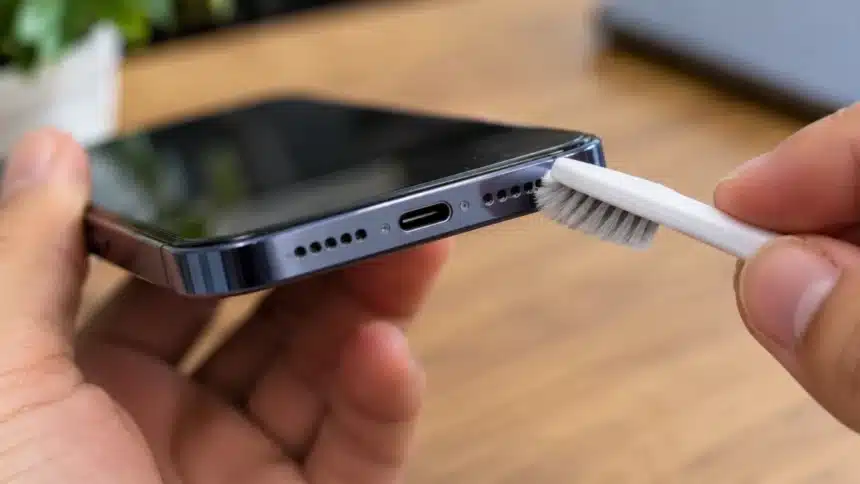
Step 3: Use a Soft, Dry Brush
A clean, soft-bristled toothbrush is often one of the safest tools available.
Gently brush across the speaker grille using light strokes.
The goal isn’t to dig into the mesh.
The goal is to loosen surface debris and encourage it to fall away. Soft brushes are commonly recommended because they can dislodge dirt without excessive force. Apple’s official guidance also recommends a clean, dry, soft-bristled brush for speaker openings.
Think “dusting furniture,” not “scrubbing a frying pan.”
One Surprisingly Effective Trick: Adhesive Removal
For stubborn lint, a small piece of tape can help.
Some cleaning experts recommend gently dabbing sticky tape against the grille to lift loose dust and debris from the surface.
The key word is gently.
Avoid pressing tape deeply into openings or using tape that leaves sticky residue.
What About Compressed Air?
This is where opinions become divided.
Although some guides suggest using controlled bursts of air to remove loose particles, phone manufacturers warn against using compressed air on their devices because it can cause damage. Google’s Pixel cleaning guidance and Samsung’s phone-cleaning instructions advise against it.
Instead, use a clean, dry, soft-bristled brush to remove visible debris from the speaker grille.
A gentle manual cleaning is a safer first step than blasting the opening with compressed air.
Cleaning Methods You Should Probably Avoid
The internet is full of creative phone-cleaning advice.
Not all of it is good.
Don’t Use Needles or Pins
It may seem logical to pick lint out manually.
Unfortunately, sharp objects can:
- Tear speaker mesh
- Damage waterproof membranes
- Scratch internal components
Don’t Pour Liquids Into the Speaker
Even water-resistant phones are not designed for liquid cleaning inside speaker openings.
Don’t Use Excessive Alcohol
Cleaning recommendations vary by device, but alcohol should not be applied directly to speaker openings. Follow the manufacturer’s instructions and keep liquids away from the mesh.
Don’t Scrub Aggressively
The speaker grille is not a barbecue grill.
Force is not your friend.
Do Speaker Cleaning Apps Actually Work?
You’ve probably seen apps or websites that promise to “clean” speakers using sound frequencies.
The idea isn’t entirely ridiculous.
Some tools generate low-frequency tones designed to create vibrations that may help dislodge moisture from speaker openings. Apple Watch, for example, has a feature that uses sound to eject water from its speaker.
Should you rely on them exclusively?
Probably not.
Sound-based tools may help with certain moisture-related problems, but they are not a proven replacement for physically removing dust and lint from the grille. A soft brush remains the safer first step for visible debris.
Think of them as an assistant, not a miracle cure.
The Water Resistance Question
Many modern phones feature IP67 or IP68 ratings, but speaker openings still require special engineering.
Behind the visible grille are tiny meshes and membranes designed to balance:
- Sound quality
- Water resistance
- Dust protection
That’s another reason aggressive cleaning is risky.
Damaging those protective layers could compromise both audio performance and water resistance.
Sometimes the safest approach is also the least dramatic.
How to Prevent Future Buildup
Once your speaker sounds good again, keeping it clean is much easier than fixing a severe blockage later.
Simple habits help:
- Clean your phone case regularly
- Avoid storing your phone in lint-heavy pockets
- Wipe down the device weekly
- Keep it away from sand when possible
- Inspect speaker grilles every few months
A two-minute cleaning session every few months often prevents major buildup altogether.
Final Thoughts
Yes, phone speakers absolutely can get clogged with dust, lint, and everyday debris. Gradual buildup can make a phone sound quieter or more muffled over time. Because modern speaker grilles use tiny openings, even a relatively small amount of dirt can noticeably affect sound quality.
Fortunately, cleaning them is usually simple. A soft brush and careful handling are often all that’s needed to restore clearer audio. The biggest mistake isn’t failing to clean your speakers. It’s cleaning them too aggressively.
When it comes to phone speaker maintenance, patience beats force every time.