



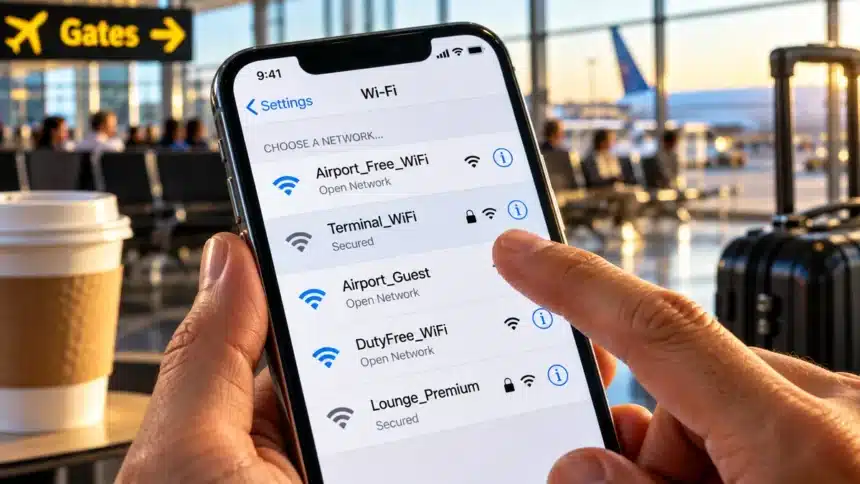
You are sitting at an airport gate. Your flight is delayed. You spot a free Wi-Fi network called “Airport_Free_WiFi” and connect without thinking. You check your email. You log into your bank. You scroll through social media.
That took about 90 seconds. And it might have been enough for someone nearby to start targeting your data. Public Wi-Fi safety matters because public networks are convenient, but they are also places where attackers can target your phone.
- The Risks Are Real, But They Have Changed
- Evil Twin Networks: The Biggest Threat Right Now
- Juice Jacking: Should You Worry About Public USB Ports?
- Five Rules That Actually Work
- Public Wi-Fi Safety: Risks and What to Do
- What About Using Mobile Data Instead?
- A Quick Checklist Before You Connect
- The Bottom Line
The Risks Are Real, But They Have Changed
Here is the honest truth. Public Wi-Fi in 2026 is safer than it was five years ago. Most websites now use HTTPS. That means someone sitting next to you at a cafe cannot simply read your Gmail or see your bank balance just by being on the same network.
But that does not mean the danger is gone.
Attackers have adapted. They can set up fake networks. They can try to redirect your requests. They can build convincing login pages that steal your credentials before you even notice something is wrong.
Forbes reported in 2025 that airports have upgraded their network security. But at the same time, scammers have gotten smarter about stealing personal information from travelers.
So the threat has shifted. It is less about simple eavesdropping now. It is more about deception.
Evil Twin Networks: The Biggest Threat Right Now
This is an attack you should worry about. An evil twin is a fake Wi-Fi network that copies the name of a real one. It can look identical. Your phone may not be able to tell the difference.
Here is how it works. An attacker sits in a coffee shop or airport lounge. They set up a hotspot called “Starbucks_WiFi” or “Delta_Free_WiFi.” Your phone may connect automatically if it recognizes it as a previously saved network. Phones remember old networks and can rejoin them automatically.
Once you are on the fake network, the attacker can observe connection information and any unencrypted traffic. They can redirect you to phishing pages. They can intercept login credentials on sites without proper encryption.
In August 2026, passengers on Delta Flight 591 from Las Vegas to Atlanta allegedly encountered a fake “Delta WiFi Fast” network. The FBI said it was looking into the incident, and no arrests had been announced at the time of the report. Such attacks can be carried out with readily available wireless hardware and software.
Juice Jacking: Should You Worry About Public USB Ports?
You have probably seen the warnings. US authorities have cautioned against plugging your phone into unknown public USB charging ports at airports and other public places. The concern is called “juice jacking.” A compromised USB port or cable could potentially attempt to install malware or access data from your phone while it charges.
Here is the honest take. No confirmed case of juice jacking has been publicly documented in the wild as of 2026. Researchers have proven the concept works in controlled settings. But real-world attacks remain unconfirmed.
That said, the precaution is easy enough to follow. Carry your own wall charger and cable. Use a power bank. If you must use a public USB port, a charge-only cable or USB data blocker can prevent a data connection.
Modern phones help too. Android 16 introduced Advanced Protection mode, which includes additional safeguards against USB-based threats. iPhones and iPads also restrict data connections with unknown wired accessories while locked.
Five Rules That Actually Work
You do not need a cybersecurity degree for this. These five habits cover most of the risk.
1. Turn off auto-join for public networks. Go into your Wi-Fi settings. Remove saved networks you no longer use. This helps stop your phone from reconnecting to a network automatically. On iPhone, you can disable “Auto-Join” for a saved network. On Android, you can remove a saved network by selecting “Forget.”
2. Use a VPN on public Wi-Fi. A VPN encrypts traffic between your device and the VPN server. Even if someone intercepts traffic on the local network, that makes it much harder for them to read. Pick a reputable VPN with a kill switch and auto-connect on untrusted networks. Be cautious with free VPNs, because their privacy and data-handling practices vary.
3. Verify the network name before connecting. Ask a staff member for the exact Wi-Fi name. Do not just pick the strongest signal. Attackers often name their fake networks something very close to the real one. “CoffeeShop_WiFi” versus “CoffeeShop_WiFi_Free” is a common trick.
4. Avoid logging into sensitive accounts. Do not check your bank account on airport Wi-Fi. Do not enter credit card details on a cafe network. If it can wait until you are home, let it wait. Use mobile data for anything sensitive when practical. It avoids the risks of joining an unknown local Wi-Fi network.
5. Keep your phone updated. Security patches fix vulnerabilities attackers can exploit. Both iOS and Android receive security updates that address Wi-Fi, Bluetooth, and other vulnerabilities. Turn on automatic updates. Do not ignore them for weeks.
Public Wi-Fi Safety: Risks and What to Do
| Public Wi-Fi Risk | What Can Happen | What You Should Do |
| Evil twin network | A fake Wi-Fi network can imitate a legitimate hotspot and lead you to phishing pages. | Verify the exact network name with staff and turn off auto-join. |
| Unencrypted traffic | Traffic that is not properly encrypted may be visible to someone on the network. | Use HTTPS and a reputable VPN on public Wi-Fi. |
| Phishing pages | A fake login page can trick you into entering passwords or other sensitive information. | Check the website carefully before entering login details. |
| Public USB charging | A compromised USB connection could potentially attempt to access data or exploit the device. | Use your own charger, power bank, or a charge-only cable. |
| Sensitive account access | Using banking or other sensitive services on an untrusted network adds unnecessary risk. | Use mobile data when practical for sensitive tasks. |
What About Using Mobile Data Instead?
This is the simplest solution. It is also the one most people overlook. Your phone’s cellular connection avoids the risks associated with joining an unknown public Wi-Fi network. It is not perfect, but it is generally a safer option than an untrusted open Wi-Fi network.
If you travel often, consider an eSIM data plan. Several providers offer travel data packages. You get a cellular connection without hunting for Wi-Fi at every stop.
For quick tasks like checking email or messaging, mobile data is often the better choice. Save the Wi-Fi for low-risk browsing when you are not entering passwords or personal information.
A Quick Checklist Before You Connect
Before joining any public Wi-Fi network, run through this list.
- Is this the real network name? Did you verify with staff?
- Is your VPN turned on?
- Have you disabled auto-join for unknown networks?
- Are you avoiding sensitive logins?
- Is your phone’s software up to date?
If you can check all five, you are in good shape.
The Bottom Line
Public Wi-Fi is not going away. And you do not need to avoid it completely. But you do need to treat it differently than your home network. The threats have evolved from simple eavesdropping to more sophisticated deception. A little awareness and a few good habits go a long way.
Carry your own charger. Use a VPN. Verify the network. Skip the banking app until you are home. That is really all it takes.