


USB-C is everywhere now. Your phone, tablet, laptop, earbuds, and even your power bank all use it. So it feels natural to grab any cable from your drawer and plug it in. But here is the thing. That random cable might not be safe for your phone.
Let us understand why.
USB-C Is Just a Shape
This is where most people get confused. USB-C refers to the connector shape only. It tells you nothing about power, speed, or safety. Two cables can look identical on the outside. But inside, they can be completely different.
One might support 15W charging. Another might handle 100W or more. One might transfer data at 480 Mbps. Another could hit 40 Gbps. The plug looks the same. The performance is not.
What Happens When You Use a Bad Cable?
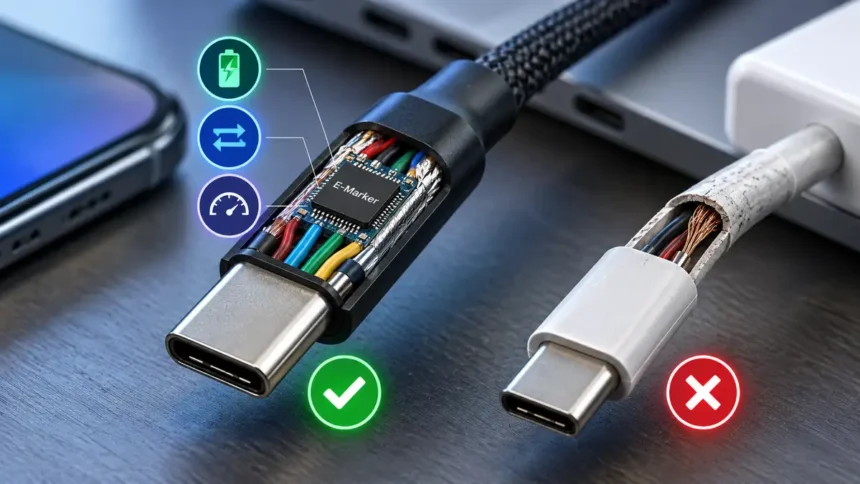
Cheap, unbranded cables skip important safety features. They often use thin wires. They lack proper shielding. Many do not have an e-marker chip when one is required. That chip communicates information about what the cable can handle.
Without it, things can go wrong. Your phone might charge painfully slowly. The cable could overheat during charging. In worse cases, it can damage your charging port. It can even short-circuit the motherboard.
In 2025, the U.S. Consumer Product Safety Commission (CPSC) reported over 1,200 incidents tied to non-compliant USB cables. These included melted insulation, fire hazards, and fried ports. That is not a small number.
Fast Charging Needs the Right Cable
Most modern phones support fast charging. Samsung, Google, OnePlus, and Apple all support USB Power Delivery (PD) on compatible devices. But fast charging only works when the cable supports it.
A basic USB 2.0 cable might transfer data at only 480 Mbps, but its charging capability is separate from its data speed. If your phone supports 45W or 65W charging, a cable that does not support the required power becomes a bottleneck. You will sit there wondering why your phone charges so slowly. The cable is the weak link.
For USB-C to USB-C charging above 60W, the cable needs an e-marker chip. No appropriate e-marker means USB Power Delivery will not negotiate the cable for higher-power operation. Your phone stays safe, but charges at a lower supported rate.
The Security Risk Nobody Talks About
Here is another angle most people miss. Not all cables just carry power. Some carry data too. And that opens a door.
There is a real threat called “juice jacking.” Someone swaps a public charging cable with a modified one. It looks normal. But it can potentially attempt to access data or exploit your phone when you plug in.
Craig Ford, a cybersecurity expert at Cyber Unicorns, put it simply. “If you use a cable given to you by a stranger, it could be a risk.” That applies to cables at airports, cafes, and hotel lobbies.
The safest move? Always carry your own cable. If you must use a public port, switch your phone to “charge only” mode where available. Or use a USB data blocker. It is a small dongle that blocks data pins.
How to Pick a Safe USB-C Cable
You do not need to spend a fortune. But you do need to be a little careful. Here is what to look for.
- Check for USB-IF certification. The USB Implementers Forum runs a compliance program. Certified cables pass applicable USB-IF compliance testing. Look for the appropriate USB-IF certification and performance markings on the packaging.
- Match the cable to your charger. If your charger outputs 45W, get a cable rated for 60W or higher. Do not pair a high-power charger with a low-spec cable.
- Stick with known brands. Anker, Belkin, Ugreen, and Apple make reliable cables. They cost a bit more. But they will not fry your phone.
- Avoid mystery cables from bargain bins. If the packaging has no specs, no brand, and no certification, skip it. A $2 cable is not a deal if it kills a $1,000 phone.
- Look at the wire gauge. Thicker wires (20 AWG or lower) handle more current safely. Thin wires heat up faster and deliver less power.
What About Using a Laptop Charger for Your Phone?
This comes up a lot. And the short answer is yes, it is generally safe. USB-C Power Delivery negotiates the right voltage and current between compatible devices. Your phone will only pull what it needs.
So a 96W MacBook charger will not push 96W into your phone. The phone asks for what it can handle. The charger agrees. No damage done.
But again, the cable matters. Use a proper USB-C to USB-C cable rated for the wattage. A flimsy cable can still cause problems even with a good charger.
The Bottom Line
Not every USB-C cable is built the same. The connector might look universal. The quality inside is not. A bad cable can slow your charging, overheat, or even damage your phone.
Spend a few extra dollars on a certified cable. Carry your own when you travel. Check the specs before you buy. Your phone will thank you for it.