





Offline Siri On iPhone 17
The launch of the iPhone 17 has made many users ask an important question. Can Siri work offline when there is no internet connection available? The answer is that Siri can perform several useful tasks without a data or WiFi connection. This means users can continue to use voice commands in situations such as flights, remote areas, or when trying to save data. Offline Siri uses on device processing, where commands are handled locally by the phone.
However, it is important to understand that not all Siri features are available offline. Some actions still require access to online services and data. This guide explains what offline Siri can do on the iPhone 17, how to enable it, and the limitations that users need to know. The aim of this article is to help users get more value from their devices in everyday life.
How Offline Siri Works on iPhone 17
Offline Siri uses on device processing, which means the iPhone completes voice actions without sending information to servers. The iPhone 17 has the necessary hardware to handle this. When users request simple actions, the device processes speech locally and executes commands.
For offline use, the phone must download language files so that speech recognition works even without internet. This download usually happens when setting up Siri for the first time. Once installed, basic voice commands continue to work even if the phone is in Airplane Mode.
Offline processing is beneficial for privacy because information stays on the device instead of being shared. It also makes responses faster because the phone does not wait for a server to reply.
What Siri Can Do Offline on iPhone 17
Siri can perform many basic tasks without an internet connection. These tasks are related to actions that rely only on the device and not on online data.
Examples include:
- Setting alarms and timers
- Opening installed apps
- Controlling music stored on the device
- Adjusting brightness or volume
- Turning on features such as Airplane Mode or Low Power Mode
- Activating Dark Mode or Night Shift
- Reading downloaded notifications in some situations
Offline Siri is useful for travel, flights, daily routines, and situations where a user cannot access a network. It allows the iPhone to remain functional and responsive even when there is no connection.
What Siri Cannot Do Offline
Offline Siri has limitations. Any action that requires internet or access to remote information will not work until the device connects again. Siri will ask for a connection for actions such as:
- Web searches
- Weather updates
- Sports scores
- News
- Information lookups
- App features that depend on cloud services
- Translation that requires online data
These actions require up to date information from online services, and Siri cannot complete them when offline. It is important for users to understand that offline Siri is designed for basic control of the phone and not for advanced tasks.
How to Enable Offline Siri on iPhone 17
Users can enable offline Siri easily by following these steps.

Open Settings Open Settings and go to “Apple Intelligence & Siri “.
go to Apple Intelligence & Siri - Turn on the options to use “Talk & Type to Siri” by voice or with the side button.
Talk & Type to Siri - Make sure the phone downloads voice files by staying connected to WiFi during setup.
voice or with the side button - Turn off WiFi and mobile data to test offline commands.



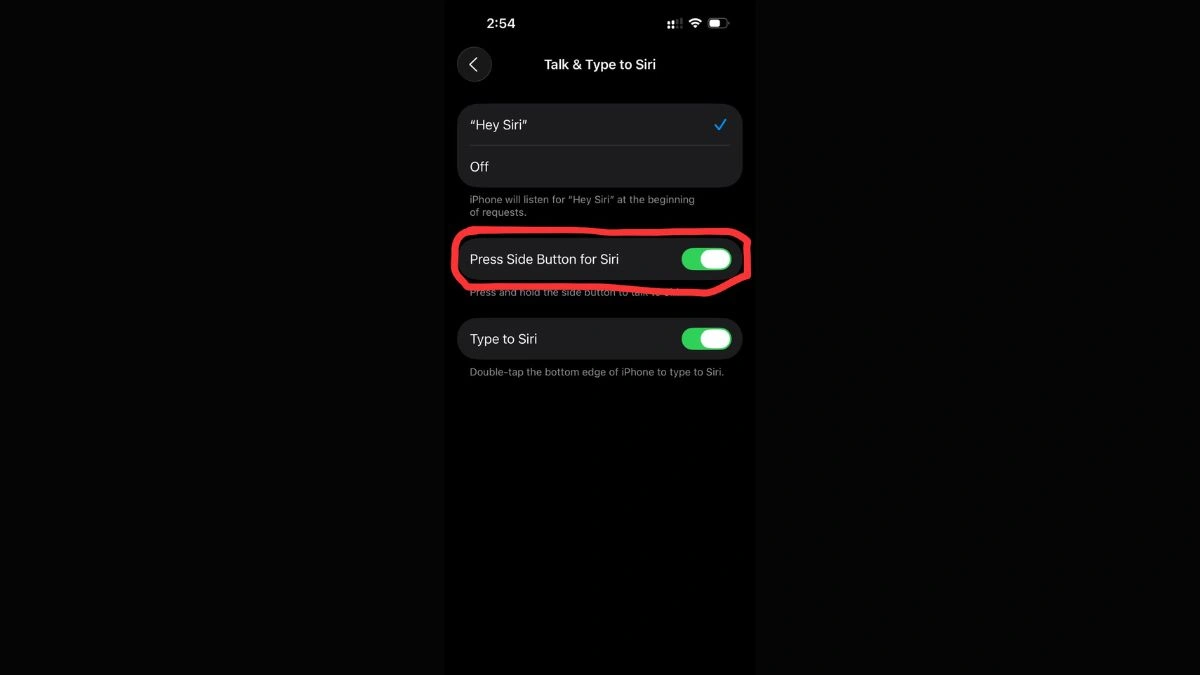
If the phone has not downloaded voice models, offline requests may not work. After enabling Siri and completing setup, users can issue commands even with no connection.
Why Offline Siri Matters on iPhone 17
Offline Siri has practical benefits in everyday life. It allows users to continue giving commands when the phone has no signal. This is useful in airports, travel destinations, rural areas, and during emergencies.
Offline use also protects privacy. Since commands are processed on the device, personal data is not sent to external servers. This allows users to control basic phone features with more confidence.
Another advantage is convenience. Users can set alarms, open apps, start music or make quick adjustments without touching the screen. This makes offline Siri an efficient tool in many day to day situations.
Limitations to Keep in Mind
Even though offline Siri is useful, it has limitations. It works only for actions that require no outside information. For any task where the phone needs fresh data from the internet, Siri will not respond.
Offline Siri cannot give answers that require research, search or real time information. Also, some languages and features may need additional downloads before they work offline.
It is also possible that offline behaviour changes slightly across different iOS updates. Users should keep their phones updated so they receive improvements and new capabilities.
Tips for Better Offline Siri Use
To make the most of offline Siri, users should follow these tips:
- Allow the phone to download voice files during setup
- Test offline commands after setup
- Use offline Siri for alarms, timers, settings and apps
- Avoid commands that require online data
- Update iOS regularly, as features may expand
By following these suggestions, users can rely on Siri in more situations and improve their overall experience.
Offline Siri on the iPhone 17 is a useful feature that allows users to perform several everyday actions without an internet connection. It supports common tasks like setting alarms, opening apps and changing settings. It offers speed, convenience and better privacy because everything happens on the device.
Users should remember that offline Siri cannot perform online searches or actions that require real time information. With proper setup and usage, offline Siri improves the experience of using the iPhone 17 and makes the device more reliable in many situations.
Frequently Asked Questions
Q1. Does iPhone 17 have offline Siri?
A. Yes, the iPhone 17 supports offline Siri for basic device actions that do not need internet.
Q2. What commands work offline?
A. Users can open apps, set alarms, control music on device, and change settings like Airplane Mode, brightness and volume.
Q3. Why does Siri still ask for internet sometimes?
A. Siri may ask for internet if voice files are not downloaded or if the command needs online information.
Q4. Can Siri read messages offline?
A. Siri can read messages that are already downloaded on the device. New messages may require a connection.
Q5. Will offline Siri improve in future updates?
A. Future updates are likely to add more on device capabilities, making offline use more powerful over time.
Also Read- Google Is Adding A Way To See Which Apps Drain Your Phone Battery Most