Apple’s Messages app, previously known as iMessage, has never been limited to simple text messages. From the beginning, it has offered much more, especially when both sender and receiver are using an iPhone. Today, sending plain text is just one small part of what Messages can do. The app functions as a powerful communication platform that allows users to send money, share locations, create drawings, and much more.
To access these features, open Apple Messages and select a conversation. At the bottom of the screen, next to the text field, there is a plus (‘+’) icon. Tapping this icon opens a menu filled with extra tools. This menu expands as more compatible apps are installed on the iPhone, such as Starbucks and other third-party services.
Below are seven useful and entertaining features that show how Apple Messages goes far beyond basic texting.
Create and Send Stickers From Photos
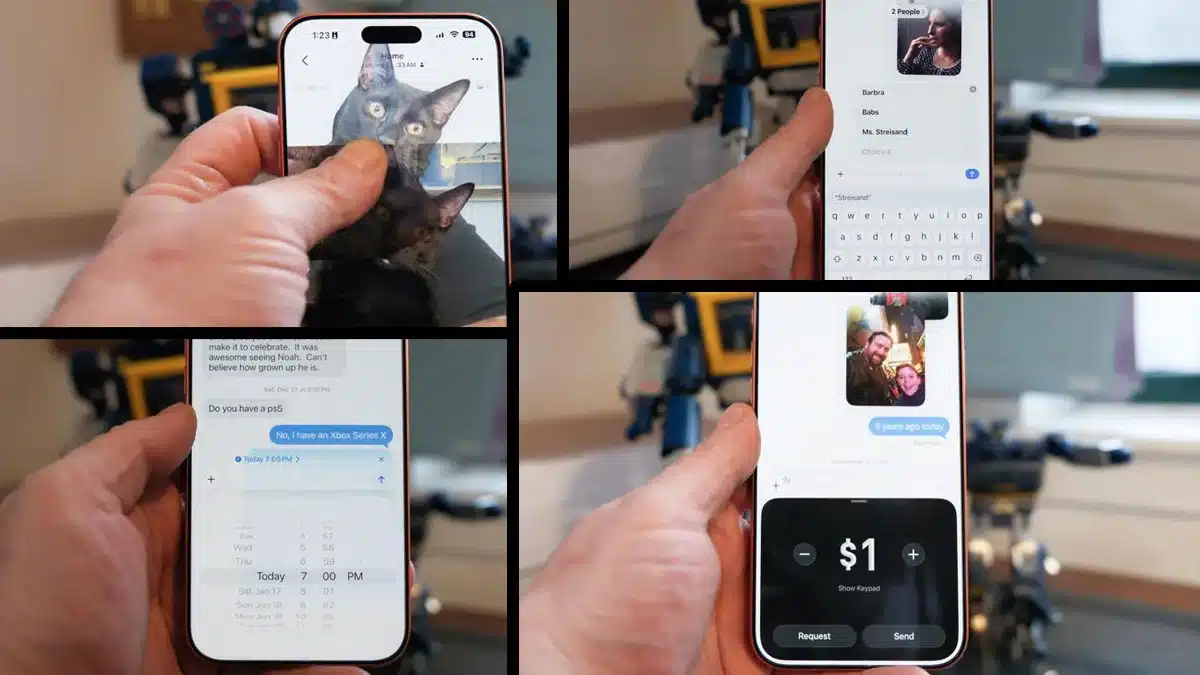
Apple Messages allows users to turn favorite photos into custom stickers. To create one, open the Photos app and choose an image where the subject can be easily separated from the background. Press and hold on the subject until a glowing outline appears. Release your finger and select the ‘Add Sticker’ option from the pop-up menu.
Live Photos cannot be used directly for stickers, as holding them triggers playback. The Live Photo feature must be turned off before creating a sticker.
Once created, stickers can be added to conversations by tapping the ‘+’ icon in Messages and selecting ‘Stickers.’ Visual effects such as puffy or sparkly styles can also be applied, adding motion that responds when the iPhone is tilted.
Send Money Using Apple Cash
Apple Messages includes built-in money transfers through Apple Cash. If Apple Cash is set up with a linked payment method, users can send or receive money directly within a Messages conversation.
To use the feature, tap the ‘+’ icon and select Apple Cash. Transactions can be completed without opening another app. Apple Cash can be set up through the Apple Wallet app, where it appears as one of the available cards.
Create Polls in Group Chats
Instead of sending multiple messages to ask for opinions, Apple Messages allows users to create polls in group chats. This can be useful for planning meals, events, or gathering quick feedback.
To create a poll, open Messages, tap the ‘+’ icon, and choose ‘Polls.’ While there are limited customization options, such as time limits, users can add as many response choices as needed.
Polls are only available in conversations where all participants are using iPhones. If an Android user is included in the group chat, the Polls feature will not be available.
Schedule Messages for Later Delivery
Messages can be written in advance and scheduled to send at a later time. This feature is helpful for reminders, time-sensitive messages, or situations where sending a message immediately may not be appropriate.
To schedule a message, tap the ‘+’ icon and select Send Later. A small bubble appears above the text field showing the scheduled delivery time. This time can be adjusted by tapping the bubble. Messages can be scheduled up to 364 days in advance.
Use Check In for Safety Updates
The Check In feature allows Messages to automatically notify a contact when a user arrives at a destination or after a set amount of time. To enable it, tap the ‘+’ icon and choose Check In.
Check In can be triggered by reaching a specific location, after a timed interval, or even after completing a workout when paired with an Apple Watch. The feature can share information such as location, battery level, and signal strength. Optional details include the travel route taken and the last known location if the device powers off.
This functionality positions Check In as a safety and security tool rather than just a messaging feature.
Send Starbucks Gift Cards or Play Games
Apple Messages supports app integrations that allow users to send digital gift cards or play games within conversations. For example, if the Starbucks app is installed, a Starbucks option appears in the ‘+’ menu. Users can choose a card design, set an amount, and send it directly through Messages.
Other apps, including TikTok, integrate with Messages for easy content sharing. Games such as those found in Game Pigeon allow players to take turns by sending moves back and forth within a chat.
Send Animated Doodles With Digital Touch
Digital Touch enables users to send animated drawings that replay the motion of each stroke. Rather than appearing as static images, these doodles animate as they are received, making them more expressive.
The feature also allows users to record video and draw directly on the screen while recording. Digital Touch works across Apple devices, including the Apple Watch, offering another creative way to communicate through Messages.
With these features, Apple Messages continues to evolve into a versatile communication platform that blends messaging, creativity, payments, and safety tools into a single app.
ALSO READ: Motorola’s Razr Fold Targets Photographers With Stylus Support