




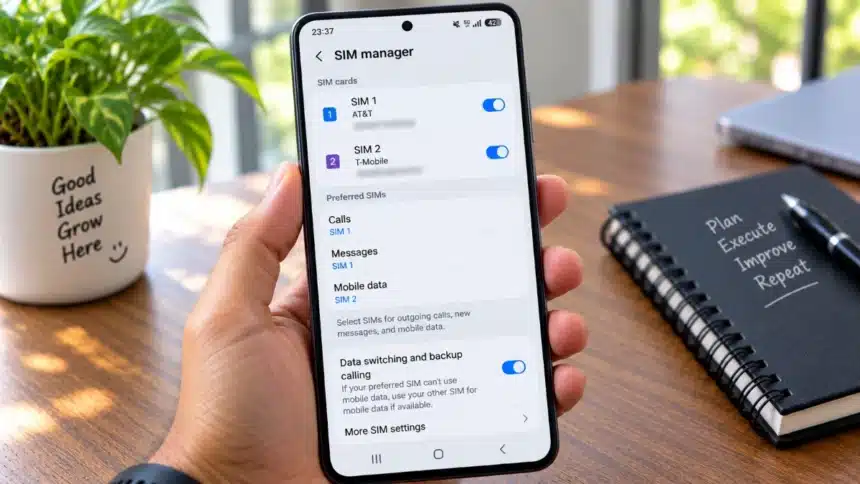
If you use a dual SIM phone, you have probably experienced this at least once. You are browsing the web, loading a map, or downloading something, and then you make or receive a call on your other SIM. Suddenly, your mobile data stops working. Pages refuse to load, downloads pause, and your internet connection seems to vanish until the call ends.
This is one of the most common frustrations for dual SIM users, and it catches many people off guard. You have two SIMs in your phone, both active, and yet your internet drops the moment a call starts on the SIM that is not handling your data.
- Why Mobile Data Stops Working When You Call From Another SIM
- Can You Use Mobile Data While Calling From Another SIM?
- What Is Automatic Mobile Data Switching?
- How to Turn On Automatic Data Switching
- I Tested This on a Dual SIM Phone
- What Happens If Automatic Data Switching Is Not Available?
- Things to Check Before Using This Feature
- Does Automatic Data Switching Actually Fix the Problem?
The reason behind this is not necessarily a network fault or a broken setting. It comes down to how dual SIM phones manage voice calls and data connections at the same time. In this article, we will explain exactly why this happens, whether it is possible to keep mobile data working when calling from another SIM, and how a feature called automatic data switching can help solve the problem on supported phones.
Why Mobile Data Stops Working When You Call From Another SIM
To understand the issue, it is first important to know how your phone handles mobile data in a dual SIM setup.
When you have two SIMs in your phone, you typically choose one as your preferred mobile data SIM. This is the SIM your phone normally uses for internet activity, whether you are browsing, streaming, or using apps that need a connection. The other SIM can remain available for calls and texts without being the default data line.
Now, here is what can happen when you place or receive a call on the SIM that is not your data SIM. Depending on the phone’s dual SIM implementation, the data connection on your preferred SIM may be temporarily unavailable while the call is active. Your internet can stop working until the call ends or until the phone switches data to the SIM handling the call.
This behaviour is closely related to how Dual SIM Dual Standby, often shortened to DSDS, works. In a typical DSDS setup, both SIMs remain available while the phone is idle, but their behaviour changes when one line becomes active. Whether the other SIM remains available for data or calls depends on the phone’s modem capabilities, software, network configuration, and features such as data switching or Wi-Fi Calling.
The role of VoLTE (also called 4G Calling) matters here too. VoLTE allows a voice call to stay on the LTE network instead of falling back to an older network where such fallback is still available. However, VoLTE alone does not guarantee that the phone can keep the other SIM’s data connection active during a call. The phone’s dual SIM implementation and carrier support also matter.
It is also worth noting that this behaviour is not identical across all phones. The exact result depends on your phone model, its chipset, the software version, and even your carrier’s network configuration. Two people with different phones on different networks may see different results in the same situation.
Can You Use Mobile Data While Calling From Another SIM?
The short answer is yes, it can be possible, but it depends on several factors working together.
Some phones can maintain internet access while a voice call is happening on the other SIM. How this works depends on the phone’s hardware and software, the type of dual SIM implementation, and carrier support.
VoLTE can also be relevant because it allows supported voice calls to remain on LTE, but it is not by itself a guarantee of simultaneous data on the other SIM.
For phones that do support this, there is often a feature called automatic data switching or a similar setting that handles the process. When enabled, the phone can temporarily use the calling SIM for mobile data so that internet access continues even while your usual data SIM is unavailable.
However, it is important to be clear: this feature is not available on every dual SIM phone. It depends on the manufacturer, the phone’s hardware capabilities, software version, and carrier configuration. If your phone does not offer this option, no amount of toggling settings will make it appear.
What Is Automatic Mobile Data Switching?
Automatic data switching is a feature that allows a supported phone to temporarily move mobile data to the SIM that is currently handling a call when necessary.
Here is how it works in practice. Say SIM 1 is your data SIM and SIM 2 is the SIM you use for calls. When you make or receive a call on SIM 2, the phone detects that internet access through SIM 1 may be disrupted. If automatic data switching is enabled and supported, the phone can shift the data connection to SIM 2 for the duration of the call. You stay connected to the internet through SIM 2’s data instead.
Once the call ends, the phone can switch the data connection back to SIM 1 automatically. You do not need to do anything manually. The transition happens in the background.
The name of this feature and its exact behaviour can vary between manufacturers. Google, Apple, Samsung, Motorola, and other manufacturers may use different terminology or implement dual SIM connectivity differently. The underlying goal is similar, but the setting location, requirements, and behaviour can differ.
It is also important to understand the difference between automatic switching and manually changing your preferred data SIM. Manual switching means you go into settings and select a different SIM for data yourself. Automatic switching is handled by the phone when needed and can revert on its own afterward.
How to Turn On Automatic Data Switching
Here’s how you can turn automatic data switching or the equivalent feature on supported Android phones and iPhones.
On Android Phones
On supported Android phones, the data switching option can usually be found in the SIM or network settings, although the name and path vary by manufacturer.
The general path may look like this:
- Open Settings
- Go to Network and Internet or Mobile Network
- Tap on SIMs, SIM cards, or SIM management
- Look for an option such as Automatic data switching, Switch mobile data automatically, Data during calls, or something similar. Enable the relevant toggle if your phone provides it.
The exact name and location of this setting varies by manufacturer, phone model, and software version.
On Pixel phones, Google currently directs users to Settings > Network & internet > SIMs. Depending on the Pixel model, you may see Data during calls or Automatic data switching. On Pixel 8a and later, Google specifically documents Automatic data switching as part of using a second SIM during calls.
As a practical example, on a Motorola Edge 60 Fusion running Android 15, I found the relevant automatic data switching option within the SIM settings under Network and Internet.
If you cannot find the setting, try using the search bar in your Settings app and type “data switching.” If nothing comes up, check your manufacturer’s documentation because your phone may use another name for the feature or may not support it.
On iPhone
On iPhone, Apple calls the feature Allow Cellular Data Switching or Allow Mobile Data Switching, depending on your region and terminology settings.
You need a Dual SIM setup with two lines configured on your iPhone to use this feature.
Follow these steps:
- Open Settings
- Tap on Mobile Service, Mobile Data, or Cellular, depending on your region
- Tap on Mobile Data or Cellular Data
- You will see your available lines along with Allow Cellular Data Switching or Allow Mobile Data Switching
- Turn it on
When this setting is enabled and you are on a voice call using a line that is not your designated cellular-data line, that line can automatically switch to use voice and data during the call.
If you cannot see the Mobile Data or Cellular Data switching option, confirm that your Dual SIM lines are properly configured and active. You should also check carrier support if the feature does not behave as expected.
One additional limitation to note is that Apple says cellular-data switching does not work while Data Roaming is active. Carrier availability and additional fees can also apply.
I Tested This on a Dual SIM Phone
To verify that this actually works in practice, I tested it on my Motorola Edge 60 Fusion running Android 15.
Here is how I set it up:
- SIM 1 was configured as my preferred mobile data SIM
- SIM 2 was the SIM I used for making calls
- Automatic data switching was enabled in the SIM settings under Network and Internet
I placed a call from SIM 2 and then immediately opened Google Chrome to load a webpage. I also opened WhatsApp to check whether messages were being sent and received.
Before enabling automatic data switching: When I made a call from SIM 2, my internet stopped working completely. Chrome showed an error page, and WhatsApp messages were stuck on a single tick until the call ended.
After enabling automatic data switching: When I made the same call from SIM 2, my internet continued working. Chrome loaded pages normally, and WhatsApp messages were sent and received without delay. The phone had switched the data connection to SIM 2 for the duration of the call.
Once the call ended, the data connection moved back to SIM 1 automatically within a few seconds.
The result was clear on this device and SIM configuration. The feature worked as intended in my test. The only minor observation was a brief pause of one to two seconds during the switch, but after that, connectivity was smooth.
What Happens If Automatic Data Switching Is Not Available?
If your phone does not offer this feature, you still have a few options to manage the situation:
- Manually switch the data SIM before making a call. Go into your SIM settings and change the preferred data SIM to the one you are about to call from. This is not convenient, but it can work if that line has mobile data available.
- Use Wi-Fi when possible. If you are connected to Wi-Fi, your internet does not depend on the mobile data connection during the call.
- Check your VoLTE or 4G Calling settings. Make sure VoLTE is available and enabled where your phone and carrier support it. This can affect how voice calls are handled, although it does not by itself guarantee simultaneous data on the other SIM.
- Review your phone’s network and SIM settings. Some phones have additional options in their network settings that may help.
- Contact your carrier. Carrier support and network configuration can affect Dual SIM, VoLTE, Wi-Fi Calling, and data-switching behaviour.
It is important to understand that if your phone’s hardware or software does not support the required functionality, there may not be a setting that can add it. Dual SIM behaviour depends on a combination of modem hardware, firmware, operating-system support, and carrier configuration.
Things to Check Before Using This Feature
Before relying on automatic data switching, make sure the following are in order:
| Check | Why It Matters |
| Both SIMs are active | The phone needs both lines properly configured for Dual SIM features to work as intended |
| The calling SIM can use mobile data | If data switches to the calling SIM, that line needs usable mobile data service |
| VoLTE or 4G Calling is available where required | Voice and data behaviour can depend on the phone and carrier’s calling configuration |
| Phone supports automatic data switching | Not all phones offer the same Dual SIM data-switching features |
| Preferred data SIM is correctly set | The phone needs to know which SIM should normally handle mobile data |
| Carrier supports the required features | Carrier configuration can affect Dual SIM, Wi-Fi Calling, VoLTE, and data switching |
| Data usage and charges are considered | The secondary line may use mobile data during calls, which can result in data usage or additional charges |
Also keep in mind that software updates can sometimes change where these settings are located or how they behave. If a setting disappears after an update, check your phone manufacturer’s current documentation or search within the Settings app.
Does Automatic Data Switching Actually Fix the Problem?
Based on my practical test, yes, it fixed the problem on the Motorola Edge 60 Fusion and SIM configuration I tested. Enabling automatic data switching kept my internet running during calls made from the non-data SIM. The switch back to the primary data SIM after the call was automatic.
This feature is most useful for people who consistently use one SIM for calls and another for data. If that describes your setup, enabling this toggle can eliminate the frustration of losing internet every time you pick up or make a call.
However, it is not a universal solution. It requires the right combination of phone hardware, software support, carrier compatibility, and mobile data availability on the line used during the call. The exact requirements vary by device.
The practical takeaway is simple. If you use a dual SIM phone and regularly lose data during calls, check whether your phone offers automatic data switching, Data during calls, or an equivalent feature. If it does, enable it. If it does not, consider the alternatives listed above, or keep this requirement in mind the next time you upgrade your phone. It is a small feature that makes a genuinely noticeable difference in daily use.