


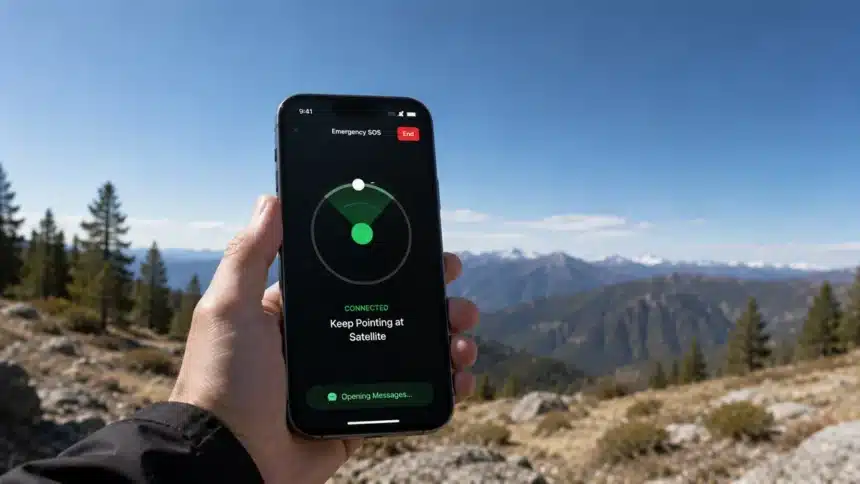
Imagine you’re hiking on a trail in the middle of nowhere, miles from the nearest town, and you hurt your leg when you slip. You grab your phone to call for help, but there are no bars on the screen. A few years ago, that would have meant relying entirely on luck, a whistle, or whoever happened to pass by next. Today, if you’re carrying a compatible recent smartphone, you may have another option: Satellite SOS.
It’s one of the most genuinely life-saving features to arrive on phones in the last decade, and it’s now available on a growing number of smartphones from Apple, Google, Samsung, and other manufacturers. Here’s exactly what it is, how it works under the hood, and what its real-world limits are.
- Satellite SOS on Smartphones: Quick Overview
- What Satellite SOS Actually Is
- How Does Satellite SOS Work, Step by Step?
- 1. Your phone detects no signal
- 2. You answer a short questionnaire
- 3. You physically aim your phone at the sky
- 4. Your phone transmits a compressed emergency message
- 5. A relay center or dispatcher receives it
- 6. You may need to stay connected for follow-up
- Beyond Emergencies: Everyday Satellite Features
- Real Limitations You Should Know
- Geographic restrictions
- Limited communication
- You need a clear sky
- Battery matters
- Latency and inconsistency
- Pricing and service terms may change
- Why Satellite SOS Matters
Satellite SOS on Smartphones: Quick Overview
| Feature | Apple iPhone | Google Pixel | Samsung Galaxy |
| Satellite feature | Emergency SOS via satellite | Satellite SOS | Carrier and device-dependent satellite services |
| Started with | iPhone 14 series | Pixel 9 generation | Galaxy S25 series for native satellite-capable hardware |
| Main purpose | Emergency communication when cellular and Wi-Fi are unavailable | Emergency communication when cellular and Wi-Fi are unavailable | Satellite communication through supported carrier and network services |
| Connection type | Satellite connectivity | Satellite connectivity | Depends on supported carrier and satellite network |
| Non-emergency features | Messages via satellite, Find My location sharing, and Roadside Assistance in supported regions | Availability and features depend on device and region | Features depend on carrier, device, and region |
| Availability | Depends on country, region, and supported device | Depends on model and region | Depends on device, carrier, network, and region |
What Satellite SOS Actually Is
Satellite SOS (Apple calls it “Emergency SOS via satellite“; Google calls it “Satellite SOS”) is a built-in smartphone feature that lets a compatible phone send emergency information through a satellite connection when there’s no cellular signal and no Wi-Fi available. The satellite connection helps route that information through the provider’s satellite infrastructure to emergency services or, in some implementations, a relay center that contacts emergency services on your behalf.
It’s important to know what this is not. Satellite SOS isn’t a full replacement for a satellite phone because it isn’t designed for normal live voice calls, casual browsing, or streaming. It’s built for short, critical bursts of communication: your location, the nature of your emergency, and enough context for responders to act.
Apple pioneered this feature for mainstream phones in 2022, in partnership with the Globalstar satellite network, with the iPhone 14. The tech has since expanded, and Apple now offers built-in satellite capabilities across compatible iPhone models starting with the iPhone 14. The feature is also available on devices such as the iPhone 16e, which supports Emergency SOS via satellite in supported regions.
Google added Satellite SOS to supported Pixel phones starting with the Pixel 9 generation, while Samsung introduced native satellite-capable hardware with the Galaxy S25 series. On Samsung devices, actual satellite services depend on supported carriers, networks, models, and regions.
How Does Satellite SOS Work, Step by Step?
In a technical sense, supported phones can communicate with satellites in Low Earth Orbit (LEO), which orbit much closer to Earth than traditional geostationary satellites. You can think of the basic idea as extending connectivity into places where terrestrial cell towers can’t reach.
Here’s the general flow of an emergency session:
1. Your phone detects no signal
When you try to call or text 911 (or the local emergency number) and your phone can’t find cellular service or Wi-Fi calling, a supported device can offer the option to use satellite communication instead.
This works alongside the emergency tools already built into modern smartphones. Android phones, for example, also include an Emergency SOS feature that can quickly call emergency services and notify selected emergency contacts.
2. You answer a short questionnaire
On an iPhone, this is a set of quick multiple-choice questions about your situation, like what kind of emergency it is, if you’re hurt, and how many people are with you. This way, first responders can get useful information about the situation. This step is designed to work fast, since you might be in a stressful or physically difficult situation.
3. You physically aim your phone at the sky
This is the part most people aren’t expecting. Because the satellites are moving overhead and the connection is much weaker than a normal cellular link, your phone needs a relatively clear view of the sky and horizon. The screen can show you where to point your phone to establish or maintain the connection. Dense foliage, hills, mountains, canyons, and tall structures can slow or block the connection.
4. Your phone transmits a compressed emergency message
Rather than working like an ordinary high-bandwidth cellular connection, the satellite link is designed to transmit essential information efficiently. On iPhone, the emergency exchange can include answers from your emergency questionnaire along with relevant information such as your location and Medical ID, where applicable.
5. A relay center or dispatcher receives it
Depending on the implementation and location, the emergency information can be routed to emergency services or through a relay center. In areas where emergency services cannot receive the information directly, trained relay specialists can communicate the details to emergency responders on the user’s behalf.
6. You may need to stay connected for follow-up
Because satellites move across the sky, your phone might prompt you to re-aim periodically to maintain the connection while emergency services or relay specialists ask follow-up questions.
Sending a satellite message can take noticeably longer than a normal text. Connection and delivery times can vary according to your location, satellite availability, surrounding obstacles, and how much open sky is visible. It’s slower than sending a normal text, but it’s meant to be used when any connection is better than none.
Beyond Emergencies: Everyday Satellite Features
Apple has expanded well past pure SOS use. In supported regions, compatible iPhones can send Messages via satellite even outside an emergency. Apple also offers Roadside Assistance via satellite in supported countries and through participating roadside providers. There’s also satellite-based location sharing through Find My, so users can share their location even when they’re outside cellular and Wi-Fi coverage.
Find My is also one of Apple’s most useful tools when an iPhone goes missing. If you want to understand the regular network-based side of the feature, Devicology’s guide on what to do if you’ve lost your iPhone explains how Find My can be used to locate and protect the device.
On Android, things are more complicated because satellite support can depend on the phone, carrier, country, and satellite network. Google’s Satellite SOS is available on supported Pixel phones starting with the Pixel 9 generation, although model and regional restrictions apply.
Samsung has also expanded satellite support across compatible Galaxy devices, with actual services varying by carrier and market. Carrier-based satellite services add another layer. T-Mobile’s satellite service, for example, uses SpaceX’s Starlink direct-to-cell network to extend connectivity to compatible phones outside normal terrestrial coverage. This kind of carrier-provided satellite connectivity is related to Satellite SOS, but it isn’t exactly the same thing as a phone manufacturer’s dedicated emergency SOS feature.
Satellite connectivity isn’t the only way phones can communicate outside a conventional internet connection. Technologies such as Bluetooth mesh networking can also provide limited off-grid communication. For example, the Bitchat messaging app uses nearby devices to relay messages without relying on cellular service or the internet, although its technology and purpose are very different from satellite communication.
Real Limitations You Should Know
Satellite SOS is remarkable technology, but it comes with real constraints:
Geographic restrictions
Not every country or region has access to the same satellite features. Availability continues to expand, but it can depend on the device, manufacturer, carrier, satellite provider, and local regulations. If you plan to rely on Satellite SOS while travelling, check the current support information from your phone manufacturer or carrier before you leave.
Limited communication
Emergency SOS itself is primarily designed for low-bandwidth emergency communication rather than normal voice calls, video, or unrestricted mobile data. Broader satellite services are beginning to support additional messaging and limited data capabilities, but those features vary considerably by provider and device.
You need a clear sky
Dense forest canopy, canyon walls, mountains, or being indoors can block or seriously degrade the connection. Satellite communication works best with a clear view of the sky and horizon.
Battery matters
Satellite communication can require additional radio activity, so conserving battery remains important when you’re off the grid. If you’re in an emergency situation, keeping enough power available for follow-up communication can matter.
Latency and inconsistency
Because satellite availability, your surroundings, and network conditions vary, delivery times aren’t as predictable as a normal cellular text, so patience matters.
Pricing and service terms may change
Satellite features aren’t necessarily priced or bundled in the same way across manufacturers, carriers, and regions. Apple has offered eligible satellite features free for defined periods on supported devices, while roadside providers may separately charge for the assistance they provide. Users should check the current terms for their device and region rather than assuming every satellite feature will always be free.
Why Satellite SOS Matters
Search-and-rescue incidents involving Satellite SOS have shown why the feature matters for the average outdoor traveler: someone who would never have carried a dedicated satellite communicator may now have an emergency satellite connection built into the phone already in their pocket. It won’t replace training, preparation, or a proper emergency plan, but as a last-resort lifeline when everything else has failed, satellite connectivity can provide another way to reach help.
If you own a compatible phone, it’s worth taking a few minutes now to walk through any built-in satellite demo or connection test available on your device so the process feels familiar if you ever genuinely need it. Apple, for example, provides a Satellite Connection Demo on supported iPhones, while Google’s Pixel Satellite SOS also includes a demo for supported devices.
An emergency is not the time to be learning how to aim your phone at the sky for the first time.