
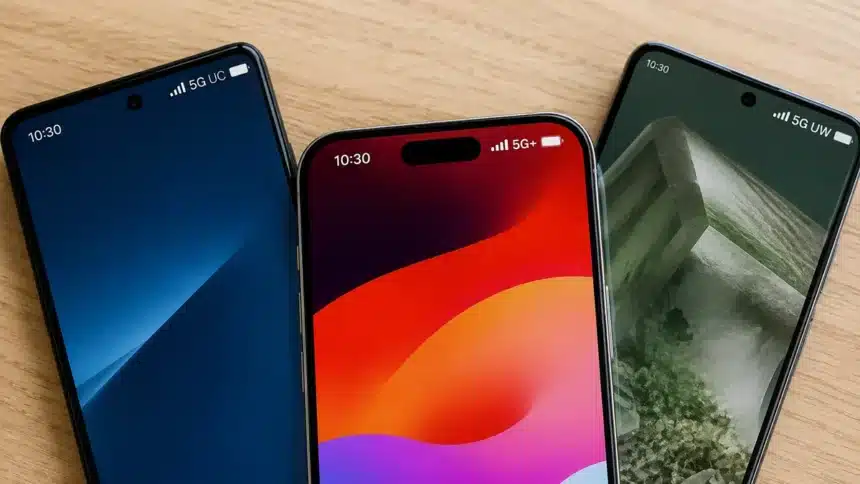
You’re mid-scroll. You glance at your status bar, and there it is: a tiny icon that says “5G,” or maybe “5G UC,” “5G+,” or “5G UW.” It changed from an hour ago. You have no idea why. Did your phone get an upgrade? Did you drive into a better neighborhood? Is your carrier just messing with you?
You’re not imagining things. You’re not losing your mind. Those little icons are your phone quietly reporting which layer of your carrier’s 5G network it’s currently riding on. The differences between them are bigger than you’d think.
- First, a quick truth bomb: 5G isn’t one thing
- 5G UC: T-Mobile’s “the good stuff” badge
- 5G+: AT&T’s version of the same idea
- And Verizon’s entry: 5G UW
- So, are they actually different technologies?
- Does the icon guarantee you’ll get faster speeds?
- Why should you actually care?
- What Your 5G Icon Actually Tells You
First, a quick truth bomb: 5G isn’t one thing
Here’s the part that carriers don’t highlight on billboards. “5G” is not a single, uniform network. It is an umbrella term. It operates across different parts of the radio spectrum, commonly grouped into three broad categories, each with its own trade-offs between speed and reach.
Think of spectrum like lanes on a highway:
Low-band 5G
There is a wide reach. However, the lanes are narrow. Signals travel long distances and generally penetrate buildings better than higher-frequency signals. However, they can’t carry as much traffic at once. Speeds can sometimes be only moderately better than 4G LTE.
Mid-band 5G
The sweet spot. Decent range, noticeably faster speeds, and enough capacity to handle a busy crowd without choking.
High-band 5G (mmWave)
It is blazing fast, sometimes exceeding a gigabit per second. However, the range is tiny compared with lower-frequency 5G, and walls, buildings, people, and other obstacles can block or weaken the signal. You will mostly find it in places such as stadiums, airports, and dense downtown blocks.
Every major U.S. carrier deploys a mix of low-, mid-, and high-band spectrum. They utilize various strategies to achieve this, and the exact frequencies and spectrum holdings differ between carriers. The problem is that your phone showing just “5G” doesn’t always tell you what kind of performance you’re about to get. Carriers introduced new icons to help tell the faster layers apart.
5G UC: T-Mobile’s “the good stuff” badge
If you’re on T-Mobile, 5G UC stands for 5G Ultra Capacity. It lights up when your phone connects to T-Mobile’s mid-band or high-band spectrum. This layer is built largely on the 2.5 GHz frequency it gained through the Sprint merger, plus other mid-band spectrum and some mmWave in denser areas.
When you don’t see “UC” and just see “5G,” you are likely on Extended Range 5G. This is T-Mobile’s low-band layer that prioritizes blanket coverage over raw speed. T-Mobile has used it to extend 5G into cities, small towns, rural areas, and highways. However, its performance can sometimes feel closer to LTE than the faster Ultra Capacity layer.
T-Mobile has built extensive low-band and mid-band 5G coverage. This is part of why the 5G UC icon can appear frequently for customers in areas covered by its Ultra Capacity network.
5G+: AT&T’s version of the same idea
5G+ is AT&T’s label for the faster parts of its 5G network. It represents AT&T’s faster 5G running on mid-band or high-band spectrum, with high-band 5G focused more heavily on places such as stadiums and airports.
AT&T has expanded this faster tier well beyond big metro markets. The carrier says its mid-band 5G+ network now covers more than 310 million people nationwide, while its high-band 5G+ is focused more heavily on high-traffic areas and large venues.
So, if you see plain “5G” instead of “5G+,” that’s not your phone failing. It can simply mean the faster 5G+ layer isn’t available to your phone at that particular location.
A quick historical aside: AT&T used to show a “5GE” icon on some phones. Despite the name, “5GE” was really an enhanced version of LTE, not actual 5G.
And Verizon’s entry: 5G UW
It is not asked directly. For now, though, it’s helpful to know that Verizon’s fast level of 5G is called UW, which stands for Ultra Wideband. At first, it was associated with mmWave. But after Verizon began using C-band spectrum, mid-band connections also became part of its 5G Ultra Wideband network. Verizon phones can show a plain 5G icon when connected to its broader-coverage 5G network.
So, are they actually different technologies?
Not in the sense of being completely different 5G standards. Here’s the twist. 5G UC, 5G+, and 5G UW are carrier-specific names for the higher-performance parts of their 5G networks.
All three major U.S. carriers use a mix of low-, mid-, and high-band spectrum, although the specific frequencies, spectrum holdings, and network configurations are not identical. If you’re on a carrier’s faster mid-band or high-band network, that’s generally when you’ll see 5G UC, 5G+, or 5G UW. A simple 5G icon usually represents the carrier’s broader-coverage 5G layer.
| Carrier | Icon for the fast tier | Icon for the basic tier | What “fast” is built on |
| T-Mobile | 5G UC (Ultra Capacity) | 5G | Mid-band + some mmWave |
| AT&T | 5G+ | 5G | Mid-band + high-band in dense venues |
| Verizon | 5G UW (Ultra Wideband) | 5G | Mid-band (C-band) + mmWave |
Does the icon guarantee you’ll get faster speeds?
Keep this in mind before you get too excited, or the reverse:
It isn’t always the case. If you see a 5G UC, 5G+, or 5G UW symbol, it doesn’t always mean you’re getting the maximum speed that network can deliver. The icon tells you which type of 5G network your phone is connected to or has access to, not the exact speed you’ll receive.
Things like walls, how far away you are from the cell site, network congestion, available spectrum, and even the type of phone you have can still change what you actually experience. Things can feel slow with 5G UC if the stadium is full and the game is sold out. This is because thousands of phones may all be trying to use the available network capacity.
If the icon looks right but your mobile data is not working, the issue may instead be related to your network settings, signal, SIM, or carrier.
Why should you actually care?
In addition to being interesting, knowing what these icons mean is useful:
- If you see plain 5G and need real speed, moving to a window or a more open area may improve the signal. However, it won’t necessarily move your phone onto a faster 5G tier.
- Hotspot use, video calls, large downloads, and cloud gaming can benefit from the extra capacity available on faster 5G layers.
- If you want to get a new plan, you should know how to read carrier coverage maps. “5G coverage” claims can include areas with different types of 5G performance.
- Don’t worry if the icon changes as you move around. You should expect your phone to hand you off between network layers as you go.
What Your 5G Icon Actually Tells You
5G, 5G UC, 5G+, and Verizon’s 5G UW aren’t completely different cellular technologies. Instead, the extra letters generally tell you that your phone is connected to one of the faster parts of your carrier’s 5G network.
T-Mobile’s fast layer is called “Ultra Capacity,” AT&T’s is called “5G+,” and Verizon’s is called “Ultra Wideband.” All three carriers use combinations of low-, mid-, and high-band spectrum, although their exact frequencies and network deployments differ.
Your phone is trying to tell you something, not just showing you a string of letters. The next time that icon flips on your status bar, it will give you a clue about the lane you just joined on the 5G highway.