



It can silence the chaos, drain the color from your screen, and quietly nudge you toward better sleep. Here is everything you need to know about Bedtime Mode on realme phones.
Let’s be honest for a second. You have probably told yourself “just five more minutes” while scrolling through your phone at midnight. Then those five minutes turned into forty-five, and suddenly it was 1:30 AM, and you were watching a stranger reorganize their pantry on Instagram.
- What Exactly Is Bedtime Mode?
- Why Your Brain Needs This More Than You Think
- How to Set Up Bedtime Mode on realme Phones
- Two Ways to Trigger It: Pick What Fits Your Life
- What Bedtime Mode Does and Does Not Do
- Bedtime Mode vs. Do Not Disturb: They Are Not the Same Thing
- Pro Tips to Get the Most Out of It
- Which realme Phones Support Bedtime Mode?
- The Bottom Line
You are not alone. A 2019 Common Sense Media survey of 1,000 U.S. parents and teens found that 70% of teens checked their mobile device within 30 minutes of falling asleep. And a recent 2026 study published in the European Heart Journal found that greater nighttime light exposure was associated with changes in cardiac structure and function in 11,071 UK Biobank participants. The stakes can go beyond just feeling groggy the next morning.
Here is the good news: your realme phone may already have a built-in tool designed to help with this problem. It is called Bedtime Mode, and you may not know it exists or may have never bothered to turn it on.
Let’s change that.
What Exactly Is Bedtime Mode?
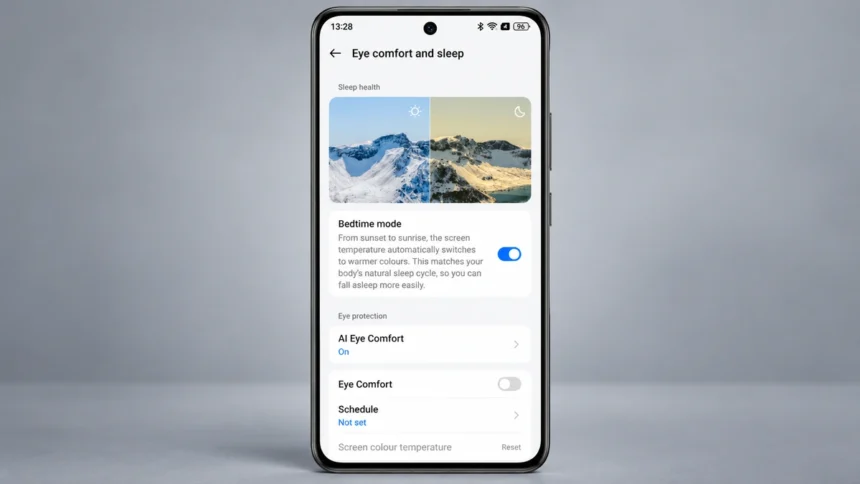
Bedtime Mode is an Android feature available on supported realme phones and can be found through Digital Wellbeing or related system settings, depending on the device and software version. Think of it as a nighttime bouncer for your brain. Once configured, it can combine features such as:
- Do Not Disturb during Bedtime Mode to reduce calls, notifications, and other interruptions according to your Do Not Disturb settings.
- Turns your screen to grayscale (optional), stripping away the vibrant colors from the display.
It is not the same as simply putting your phone on silent. Bedtime Mode can combine a bedtime routine with Do Not Disturb and screen options such as grayscale, depending on your Android and realme UI version. Digital Wellbeing can also provide information about your device usage, helping you understand your phone habits over time.
The best part? You can set up a routine so Bedtime Mode turns on automatically instead of manually enabling it every night.
Why Your Brain Needs This More Than You Think
Here is the science in simple terms for you.
Your phone screen emits blue light. Light exposure at night can suppress melatonin, a hormone involved in regulating your sleep-wake cycle. Harvard researchers found that blue light suppressed melatonin for about twice as long as green light of comparable brightness in an experimental comparison. Using your phone before bed can also keep you mentally engaged when you are trying to wind down.
A 2026 study published in Frontiers in Public Health examined associations between daily screen time, sleep duration, social media use, and anxiety using a global dataset of 3,000 adults covering 2020 to 2024. Greater screen time and social media use were associated with higher anxiety, while longer sleep duration was associated with lower anxiety. However, the study was observational and did not specifically measure screen use immediately before bedtime.
And it is not just about feeling tired. That European Heart Journal study I mentioned earlier included 11,071 UK Biobank participants with nighttime light measurements and subsequent cardiac MRI data. Greater nighttime light exposure above 3 lux was associated with adverse cardiac remodeling and subclinical functional decline. The researchers also found associations with increased cardiovascular risks in a larger analysis, but the observational findings do not establish that nighttime light directly caused those outcomes.
The grayscale feature in Bedtime Mode addresses one source of visual stimulation by removing color from the display. It can make the screen less visually engaging, although grayscale alone should not be treated as a proven sleep treatment.
How to Set Up Bedtime Mode on realme Phones
On realme phones where Bedtime Mode is available through Digital Wellbeing, the setup is generally as follows, although menu names can vary by realme UI and Android version:
- Open Settings on your realme phone.
- Tap Digital Wellbeing & parental controls.
- Tap Bedtime mode.
- Choose your bedtime routine or trigger method.
- Set the available start and end times or charging window.
- Customize options such as Do Not Disturb and Grayscale, if available.
That is it. Once configured, Bedtime Mode can run automatically according to the routine you choose.
Two Ways to Trigger It: Pick What Fits Your Life
Android’s Bedtime Mode can provide two automatic activation methods on supported realme devices, although the exact options can vary by software version.
| Trigger Method | How It Works | Best For |
| Use a schedule | You set a start time, end time, and the days on which the routine repeats. | People with a consistent daily routine who go to bed and wake up around the same time. |
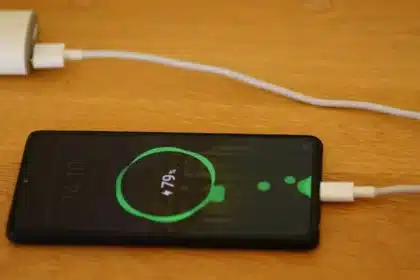
| Turn on while charging | You set an “After” and “Before” time, and Bedtime Mode turns on when the phone is charging during that time frame. | People who normally plug in their phone around bedtime. |
The charging-based trigger can be convenient because Bedtime Mode starts when your phone is charging within the bedtime window you configured, rather than requiring you to switch it on manually.
What Bedtime Mode Does and Does Not Do
There is some confusion floating around about what this feature actually controls. Let’s clear it up.
| Feature | Does Bedtime Mode Handle It? |
| Reduces notification and call interruptions | Yes, when Do Not Disturb for Bedtime Mode is enabled and configured. |
| Turns screen to grayscale | Yes, as an optional screen setting on supported versions. |
| Silences alarms | No. Bedtime Mode can be configured to turn off at your next alarm, and alarms are handled separately from ordinary notifications. |
| Blocks specific apps | No. Use features such as Focus Mode if you want to pause distracting apps. |
| Works with Do Not Disturb | Yes. Do Not Disturb can be enabled as part of the Bedtime Mode routine. |
| Provides device-usage information | Digital Wellbeing can provide information about your device and app usage, but Bedtime Mode should not be treated as a medical sleep tracker. |
| Stays active after unplugging charger | Not necessarily. With a charging-based routine, Bedtime Mode can turn off when you stop charging, depending on the routine and software version. |
One important detail: if you need certain people to still reach you during the night, configure the allowed interruptions or notification filters in your phone’s Do Not Disturb settings. The exact options can vary by Android and realme UI version.
Bedtime Mode vs. Do Not Disturb: They Are Not the Same Thing
A lot of people assume Bedtime Mode is just a fancy name for Do Not Disturb. It is not. Here is the difference.
Do Not Disturb primarily controls interruptions such as calls, notifications, and alerts according to the rules you configure.
Bedtime Mode can use Do Not Disturb as part of a broader bedtime routine and can also apply screen settings such as grayscale. It is integrated with Android’s Digital Wellbeing features, while the exact options available depend on your phone and software version.
Think of DND as a tool for controlling interruptions. Bedtime Mode combines interruption controls with a scheduled bedtime routine and optional display changes.
Pro Tips to Get the Most Out of It
Here are a few suggestions that can make Bedtime Mode more useful:
- Try turning on grayscale. Removing color can make your phone less visually engaging, which may make it easier to put down.
- Set your schedule before you actually plan to sleep. This gives you some time to wind down instead of going straight from scrolling to lights out.
- Use the charging trigger if it fits your routine. It can automatically activate Bedtime Mode when your phone is charging during your configured bedtime window.
- Pair it with a physical habit. Put your phone on a charger away from your bed instead of keeping it on your nightstand. Bedtime Mode handles the software side, while physical distance can reduce the temptation to pick up your phone.
- Do not confuse it with realme’s Sleep Capsule. Sleep Capsule, introduced with realme UI 2.0 and available on supported devices, can restrict phone use for a predetermined period while allowing specified apps. Bedtime Mode is a different Android Digital Wellbeing feature focused on bedtime routines, interruption controls, and display options.
Which realme Phones Support Bedtime Mode?
Bedtime Mode is part of Android’s Digital Wellbeing functionality and is available on many realme phones, but availability and the exact settings can vary by model, Android version, realme UI version, and region. Current realme devices such as the realme 14x 5G and other recent models explicitly list Bedtime Mode among their display or eye-comfort features.
Instead of relying on a fixed compatibility list, check your own device by opening Settings and searching for “Bedtime mode” or “Digital Wellbeing.” Older realme models and different software builds may expose different options.
The Bottom Line
Your phone is not going to fix your sleep on its own. No feature can do that. But Bedtime Mode on supported realme phones can reduce nighttime interruptions and remove color from the screen as part of an automated bedtime routine.
It only takes a short time to set up, and once configured, it can run automatically according to the schedule or charging routine you choose.
If you have been ignoring this feature, tonight might be a good time to try it.