




Smartphones store sensitive information, including personal photographs, financial accounts, work documents, and private conversations. Losing a device can therefore create serious privacy and security risks beyond its replacement cost. A prepared response can reduce unauthorized access and protect valuable digital information.
Modern smartphones include security features designed to locate missing devices, restrict access, and erase stored data remotely. However, these protections work best when configured before a device disappears. Understanding the available safeguards helps minimize exposure and supports faster recovery.
Why Phone Security Matters After Loss or Theft
A lost smartphone can provide access to email accounts, saved passwords, payment applications, and authentication codes. Criminals may exploit an unlocked device or notifications displayed on its lock screen. Stolen credentials can also expose connected accounts and sensitive personal information.
The immediate priority is preventing unauthorized access while assessing whether recovery remains possible. Taking prompt action can reduce the risk of identity theft, financial fraud, and privacy violations.
Common Risks Associated With a Missing Phone
Several security threats can emerge when a smartphone falls into unauthorized hands.
- Account compromise: Accessible email and social media accounts may expose personal information.
- Financial fraud: Banking applications and payment services may contain sensitive financial details.
- Identity theft: Stored identification documents can facilitate fraudulent activity.
- Privacy breaches: Private photographs, messages, and documents may become accessible.
- Authentication abuse: Access to verification codes can weaken account security.
- Location exposure: Shared location services may reveal sensitive movement patterns.
A strong screen lock reduces these risks but cannot eliminate every possible threat. Remote security controls and account-level protections provide additional safeguards.
Secure the Device Before It Goes Missing
Preventive configuration makes recovery and remote protection considerably more effective. Several built-in features can help locate devices, restrict unauthorized access, and protect stored information.
Enable Essential Security Settings
The following measures strengthen protection across supported smartphones.
- Set a strong passcode or password that is difficult to guess.
- Enable biometric authentication, such as fingerprint recognition or Face ID.
- Activate the device’s built-in location and recovery services.
- Configure automatic operating system and security updates.
- Enable automatic backups for essential photographs and documents.
- Hide sensitive notification content from the lock screen.
- Review account recovery details and trusted devices periodically.
Avoid predictable passcodes based on birthdays, repeated digits, or familiar sequences. A strong device credential provides an important barrier against unauthorized access.
How to Protect a Lost iPhone Remotely
Apple provides Find My to locate compatible devices and perform remote security actions. These capabilities depend on prior configuration, connectivity, account access, and device status.
Locate and Lock the iPhone
The Find My service allows device owners to locate missing devices and activate Lost Mode. Lost Mode locks the device and can display contact information for potential recovery.
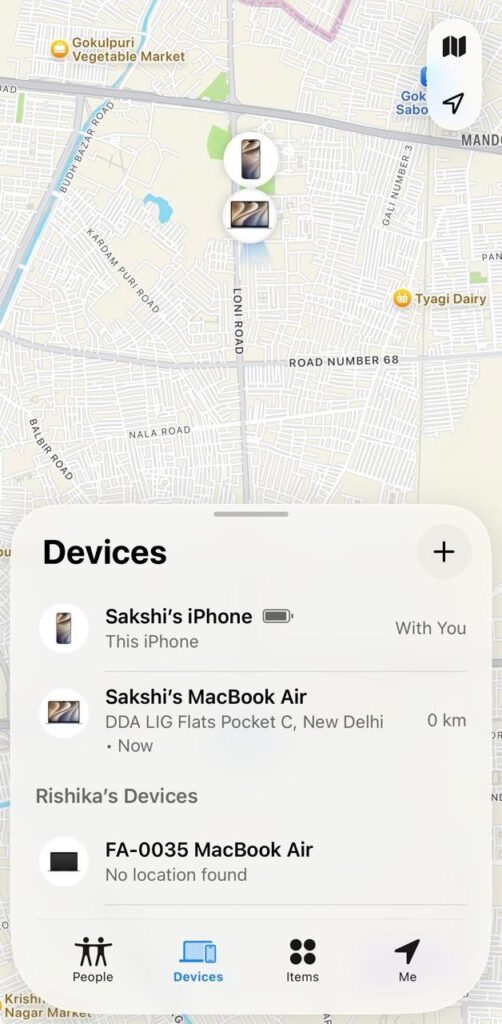
- Open Find My on another trusted Apple device.
- Select the Devices tab.
- Choose the missing iPhone from the available list.
- Review its displayed location, when available.
- Activate Mark As Lost or the equivalent Lost Mode option.
- Follow the prompts to lock the device and display recovery information.
Alternatively, access Apple’s Find Devices service through iCloud.com/find. Use a trusted browser or device and follow the available account verification instructions.
Lost Mode can suspend certain payment capabilities associated with Apple Pay. However, the displayed location may be unavailable or outdated if the device cannot report its position.
Erase Data When Necessary
Remote erasure can help protect personal information when recovery appears unlikely. Before erasing, consider whether additional recovery efforts or evidence preservation remain important.
Within Find My, select the missing device and choose Erase This Device. Follow the displayed instructions to confirm the action. Erasure may require the device to reconnect before completion.
Do not remove the device from the Apple Account or Find My after initiating erasure. Keeping Activation Lock enabled helps prevent another person from reactivating the iPhone. Remote erasure does not guarantee recovery of information that was never backed up.
How to Protect a Lost Android Phone Remotely
Android provides Google’s Find Hub, formerly known as Find My Device, for locating and securing compatible devices. Available functions depend on device configuration, account access, connectivity, and manufacturer support.
Locate and Secure the Android Device
Find Hub can display a device’s location and offer available remote security actions. Preparation beforehand improves the likelihood of successfully using these features.
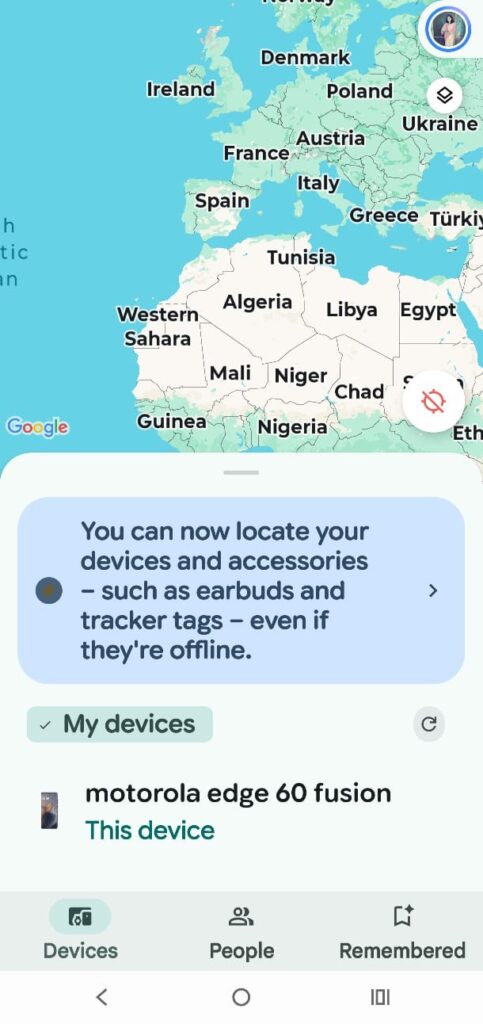
- Open Google Find Hub in a browser or supported application.
- Sign in using the Google Account associated with the missing device.
- Select the missing phone from the available devices.
- Review its location and the timestamp when displayed.
- Choose Mark as lost or the available secure-device option.
- Follow the instructions to lock the phone and display recovery information, if supported.
The service may offer additional options, such as playing a sound or locating nearby devices. Location results depend on available network connections and the device’s configuration.
Erase the Data on the Android Device
Remote factory reset is an option when protecting stored information becomes the priority. The exact workflow depends on the device and the available Find Hub controls.
Select the missing device and choose the factory reset or erase option. Review the consequences before confirming the request. Once erased, the device may no longer provide its location through the service.
A factory reset deletes locally stored information, but previously synchronized cloud data may remain available. Account credentials and device protection features may also affect subsequent activation.
Protect Accounts, Payments, and Personal Information
Securing the physical device is only one part of an effective response. Connected accounts may remain vulnerable if credentials were exposed before the phone became inaccessible.
Immediate Actions After Loss or Theft
Prioritize the following steps according to the sensitivity of the information involved.
- Contact the mobile carrier to suspend the SIM or eSIM service.
- Change the primary email password from a trusted device.
- Review active account sessions and sign out unfamiliar devices.
- Contact banks if payment credentials or financial applications may be compromised.
- Suspend mobile wallet cards through the relevant provider when necessary.
- Revoke access to sensitive work accounts and organizational applications.
- Monitor financial statements and account activity for suspicious transactions.
Changing the email password first can help protect password resets for other services. Multifactor authentication should remain enabled, preferably using a method independent of the missing device.
Compare Available Phone Protection Features
Understanding the differences between recovery services helps establish an effective response strategy.
| Security Feature | iPhone | Android |
|---|---|---|
| Device location | Find My | Google Find Hub |
| Remote locking | Lost Mode | Mark as lost, where supported |
| Remote erasure | Erase This Device | Factory reset or erase |
| Recovery contact display | Supported through Lost Mode | Available through supported lock options |
| Device recovery protection | Activation Lock | Factory Reset Protection, where supported |
Feature names and availability may vary across software versions and manufacturers. Official support documentation provides the most reliable guidance for individual devices.
Conclusion
Protecting smartphone data after loss or theft requires preparation, rapid action, and account-level security. Remote locking, location services, and data erasure can reduce exposure when devices disappear. Securing connected accounts and suspending compromised payment access further strengthens protection.
Regular backups, strong credentials, and updated recovery settings make these measures more effective. Preparing these safeguards before an incident can reduce disruption and limit unauthorized access. A structured response helps protect personal information while preserving realistic opportunities for device recovery.