
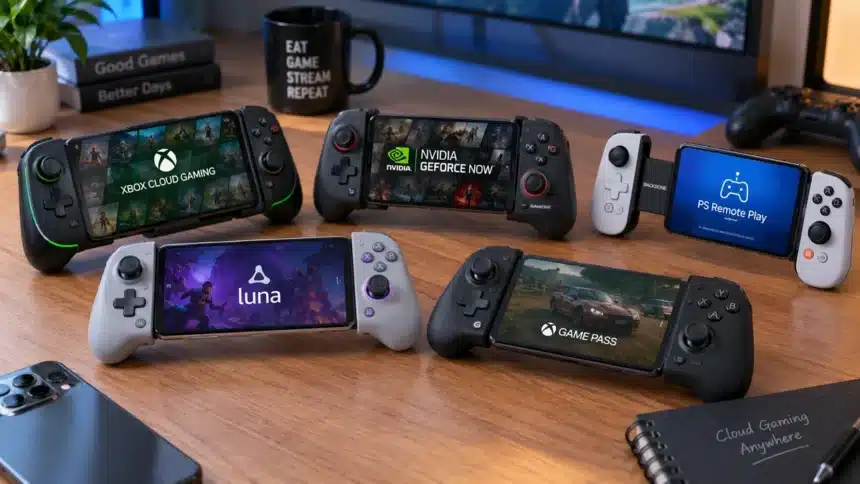
Cloud gaming is one of the most important changes in how we play. You can now stream console and PC games to your phone through services like Xbox Cloud Gaming, GeForce NOW, PS Remote Play, and Amazon Luna. You don’t necessarily need an expensive gaming PC or console to play supported cloud games on your phone. The catch is that touchscreen controls aren’t always ideal for fast-paced shooters, racing games, and platformers.
That’s where a mobile controller comes in handy. If you get the right one, your iPhone or Android phone can feel more like a handheld game console than just a phone with a game on it.
- Quick Answer: Top Picks at a Glance
- Why Your Controller Choice Matters More for Cloud Gaming?
- The Best Mobile Controllers for Cloud Gaming in 2026
- 1. GameSir G8 Galileo: Best Overall Value
- 2. Razer Kishi Ultra: Best Premium Pick
- 3. Backbone One (2nd Gen): Best iPhone and Android All-Rounder
- 4. GameSir G8 Plus: Best for Multi-Device Setups
- 5. GameSir X5 Lite: Best Budget Option
- 6. 8BitDo Ultimate Mobile Gaming Controller: Best Bluetooth Cross-Platform Pick
- Wired vs. Bluetooth: Which Should You Choose for Cloud Gaming?
- iPhone vs. Android Compatibility
- Final Thoughts
Here is a list of the best mobile controllers for cloud gaming in 2026, along with some information on why each one is good and how to choose the right one for your setup.
Quick Answer: Top Picks at a Glance
| Controller | Best For | Connection | Approx. Price |
| GameSir G8 Galileo | Best value for USB-C Android phones | USB-C (wired) | Varies by retailer |
| Razer Kishi Ultra | Best premium ergonomics | USB-C (wired) | ~$149 |
| Backbone One (2nd Gen) | Best iPhone + Android all-rounder | USB-C or Lightning, depending on version | ~$80-$100 |
| GameSir G8 Plus | Best wireless flexibility | Bluetooth | Varies by retailer |
| GameSir X5 Lite | Best budget pick | USB-C (wired) | Varies by retailer |
| 8BitDo Ultimate Mobile Gaming Controller | Best Bluetooth cross-platform pick | Bluetooth | ~$50 |
Why Your Controller Choice Matters More for Cloud Gaming?
Since cloud gaming streams games from a remote server instead of running them locally, your controller isn’t just an extra. It’s part of the latency chain. For every extra millisecond that passes between pressing a button and seeing the result on the screen, there is a chance that you will miss a headshot.
That’s why controllers suited to cloud gaming tend to put these things first:
- USB-C wired connections avoid adding a Bluetooth wireless link between the controller and phone.
- Hall-effect joysticks use magnetic sensing rather than traditional contact-based potentiometers and are designed to reduce the risk of stick drift caused by wear.
- Pass-through charging on supported controllers keeps your phone from dying in the middle of a game while your controller is plugged in.
- Broad compatibility is important because many gamers switch between GeForce NOW, Xbox Cloud Gaming, and PS Remote Play based on the game they want to play.
The Best Mobile Controllers for Cloud Gaming in 2026
Here are 2026’s best mobile game controllers for the cloud:
1. GameSir G8 Galileo: Best Overall Value
The GameSir G8 Galileo has become popular among mobile gamers who want features like those on consoles but don’t want to pay premium-controller prices. Its direct USB-C connection avoids the additional wireless link introduced by Bluetooth, while Hall-effect joysticks are designed to provide precise control without relying on traditional contact-based stick sensors. It also has a 3.5mm headphone jack for wired audio, which is a small detail that matters during long sessions. Its stretchable design makes it a practical choice for compatible USB-C Android phones.
2. Razer Kishi Ultra: Best Premium Pick
The Razer Kishi Ultra is one of the strongest options if comfort and build quality are the most important things to you. Its grips are noticeably thicker and more shaped than most mobile controllers. They feel more like a separate gamepad than an add-on for your phone. It also supports Razer Chroma RGB and Sensa HD Haptics on compatible setups, while the USB-C connection keeps the controller directly connected to the phone. That being said, this controller is very pricey, but the comfort may be worth it for gamers who play for hours on end.
3. Backbone One (2nd Gen): Best iPhone and Android All-Rounder
Backbone has made a name for itself in mobile controllers, and the Backbone One (2nd Gen), which is available in multiple editions, builds on that reputation. Backbone sells separate USB-C and Lightning versions depending on your phone. The second-generation design also uses magnetic adapters to improve phone fit and features a reshaped D-pad. This is a great choice for people who want a controller that “just works” with supported cloud games and Remote Play services.
4. GameSir G8 Plus: Best for Multi-Device Setups
The GameSir G8 Plus uses Bluetooth connectivity and a stretchable design, making it useful for gamers who want wireless flexibility across compatible devices. Unlike a traditional standalone gamepad, it can hold a compatible phone directly between its two controller halves. It also uses Hall-effect joysticks and gives you the freedom to play without physically connecting the controller to your phone’s USB-C port. It’s a good choice if you play games on more than one compatible device during the day.
5. GameSir X5 Lite: Best Budget Option
The GameSir X5 Lite proves that you don’t need to spend more than $100 to play games in the cloud. It brings Hall-effect sticks and a wired USB-C connection to a relatively affordable controller. It’s not as premium or substantial as the Kishi Ultra, but for occasional gaming and cloud gaming, it’s a practical budget choice.
6. 8BitDo Ultimate Mobile Gaming Controller: Best Bluetooth Cross-Platform Pick
The 8BitDo Ultimate Mobile Gaming Controller is a good all-around option for gamers who want a Bluetooth telescopic controller that works with compatible Apple and Android devices. It has Hall-effect joysticks and triggers, a stretchable design that holds the phone directly, and support for 8BitDo’s Ultimate Software V2. It isn’t wired directly to the phone like some of the other options on this list, but its broad mobile compatibility and familiar controller design make it a useful choice for gamers who prefer Bluetooth.
Wired vs. Bluetooth: Which Should You Choose for Cloud Gaming?
A lot of cloud gamers ask this question, and the answer changes depending on the game.
Choose a wired USB-C controller if:
- You play competitive shooters, racing games, or fighting games where timing is very important.
- You want to avoid adding a Bluetooth wireless link between your controller and phone.
- You don’t mind that your phone is physically connected to the controller.
Choose a Bluetooth controller if:
- You want more wireless flexibility or regularly switch between compatible devices.
- You mostly play RPGs, adventure games, or games where small differences in controller latency are less important.
- You value being able to move freely more than having a direct wired controller connection.
For latency-sensitive cloud gaming, a wired USB-C controller can be preferable because it avoids adding a Bluetooth wireless link on top of network latency. Bluetooth controllers are still a practical option, however, and services such as GeForce NOW officially support compatible Bluetooth gamepads. If latency is a broader concern in your mobile gaming setup, it is also worth understanding how Bluetooth audio delay while gaming can affect the overall experience.
iPhone vs. Android Compatibility
Thanks to standard USB-C ports on most modern Android phones and recent iPhones, including the iPhone 15, 16, and 17 generations, many newer controllers can now support devices across both platforms. Some controllers are still platform-specific or connector-specific, so make sure you know what you’re getting before you buy, especially models designed around a particular connector, operating system, or phone size.
If you use both an iPhone and an Android device, look for controllers with explicit support for both platforms. Check the manufacturer’s compatibility list for your exact phone, connector type, operating system, and gaming service before buying.
Final Thoughts
Your choice of the best mobile controller for cloud gaming will depend on where and how you play. The GameSir G8 Galileo offers strong value if you use a compatible USB-C Android phone. If comfort and high-end construction are most important to you, the Razer Kishi Ultra feels closer to a full-size console controller. And if you’re just getting started, a budget wired option like the GameSir X5 Lite proves you don’t need to spend big to leave touchscreen controls behind for good.
No matter what you choose, one of the best ways to improve your mobile cloud gaming experience in 2026 is to get a good controller and a stable, fast internet connection.