



SSD controller bottlenecks can help explain why two drives from the same product line do not always deliver the same performance. You bought a 128GB SSD thinking speed is speed. The spec sheet looked fine. The brand was decent. But your friend’s 512GB drive from the same product line can feel noticeably faster. Transfers finish quicker. Apps load snappier. Large file copies do not crawl halfway through.
This is not necessarily a placebo effect. Your friend’s drive can genuinely be faster. And the reason has nothing to do with brand loyalty or luck. It comes down to how SSDs are built on the inside.
SSD Controller Bottlenecks: The Controller Is the Brain
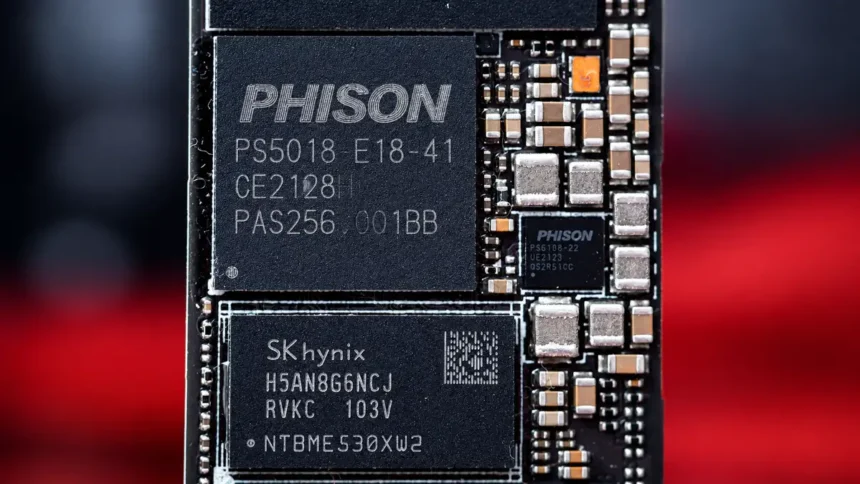
Every SSD has a controller chip. Think of it as the brain of the drive. It manages every read and write operation. It decides where data goes. It handles error correction. It runs garbage collection in the background.
The controller connects to NAND flash memory chips through channels. These channels work like lanes on a highway. More lanes mean more data can move at once. Fewer lanes mean traffic jams.
Here is the catch. The controller in a lower-capacity drive can be the same one used in a higher-capacity version. Same chip. Same firmware. Same number of channels. But the lower-capacity model may have fewer NAND dies to work with. That changes everything.
Parallelism Is the Real Speed Factor
This is the concept most people miss. SSD performance depends heavily on parallelism. That means the controller reading from and writing to multiple NAND dies at the same time.
Here is how lower and higher capacities can compare:
| Feature | Lower-Capacity Model | Higher-Capacity Model |
| NAND Dies | Typically fewer | Typically more |
| Parallel Channels Used | May use less available parallelism | Can use more available parallelism |
| Peak Sequential Write | Can be lower | Can be higher |
| SLC Cache Size | Often smaller | Often larger |
| TBW (Endurance Rating) | Often lower | Often higher |
A higher-capacity drive can spread data across more dies simultaneously. The controller talks to them in parallel. The result can be higher throughput and lower latency.
A lower-capacity drive can have fewer dies to work with. The controller may have the same potential, but not enough NAND dies to use all of it. It is like having a six-lane highway with only one car on it. The road is fast. The traffic is not.
How-To Geek explained it well in a 2026 breakdown. When a drive has lower capacity, it can contain fewer physical NAND dies. That can directly limit how much data the controller can move at once.
The SLC Cache Trap
Here is where things get even more interesting. Most modern consumer SSDs use TLC or QLC NAND.
- TLC stores three bits per cell.
- QLC stores four bits per cell.
- More bits per cell means cheaper storage.
- But it also means slower writes.
To hide this slowness, manufacturers use a trick called SLC caching. The drive sets aside a portion of its NAND and treats it like SLC memory. SLC stores just one bit per cell. It is much faster to write to.
When you start copying a file, data hits the SLC cache first. Speeds can look amazing. But that cache is limited, and its size varies significantly by SSD model and capacity.
Once the SLC cache fills up, the drive writes directly to the slower TLC or QLC cells. Speeds can drop sharply. The exact drop depends on the SSD’s NAND, controller, firmware, capacity, and cache implementation.
What the speed cliff can look like in practice:
| Scenario | Lower-Capacity Drive | Higher-Capacity Drive |
| Initial file copy | Fast while SLC cache is available | Fast while SLC cache is available |
| After SLC cache fills | Can drop sharply | Can sustain higher speeds for longer |
| Large game install | More likely to exhaust cache sooner | Larger cache may sustain speed longer |
| Photo/video editing | Performance can fall as free space shrinks | More free space can help sustain performance |
A higher-capacity drive can have a much larger SLC cache. It can absorb bigger file transfers before hitting that wall. A lower-capacity model may hit the wall much sooner.
Write Amplification Hits Harder When Free Space Is Tight
SSDs cannot overwrite data in place like hard drives can. When you change a file, the drive writes the new version to a fresh location. The old data becomes invalid. Eventually, the controller cleans up those invalid blocks through garbage collection.
This cleanup creates extra writes you never asked for. That is write amplification. Every SSD deals with it. But drives with little free space can deal with it worse.
Why a nearly full drive can suffer more:
- Less free space for the controller to work with
- Garbage collection can run more often and more aggressively
- The controller spends more time shuffling data around
- That eats into your available speed
- NAND cells can wear faster as a result
A drive with more free space has more breathing room. The controller can spread writes more effectively. Garbage collection can work more efficiently. The result can be more consistent speed and lower write amplification.
Endurance Is Often Lower Too
Every NAND cell can only be written to a limited number of times. This is measured in TBW, or Terabytes Written.
Higher-capacity versions of the same SSD family often carry higher TBW ratings. For example, Samsung rates its 250GB 870 EVO at 150 TBW and its 500GB model at 300 TBW.
If you write 20GB of data per day, here is how the math works out:
| Drive Capacity | Example TBW Rating | TBW ÷ 20GB/Day |
| 250GB Samsung 870 EVO | 150 TBW | ~20.5 years |
| 500GB Samsung 870 EVO | 300 TBW | ~41 years |
These figures are simple TBW calculations, not predictions of how long an SSD will actually last. Samsung’s warranty for both models is five years or the rated TBW, whichever comes first.
You will probably replace the computer long before reaching those write totals under a 20GB-per-day workload.
But there is a hidden factor. Write amplification inflates the actual data written to the NAND. The amount varies with the workload, free space, controller, firmware, and drive design, so it cannot be assumed to be a fixed 2x to 3x for a 128GB SSD.
What This Means for Your Next Purchase
The price gap between lower-capacity and higher-capacity SSDs has shrunk a lot in recent years. But the exact price difference varies by model, brand, NAND type, and market.
What can you gain by going with a higher-capacity model:
- More NAND parallelism in designs where capacity adds dies
- A potentially larger SLC cache that handles real workloads
- More free space for garbage collection and wear leveling
- Often a higher SSD endurance rating
- More consistent sustained-write performance on many SSD families
That does not mean every 128GB SSD is slower than every 512GB SSD. Compare capacities within the same SSD family, because controller, NAND type, NAND density, firmware, DRAM design, and interface also affect performance.
If the price difference makes sense for your workload, 512GB is generally the more practical capacity. Your drive gets more storage headroom, and many SSD families also deliver better sustained performance and endurance at higher capacities.
The spec sheet might say both drives are “NVMe” or “PCIe Gen 4.” That does not mean they perform the same. The capacity you choose can shape the speed you actually get.