Samsung is rolling out a feature that quietly fixes one of the most annoying elements about mobile phone plans. With Direct Voicemail, your phone handles missed calls itself instead of relying on your carrier’s voicemail service.
That means no extra monthly charges for visual voicemail, which usually costs $3- $5 per line if you convert typical global pricing.
The feature is part of Samsung One UI 8.5, first seen on the Samsung Galaxy S26 lineup, and is expected to reach more Galaxy devices through updates. For the record, One UI is a custom skin developed by Samsung for its own line of devices including mobile phones, smart TVs and functions as a top layer on the root Android OS. It was designed for better ease of use of its smartphones and more visual appeal. The whole look and feel has a Samsung essence which is a bit different than standard Android mobile devices.
How Direct Voicemail Actually Works
The moment you get a phone call, your device makes a decision of sending the call to the carrier either preset or if not answered. Instead, your Samsung Galaxy phone will answer the call using AI technology.
An automated voice tells the individual calling you that you are unavailable, while your phone records the message from this call as it comes in.
The fact that you can just jump in and answer at any given time, while the other person is still talking, makes the process even more useful.
Because it all remains on your phone, you have more privacy with the call, the transcription and processing by using this method, compared to how it is, if you were using a traditional voicemail system.
As mentioned above, there are also AI-based noise cancellation methods at work; therefore, messy recordings will be easier to understand.
Key Features You Should Know
The biggest advantage is control. You’re not just listening to voicemails later; you can read them live and decide instantly if the call matters.
It also cuts out extra costs completely since it doesn’t depend on carrier services.
Real-time transcription is the standout feature, especially for people who avoid picking up unknown calls. You can literally “screen” calls without ignoring them.
It’s not perfect. If your phone is switched off or has no network, the call will still go to your carrier’s voicemail. The feature also doesn’t work if you’re already on another call, since your phone needs to answer it.
Video calls aren’t supported, and there may be restrictions when you’re roaming internationally.
How to Enable Direct Voicemail
Setting it up is simple:
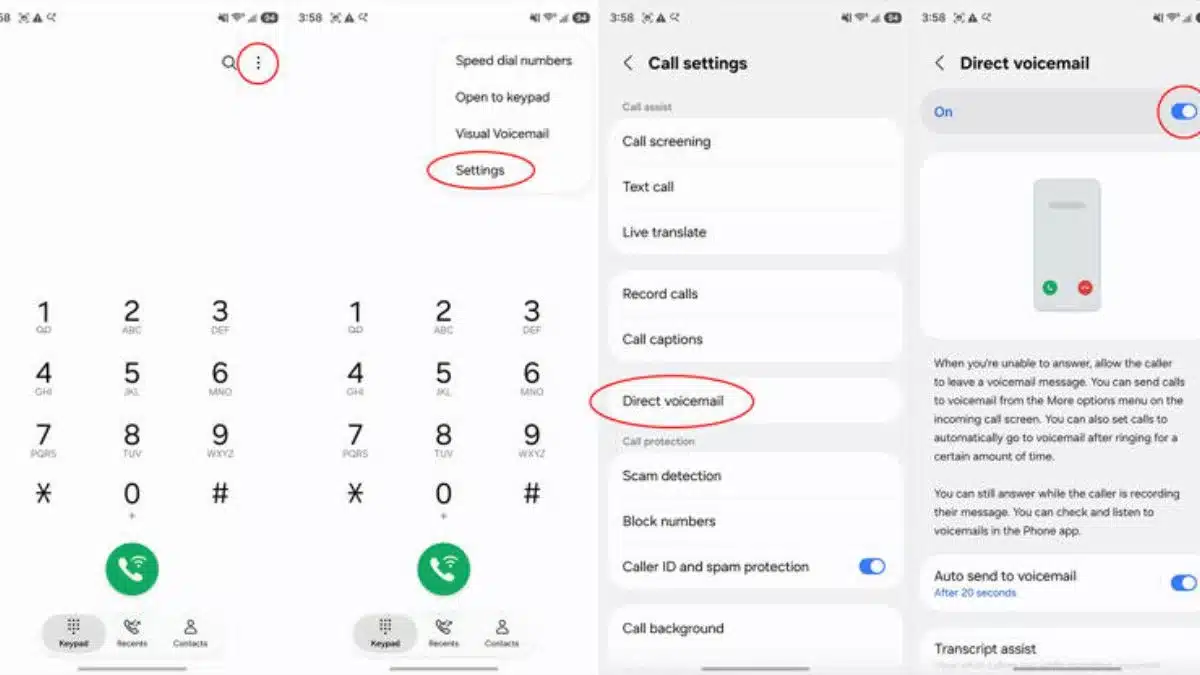
Step 1: Open the Phone app
Step 2: Tap the three-dot menu on the top right corner of your screen and go to Settings option
Step 3: Select Direct Voicemail
Step 4: Turn the toggle on
To get the full experience, enable transcription:
Step 1: Go to Direct Voicemail settings
Step 2: Tap Transcript Assist
Step 3: Turn on auto transcription
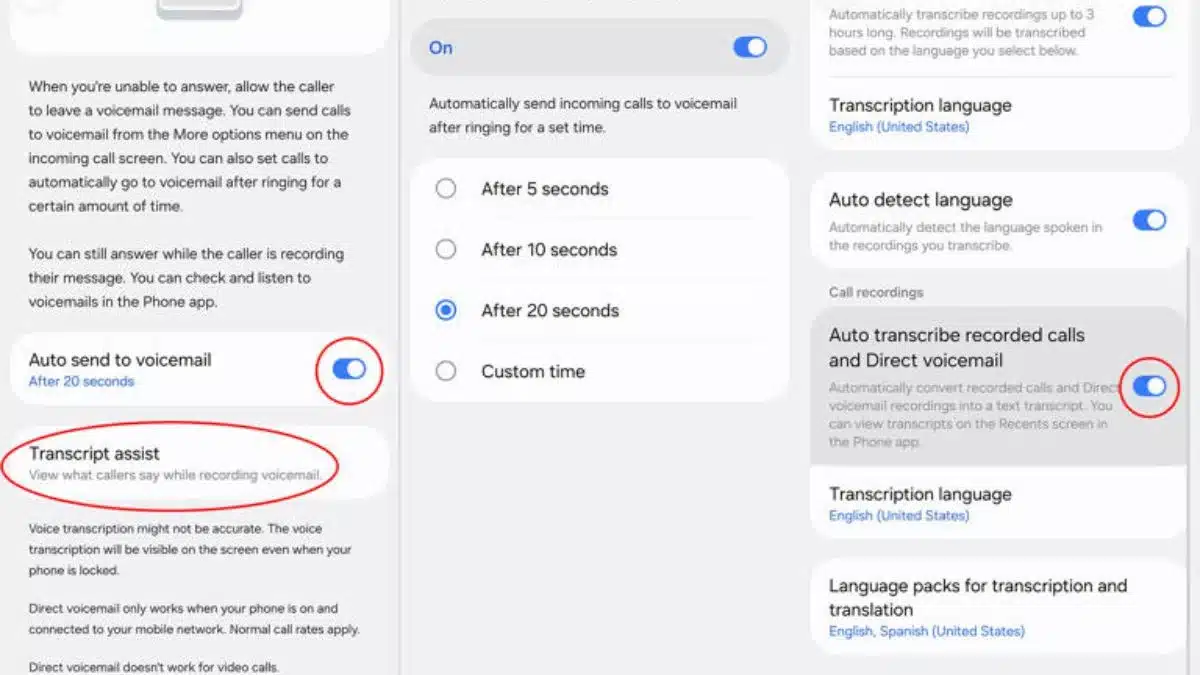
Without this, you’ll miss the live text feature, which is honestly the whole point.
How to Use It During Calls
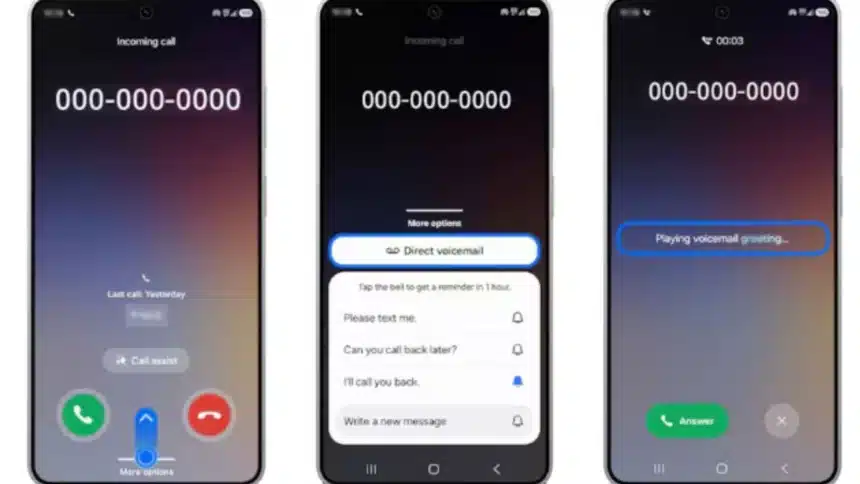
When a call comes in, you can either let it auto-divert or manually send it to Direct Voicemail.
Step 1: Tap “More options” on the incoming call screen
Step 2: Select Direct Voicemail
Step 3: Watch the live transcript appear as the caller speaks
Step 4: Tap Answer anytime if you want to jump in
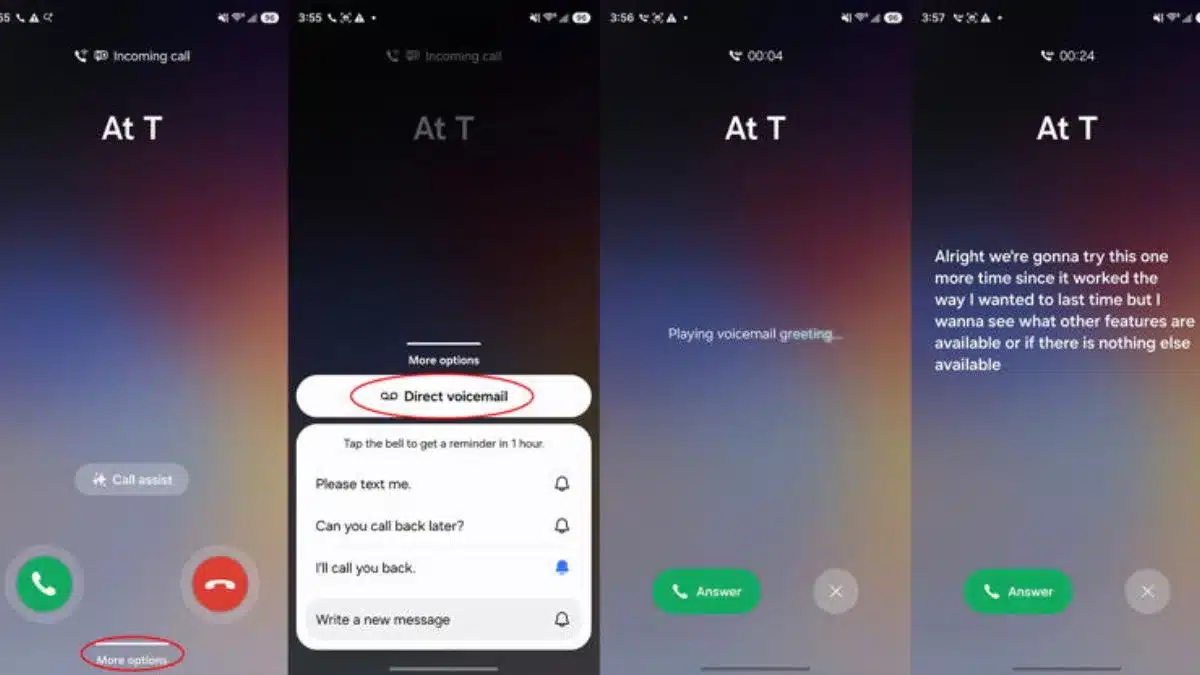
It’s basically call screening without awkwardly rejecting calls.
This feature is not just another small update. It’s a shift away from carrier-controlled features.
Samsung is turning your phone into something that handles calls smarter, cheaper, and more privately.
Also Read: How To Use WhatsApp On CarPlay For Calls and Messages Seamlessly